 Posted by
ADB AppControl Tool Latest Version Free Download
ADB AppControl Tool Latest Version Free Download is a Windows-based Android application management utility designed for users who want to manage installed apps, remove unwanted applications, install APK files, and control supported device settings through Android Debug Bridge (ADB). It provides a graphical interface that makes common ADB operations easier for beginners, developers, technicians, and experienced Android users. With features for batch app management, permission handling, device information, screenshots, and additional utilities, ADB AppControl can simplify everyday Android maintenance without requiring root access for many supported functions.
What Is ADB AppControl Tool?
ADB AppControl Tool Latest Version Free Download is a desktop program that connects a compatible Android smartphone or tablet to a Windows computer. It uses Android Debug Bridge to communicate with the device and provides visual controls for operations that would otherwise require command-line instructions.
The tool is useful for reviewing installed applications, managing selected system and user apps, installing application packages, and performing supported maintenance tasks. It can also help developers and testers prepare devices for testing by organizing applications and automating repetitive operations.
ADB AppControl does not require root access for many standard features, although certain operations depend on Android permissions, device configuration, and manufacturer restrictions.
Key Features of ADB AppControl Tool:
1. Android Application Management
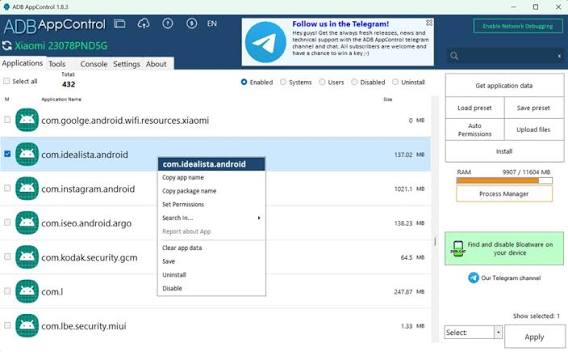
- The application provides a convenient interface for viewing and managing installed apps. Users can search through app lists and perform supported actions, such as disabling or uninstalling selected applications. Available operations depend on the Android version and the permissions granted to ADB.
2. Remove or Disable Unwanted Apps
- ADB AppControl Tool Latest Version Free Download can help users manage unnecessary preinstalled applications, often referred to as bloatware. Disabling or uninstalling supported packages may simplify the app list and reduce unwanted background activity.
- However, removing essential system packages can cause problems with calling, messaging, updates, or other device functions. Review each package carefully before making changes.
3. APK and APKS Installation
- The tool supports installing Android application packages, including compatible split APK packages. This can be useful when setting up test applications, installing apps from trusted sources, or managing multiple application files.
- Always check the source and authenticity of installation files before installing them on your phone.
4. Batch Operations and App Presets
- Batch operations help users manage multiple applications without repeating the same action individually. Presets can make recurring maintenance or testing tasks more convenient, particularly for developers and technicians working with devices they are authorized to manage.
5. Device Information and Utility Tools
- ADB AppControl includes tools for supported device-management tasks, such as viewing logs, capturing screenshots, changing screen resolution or display density, and rebooting into selected device modes.
- The available tools can vary by release, connected device, and Android version.
6. Built-in ADB Console
- The built-in console gives experienced users access to ADB commands through the application interface. This can be helpful for troubleshooting, testing, and performing supported maintenance tasks without opening a separate command prompt.
- Users should understand the purpose of a command before executing it, particularly when it changes system settings or affects installed applications.
ADB AppControl Tool System Requirements:
Before installing the Windows version, check that your computer and Android device meet the requirements.
- Operating system: Windows 7, 8, 8.1, 10, or 11, subject to the software’s current compatibility guidance.
- Framework: .NET Framework 4.6.2 or later, according to the official documentation.
- Android device: Android 7.0 or newer is recommended by the developer; support for older versions may vary.
- Connection: A compatible USB cable and working device drivers when required.
- USB debugging: Must be enabled on the Android device for standard USB-based ADB communication.
- Authorization: The user must approve the computer’s debugging connection on the phone.
For the most reliable experience, check the official system requirements before installing an older release on a modern Windows computer.
How to Install and Use ADB AppControl?
Step 1: Download the Program
Obtain ADB AppControl from its official developer source. Choose the installer or archive that matches your Windows setup, and verify that the downloaded file comes from a trustworthy source.
Step 2: Prepare Your Android Device
Open your phone’s settings and locate the Build Number option, usually under About Phone or Software Information. Tap it repeatedly until Developer Options becomes available, following your manufacturer’s instructions.
Step 3: Enable USB Debugging
Open Developer Options and enable USB Debugging. The exact menu names can differ between Android brands and software versions.
Step 4: Connect Your Phone to the Computer
Connect the device using a reliable USB cable. Unlock the phone and accept the debugging authorization prompt if it appears. Do not approve debugging requests from computers you do not trust.
Step 5: Launch ADB AppControl
Open the program and wait for it to detect the connected device. If the connection fails, check USB debugging, the authorization prompt, cable quality, and any required Windows drivers.
Step 6: Choose the Required Function
Use the application’s interface to review installed apps, install supported APK files, examine logs, or access another available utility. Confirm the target app and understand the effect of each operation before applying changes.
Common Problems and Solutions:
Device Not Detected
Make sure the phone is connected properly, USB debugging is enabled, and the computer has permission to communicate with the device. Try another data-capable USB cable or USB port if necessary.
USB Debugging Authorization Does Not Appear
Unlock the phone and reconnect it. Review the debugging settings and follow the on-screen authorization instructions. If the device is managed by an organization, its administrator may restrict debugging.
Application Fails to Start
Check the program’s Windows requirements and install the framework components recommended by the developer. Download a fresh copy from the official source if the archive appears incomplete or damaged.
App Removal Causes Problems
Some system apps are necessary for Android to function correctly. If a change causes instability, use the application’s available restore or re-enable options where supported. A factory reset may be necessary in some cases and can erase personal data, so maintain a backup before making system-level changes.
Is ADB AppControl Safe to Use?
ADB AppControl Tool Latest Version Free Download is a legitimate Android management utility, but its safety depends on how it is used. ADB provides powerful access to supported device functions, and removing the wrong package or changing system settings can cause unexpected behavior.
For better results, download the software from the developer, back up important information, authorize only trusted computers, and avoid modifying packages whose purpose you do not understand. The tool should be used only on devices you own or have permission to manage.
Final Words:
ADB AppControl Tool Latest Version Free Download is a useful Windows utility for Android app management, APK installation, device maintenance, and supported ADB operations. Its graphical interface can make routine tasks easier for Android users, developers, and technicians who prefer not to enter every command manually. Before using the tool, verify the current version, check device compatibility, and back up important data. Careful use can make Android maintenance more convenient while reducing the risk of unwanted system changes.