iRemoval PRO Premium Edition v5.2 Download iPhone XR To 17 Pro Max Latest Version 2026
iRemoval PRO Premium Edition v5.2 iPhone XR to 17 Pro Max
iRemoval PRO Premium Edition v5.2 Download is an iPhone-related utility promoted for activation and device-servicing tasks on selected Apple devices. It is associated with iOS device compatibility checks and activation-related services, making it a topic of interest for mobile technicians and users troubleshooting supported iPhone models. Before using any utility of this type, it is important to verify the exact version, supported iPhone model, iOS version, and available functionality. Compatibility can vary significantly between devices, and not every feature works on every iPhone.
What Is iRemoval PRO Premium Edition?
iRemoval PRO Premium Edition v5.2 Download is a third-party iPhone utility advertised for certain activation-related servicing scenarios. Its published editions and services may differ in their supported devices, iOS versions, and available features.
The software is primarily discussed in connection with iPhones that display activation-related restrictions. However, Activation Lock is an Apple security feature designed to prevent unauthorized use of a device. Any servicing tool should be evaluated carefully, and users should make sure they have legitimate ownership or permission to service the phone.
Key Features of iRemoval PRO Premium Edition:
1. iPhone Compatibility Information
- The utility is promoted for selected iPhone generations, with support depending on the specific edition and service. Users should check the current compatibility information before assuming that an iPhone XR, iPhone 11, iPhone 12, or a newer model is supported.
2. Activation-Related Troubleshooting
- Some editions advertise services associated with activation screens on supported devices. Results can depend on the iPhone’s hardware, installed iOS version, activation status, and the particular service being offered.
- A displayed activation screen does not necessarily indicate a software fault. If Activation Lock is enabled, the legitimate owner may need to authenticate with the associated Apple Account or request assistance from Apple.
3. Windows-Based Servicing Workflow
- iRemoval PRO Premium Edition v5.2 Download is distributed through its service website and may be used as part of a computer-based device-servicing workflow. Depending on the edition, the process may involve connecting a compatible iPhone to a computer and checking device information.
- Always confirm that the downloaded package is genuine and that your computer meets the software’s stated requirements.
4. Edition and Service Differences
- Different iRemoval PRO editions may offer different functionality. A feature advertised for one release should not automatically be assumed to work in another release.
- Before purchasing a service or installing a package, verify the exact version number, pricing, supported iOS builds, limitations, and refund conditions.
5. Device Status and Compatibility Checks
- Checking the device model and software version before servicing can help prevent compatibility problems. It is also important to determine whether the phone has an Activation Lock, a carrier restriction, a forgotten passcode, or a different setup issue, since these are separate problems requiring different solutions.
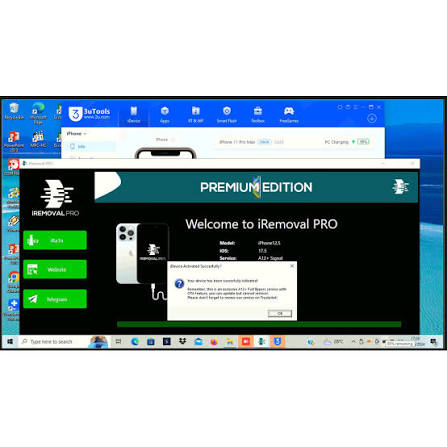
Supported Devices and iOS Compatibility:
The title refers to the iPhone XR through the iPhone 17 Pro Max, but that range should not be treated as confirmed universal support for Premium Edition v5.2.
Compatibility depends on the specific service, device generation, and iOS version. Newer iPhone models may use different hardware and security implementations, so support for an older model does not establish support for a newer one.
Before proceeding, verify:
- The exact iPhone model and model number.
- The installed iOS version and build.
- The precise iRemoval PRO Premium Edition v5.2 Download and release number.
- Whether the advertised service supports the phone’s current state.
- Any service limitations, including cellular connectivity or update restrictions.
Basic Preparation Before Using an iPhone Utility:
Step 1: Identify the iPhone
Check the model through the device’s information screen when accessible. If the phone is stuck on setup, use its model number or other available identification details.
Step 2: Verify the Software Version
Determine which iOS version is installed if that information is available. Version compatibility is important because two iPhones of the same model may behave differently when running different software releases.
Step 3: Check the Source
Download software only from a source you can verify. Avoid unofficial repackaged installers, suspicious activation requests, and programs that require unnecessary access to your computer or personal information.
Step 4: Back Up Important Data
If the iPhone is accessible, back up important information before attempting device servicing. Some recovery and restore procedures can erase data, and a backup may not be possible while a phone remains locked.
Step 5: Confirm Ownership and Authorization
Use servicing utilities only on devices you own or are authorized to manage. For a phone displaying Activation Lock, the previous owner may need to remove the device from their account, or the owner may need to contact Apple with valid proof of purchase.
Common Problems and Important Limitations:
Device Not Supported
A iRemoval PRO Premium Edition v5.2 Download may not recognize an iPhone if its model or iOS version is outside the supported range. Check the release-specific requirements rather than relying on a general claim that the utility supports all iPhones.
Activation Screen Remains
Activation problems can have several causes, including account security, network connectivity, device management, or an enabled Activation Lock. A third-party utility cannot be assumed to resolve every cause.
Cellular Service May Be Limited
Some advertised activation-related services distinguish between functionality with cellular signal and functionality without it. Confirm the precise service description before paying, and do not assume that calls, mobile data, or every Apple service will work.
Software or Service Fails
Check compatibility, USB connectivity, and the developer’s troubleshooting information. Avoid repeatedly restoring or updating a device when a service provider warns that a particular configuration may not be supported.
Is iRemoval PRO Premium Edition Safe?
Safety depends on the authenticity of the software, its permissions, the service being performed, and the device’s condition. Third-party tools can carry risks if they require untrusted downloads, payment to unverifiable resellers, or changes that leave the phone in an unsupported state.
Apple’s official account-recovery and Activation Lock support options are the recommended starting point for legitimate owners. If a device belongs to a business or educational organization, contact its administrator.
Final Words:
iRemoval PRO Premium Edition v5.2 Download is a third-party iPhone utility associated with activation-related servicing for selected devices. Before using it on an iPhone XR, iPhone 17 Pro Max, or any model in between, verify the exact release, supported iOS version, and limitations of the advertised service. Do not assume that all models or features are supported. For Activation Lock issues, prioritize official Apple recovery options and proof-of-ownership support to protect your device and personal information.