TTA Mi G3 Sideload Tool Download For Xiaomi Free and Easy to Use Latest Version 2026
TTA Mi G3 Sideload Tool Download for Xiaomi – Features, Compatibility and Repair Guide
Introduction to TTA Mi G3 Sideload Tool Download:
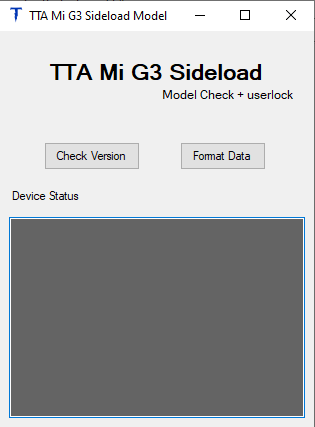
TTA Mi G3 Sideload Tool is a Windows-based utility designed for selected Xiaomi smartphones that support compatible recovery sideload functionality. It is intended for mobile repair technicians and experienced users who need to work with supported device maintenance, recovery, and software troubleshooting tasks.
The tool’s published information describes support for Xiaomi devices running a compatible MIUI Recovery 5.0 environment. Listed functions include partition backup and selected recovery-related servicing operations. Compatibility depends on the exact phone model, recovery version, firmware, and tool release, so users should verify these details before attempting any repair.
What Is TTA Mi G3 Sideload Tool Download?
Sideload mode is a recovery communication method that allows a compatible device to receive supported software packages or communicate with a computer during maintenance. It can be useful when normal Android startup is unavailable but the phone can still enter a supported recovery environment.
TTA Mi G3 Sideload Tool is specifically associated with Xiaomi servicing workflows. Its developer’s published page lists a number of compatible models and describes requirements for using the tool. Not every Xiaomi smartphone supports the same recovery features, and a compatible model may still require a particular software version.
Main Features of TTA Mi G3 Sideload Tool:
1. Xiaomi Recovery Sideload Support
- TTA Mi G3 Sideload Tool Download is designed around compatible Xiaomi recovery environments. According to its published documentation, MIUI Recovery 5.0 is an important compatibility requirement for the listed workflow.
- Before connecting a phone, confirm its recovery version and model number. Using an incompatible recovery method can cause errors or interrupt the repair process.
2. Partition Backup
- The tool’s published description mentions partition backup functionality. Partition backups can be useful when preparing for supported maintenance tasks because device software and configuration information may be stored in separate partitions.
- Backups should be handled carefully and stored securely. Restore operations should only use verified files intended for the same device and compatible firmware configuration.
3. Recovery-Based Troubleshooting
- Recovery-based servicing can help technicians investigate certain software issues when Android does not start normally. The available options depend on the phone’s recovery environment and the functions supported by the tool’s version.
- The utility should not be considered a universal solution for all boot failures, corrupted firmware, or hardware problems.
4. Support for Selected Xiaomi Models
The developer’s published compatibility list includes models such as:
- Xiaomi Mi 9
- Redmi K30 4G and Redmi K30 5G
- Redmi K30 Pro
- Redmi 10C
- Redmi Note 9S
- Redmi Note 9 Pro
- Redmi Note 10
- Xiaomi Mi 11 Lite 5G NE
- Xiaomi Mi CC9 Pro
This is a selection from the published list, not a guarantee that every regional variant or firmware build will work. Confirm the exact model and current recovery version before relying on any listed feature.
5. Windows-Based Interface
- TTA Mi G3 Sideload Tool is distributed for use with a computer. A compatible Windows installation, a reliable USB data cable, and suitable device drivers may be needed for the supported workflow.
- The exact requirements can vary by release, so consult the documentation accompanying the version you intend to use.
System Requirements and Compatibility:
Before using the tool, review these important compatibility factors:
- A supported Windows computer
- The exact Xiaomi or Redmi model number
- A compatible MIUI Recovery environment
- Suitable USB drivers and a stable data connection
- Verified firmware and backup files where required
- A tool release that supports the target device
Even if a phone appears on a published model list, differences in firmware, regional variants, and recovery revisions can affect compatibility.
Download and Installation Safety:
Obtain TTA Mi G3 Sideload Tool Download from a source you can verify, preferably the developer’s own distribution page. The official page lists a version and download options, but users should check the current release information before installing anything.
Scan downloaded files with a trusted security application. Do not disable antivirus protection just to run an unverified package. Also check whether the release requires a password, registration, or membership access; do not assume that every version is freely available without conditions.
Important Precautions Before Repair:
Always identify the phone correctly before performing recovery or partition-related operations. Back up accessible personal data and retain any legitimate device-specific backups required for recovery.
Do not interrupt a supported maintenance operation while it is running, and avoid using firmware or backup files from another device. Incorrect partition operations can lead to data loss or a phone that no longer starts normally.
Xiaomi Account and Google account protections are designed to help protect device ownership. If a phone asks for the previously associated account after a reset, use the official account recovery process or contact an authorized service provider. For a second-hand phone, ask the previous owner to complete the appropriate account-removal procedure.
Advantages and Limitations:
TTA Mi G3 Sideload Tool may be useful for technicians who work with compatible Xiaomi models and need a recovery-oriented servicing utility. Its published feature set includes partition backup and recovery-based functions for selected devices.
Its main limitation is model and software compatibility. Recovery versions, firmware updates, and regional differences may affect whether the tool works as expected. It cannot be assumed to repair every bricked phone or solve every account-verification issue.
Final Words:
TTA Mi G3 Sideload Tool Download is a Xiaomi-focused Windows utility intended for selected recovery and device maintenance workflows. Its published documentation identifies compatible recovery requirements and lists support for specific Xiaomi and Redmi models.
Before using it, verify the exact model, recovery version, release requirements, and source of the software. Careful preparation, secure backups, and authorized repair practices can help reduce the risk of data loss and device damage.