KG Killer Tool for Android – Features & Setup Guide
KG Killer Tool for Android – Features, Windows Setup & Troubleshooting Guide
The “KG Killer Tool” is a specialized software program designed to address enterprise-level locks and device management restrictions that hinder standard workflows in repair centers. Technicians frequently encounter devices restricted by “Knox Guard” or enterprise management profiles, which prevent factory resets or standard access to the device. By executing specific procedures to bypass or remove these restrictions, the tool enables service centers to efficiently manage locked devices and restore them to an operational state.
Instead of relying on complex, multi-stage manual processes, repair centers can use this tool to streamline necessary unlocking tasks. The tool’s features directly address modern security configurations, helping technicians avoid long wait times when servicing devices affected by enterprise policy restrictions or the loss of corporate credentials.
What is the “KG Killer” tool?
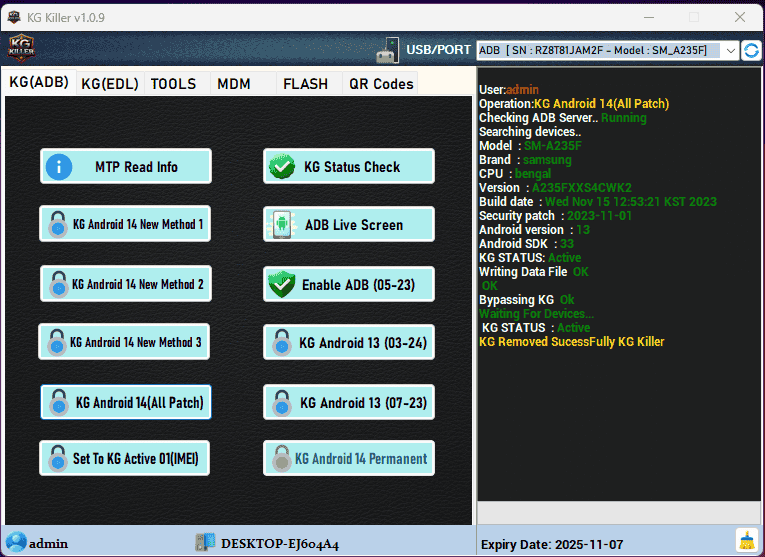
“KG Killer Tool” is an essential tool designed for Android devices, specifically targeting the “KG” system in Android 13 and 14 versions. By utilizing “ADB” (Android Debug Bridge) commands, the tool enables various functions, such as removing Factory Reset Protection (FRP), disabling factory reset capabilities, and removing Samsung accounts. It also serves as an indispensable resource for IT administrators tasked with bypassing or removing Mobile Device Management (MDM) restrictions.
The tool allows users to effectively manage device settings—including checking the “KG” status and retrieving information via the MTP (Media Transfer Protocol)—while the ability to lock or unlock the bootloader adds further flexibility. In certain scenarios, it may be necessary to employ the “KG 3 method” and set the status to “KG Active” using the device’s IMEI number.
Furthermore, the tool enables the disabling of the “Samsung Knox” system and the management of MDM features on “Redmi” devices. It is particularly useful for troubleshooting issues where an MDM system prevents content downloads—a situation where the “KG Unload” function proves highly effective. Additionally, the “ADB Live Screen” feature facilitates the troubleshooting process, while ADB-based unlocking procedures ensure a seamless user experience. The “KG Killer” tool is an exceptional solution for mobile device management, offering the ability to perform various tasks efficiently and with ease; it is, without a doubt, an essential resource for professionals working in this field.
Understanding Samsung Knox Guard (KG)
Samsung Knox Guard is a device-management solution that can help organizations, retailers, carriers, and financing providers protect and manage supported Samsung devices.
Depending on the device and management arrangement, Knox Guard may apply restrictions associated with an organization’s security or payment policies.
An active KG state is not necessarily a software malfunction. Some restrictions can only be resolved by the responsible service provider or administrator.
Why Does a Samsung Device Show KG Restrictions?
Possible reasons include:
- The device is enrolled in an active management program.
- A financing or retailer agreement is still associated with the device.
- An organization has applied device-management policies.
- The device has not been officially released from management.
- A software or enrollment issue requires authorized technical support.
The appropriate solution depends on the exact device status and the organization responsible for managing it.
What Is MDM on Android?
Mobile Device Management, commonly called MDM, allows organizations to configure and manage smartphones remotely.
Businesses and educational institutions often use MDM to enforce security settings, distribute applications, configure network access, and protect organizational information.
A phone enrolled in an MDM system may display restrictions that prevent certain settings from being changed.
If the device is still registered to an organization, the administrator normally needs to remove or release it through the official management platform.
Main Features Associated With KG Killer Tool
The following capabilities are commonly associated with Android servicing tools in this category. They should not be treated as confirmed features of every KG Killer Tool release.
1. Android Device Information
Compatible diagnostic utilities may help technicians review basic device information, such as the phone model, Android version, firmware build, and connection status.
Identifying the exact device configuration is an important first step before troubleshooting.
2. Samsung Device Diagnostics
Some servicing utilities provide diagnostic information relevant to Samsung smartphones.
This may help technicians distinguish between ordinary software problems and restrictions imposed by device-management systems.
3. ADB Communication
Android Debug Bridge (ADB) is a developer and diagnostic interface that supports communication between a computer and an Android device.
ADB functions require the appropriate device configuration and authorization. ADB access should not be assumed to be available on a locked or managed phone.
4. USB Device Detection
Android servicing software often relies on a stable USB connection to communicate with supported devices.
The correct drivers, USB cable, connection mode, and Windows configuration can affect device detection.
5. Troubleshooting Support
Diagnostic tools may assist with identifying connection errors, unsupported firmware, driver problems, and other maintenance issues.
The actual capabilities depend on the particular software package.
KG Killer Tool Compatibility
Compatibility should be checked before installing or running any servicing software.
Important factors include:
| Requirement | What to Check |
|---|---|
| Device manufacturer | Whether the release supports the manufacturer |
| Device model | Exact model number and regional variant |
| Android version | Compatibility with the installed operating system |
| Firmware | Build number and security patch |
| USB drivers | Correct manufacturer or Android drivers |
| Windows version | Requirements of the specific software release |
| Authorization | Ownership or explicit permission to service the device |
A tool supporting one Samsung model does not automatically support other Samsung smartphones.
Likewise, compatibility with older firmware does not guarantee compatibility with newer Android security updates.
Windows System Requirements
The exact minimum system requirements for KG Killer Tool have not been independently verified.
For a typical Windows-based Android diagnostic workflow, users should prepare:
- A Windows computer compatible with the software release.
- A reliable USB data cable.
- Appropriate Android or Samsung USB drivers.
- Sufficient free storage for the application and temporary files.
- A stable power supply.
- An authorized device available for servicing.
Additional software components may be required depending on the specific package.
How to Prepare KG Killer Tool on Windows
Step 1: Verify the Software Source
Before downloading KG Killer Tool, identify the publisher and verify the software package.
Avoid unknown archives that contain unexplained executable files or require security software to be disabled.
Step 2: Check the Downloaded File
Scan the downloaded archive or installer with reputable security software.
If a checksum is provided by a trustworthy publisher, compare it with the downloaded file.
Step 3: Install Required USB Drivers
Install the appropriate manufacturer USB drivers from a trusted source.
Restart Windows if the driver installer requires it.
Step 4: Review the Installation Instructions
Read the documentation supplied with the verified software release.
Check for required dependencies, supported Windows versions, and installation instructions.
Step 5: Connect an Authorized Device
Use a reliable USB cable and confirm that the phone is recognized by Windows.
Only enable debugging or other access permissions when they are available through the device’s normal authorized settings.
Step 6: Review Device Information
Begin with supported diagnostic functions that do not modify device security or erase personal data.
Confirm the exact model, firmware, and management status before proceeding with any servicing operation.
Common KG Killer Tool Problems and Solutions
KG Killer Tool Not Detecting the Device
If the software cannot detect a connected Android phone, check the USB cable and computer port first.
Then review Windows Device Manager to determine whether the appropriate USB driver is installed.
For functions requiring ADB, verify that USB debugging has been legitimately enabled and the computer has been authorized by the device.
KG Killer Tool Not Opening on Windows
If the application fails to launch:
- Check whether the software supports your Windows version.
- Confirm that the downloaded archive is complete.
- Review any documented dependencies.
- Check Windows security notifications.
- Obtain a verified copy if the package appears corrupted.
Do not disable antivirus protection to force an unknown executable to run.
Samsung KG State Remains Active
An active Knox Guard state may be controlled by an organization, carrier, retailer, or financing provider.
If the device is legitimately owned, contact the responsible provider and request an authorized status review or release.
Reinstalling drivers or restarting the computer will not necessarily change a server-managed KG state.
MDM Restrictions Are Still Present
If the phone remains enrolled in an organization’s management system, contact the administrator responsible for the enrollment.
For a second-hand device, ask the seller to arrange proper removal from the previous management account.
Unsupported Android Version
Some servicing applications may not work with newer firmware or security updates.
Check the compatibility information for the exact software release and device model.
Avoid applying procedures intended for another Android version.
KG Killer Tool Download and File Safety
Before using any KG Killer Tool download, confirm the following information:
- Software publisher or developer
- Exact version number
- File size
- Release date
- Supported device models
- Windows compatibility
- Installer authenticity
- Available documentation
Do not assume that a third-party download is official simply because a page labels it as an official download.
A trustworthy download page should clearly explain where the file originates and whether it has been independently verified.
Download information: Add a verified publisher or download link here after confirming the file’s source and authenticity.
Advantages of Android Diagnostic Utilities
For authorized repair technicians, compatible diagnostic tools can provide useful information about device configuration and connection problems.
Potential benefits include easier device identification, a centralized diagnostic interface, and more organized troubleshooting.
However, these benefits depend on the particular utility and its verified capabilities.
Limitations and Safety Considerations
KG Killer Tool should not be presented as a universal solution for every Android device or management restriction.
Important limitations include:
- Compatibility may vary by device model and firmware.
- New security updates may affect available functions.
- Certain operations may require administrator authorization.
- Incorrect servicing procedures can cause data loss.
- Unverified software packages may contain malware.
- Device-management restrictions may require official release procedures.
Always back up accessible personal data before authorized maintenance and avoid modifying devices without the owner’s permission.
Frequently Asked Questions
What is KG Killer Tool used for?
KG Killer Tool is associated with Android servicing and troubleshooting involving Samsung Knox Guard, device information, and management-related conditions. Exact features depend on the particular release.
You can also check our complete guide on Xiaomi IMEI Tools to learn more about its features, installation process, and usage.
Is KG Killer Tool compatible with all Samsung phones?
No. Compatibility depends on the device model, Android version, firmware, security patch, and software release.
Does KG Killer Tool work on Windows 11?
Windows 11 compatibility must be confirmed for the exact package. A verified compatibility statement is not currently available for every tool distributed under this name.
Is KG Killer Tool free?
The licensing and pricing depend on the specific publisher and release. Users should verify whether a package is free, paid, or requires activation.
Can KG Killer Tool remove every Knox Guard restriction?
No such universal capability has been verified. Certain Knox Guard restrictions require authorized action from the responsible provider or administrator.
Why is my Android phone not detected?
Common causes include an unsuitable USB cable, missing drivers, an incorrect connection mode, or unavailable debugging authorization.
Is KG Killer Tool safe to download?
Safety depends on the source and authenticity of the package. Download only from a source you can verify and scan the files before installation.
Final Words
KG Killer Tool is associated with Android servicing utilities used in discussions about Samsung Knox Guard, MDM, and device diagnostics.
For technicians working with legitimately owned or authorized devices, understanding firmware compatibility, USB communication, management status, and software authenticity is essential.
Before downloading or installing any KG Killer Tool package, verify its publisher, release details, supported devices, and security requirements. Where device-management restrictions are controlled by an organization or service provider, use the official authorization and release process.
A careful, well-documented approach to Android troubleshooting is safer and more reliable than relying on unverified software claims.
KG Killer Tool Download Information
Before downloading KG Killer Tool, check the software version, file source, compatibility, and publisher information. Make sure the file comes from a source you trust and scan it before installation. Features and compatibility may vary between releases, so verify the details for your device before using the software.
Official Download Link👇