Odin Flash Tool v3.14.4 Download Latest Setup 2026
Odin Flash Tool v3.14.4 Download Latest Version 2026
📱 Odin Flash Tool v3.14.4 is a popular Windows-based firmware flashing utility designed for Samsung Android smartphones and tablets. It is commonly used by mobile repair technicians and advanced Android users to install official firmware, update device software, and perform various firmware-related operations. Odin provides a straightforward interface that allows users to connect Samsung devices to a computer and flash compatible firmware files.
🚀 One of the main reasons Odin Flash Tool is widely used is its ability to install Samsung firmware through Download Mode. It can help users update their device software, restore stock firmware, and resolve certain software-related problems. With its simple interface and useful flashing options, Odin remains a familiar utility in the Samsung mobile servicing community.
🔧 Key Features of Odin Flash Tool v3.14.4:
Odin Flash Tool includes several useful features for Samsung firmware installation and maintenance.
-
📱 Firmware Flashing: Allows users to flash compatible Samsung firmware packages.
-
🚀 Stock Firmware Installation: Helps reinstall official firmware on supported Samsung devices.
-
🔄 Software Updates: Can be used to install compatible firmware updates manually.
-
🛠️ Device Recovery: Helps resolve certain software and firmware-related issues.
-
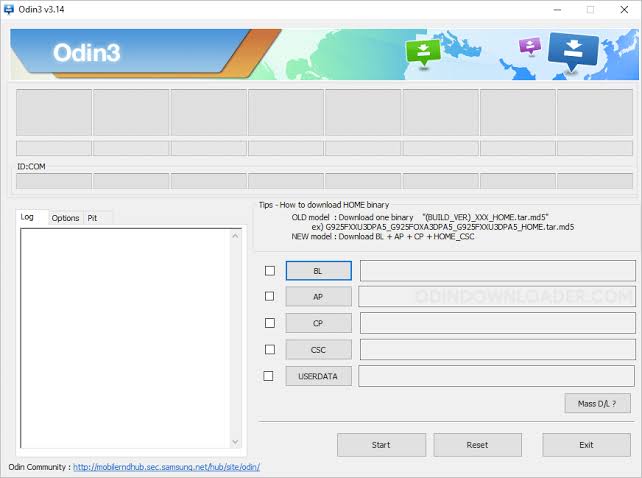
📦 BL, AP, CP, and CSC Support: Supports loading the corresponding firmware components into their designated sections.
-
🔌 USB Connectivity: Connects Samsung smartphones and tablets to Windows computers.
-
⚙️ Download Mode Support: Communicates with compatible Samsung devices through Download Mode.
-
💻 Simple Interface: Offers an easy-to-understand layout for firmware flashing operations.
-
📲 Multiple Device Compatibility: Supports many Samsung Galaxy models, depending on firmware and device compatibility.
📲 What Can You Do With Odin Flash Tool?
Odin is mainly designed for Samsung firmware-related operations. It is useful when users need to reinstall official software or manually update their smartphones.
Some common uses include:
-
Installing official Samsung firmware.
-
Updating compatible Galaxy smartphones.
-
Restoring stock firmware.
-
Reinstalling Android operating system software.
-
Fixing certain firmware-related problems.
-
Flashing supported firmware components.
-
Performing software maintenance on compatible Samsung devices.
📦 Understanding Odin Firmware Files:
Odin uses different firmware sections to install specific components on supported Samsung devices.
BL (Bootloader): Contains bootloader-related firmware files required for the device startup process.
AP (Application Processor): Usually contains the main firmware package, including major Android system components.
CP (Core Processor): Contains modem-related firmware responsible for cellular communication.
CSC (Consumer Software Customization): Contains region and carrier-related configuration files. The standard CSC package may perform a factory reset, while HOME_CSC is generally intended to preserve user data when supported.
⚙️ How to Use Odin Flash Tool v3.14.4?
Follow these general steps to prepare for firmware flashing:
-
Download Odin Flash Tool v3.14.4 from a trusted source.
-
Extract the downloaded ZIP archive on your Windows computer.
-
Install the appropriate Samsung USB drivers.
-
Back up important data before proceeding.
-
Turn off your Samsung smartphone.
-
Enter Download Mode using the correct procedure for your device model.
-
Connect your smartphone to the computer with a USB cable.
-
Open Odin Flash Tool with administrator permissions.
-
Wait for Odin to recognize the connected device.
-
Load the compatible firmware files into their corresponding BL, AP, CP, and CSC sections.
-
Carefully verify the firmware model and settings before starting.
-
Begin the flashing process and wait until it finishes.
Important: Never disconnect your device during firmware flashing. Using incorrect firmware or interrupting the process can cause serious software problems.
💻 Odin Flash Tool v3.14.4 System Requirements:
Before using Odin, make sure your computer meets the basic requirements.
-
Operating System: Windows 7, 8, 10, or 11
-
Processor: Intel or AMD processor
-
RAM: 2GB minimum recommended
-
Storage: Sufficient free disk space
-
USB Drivers: Samsung USB Drivers
-
USB Cable: Compatible data cable
-
Device: Supported Samsung Galaxy smartphone or tablet
⚠️ Important Precautions Before Flashing:
Always download firmware that exactly matches your Samsung device model and is compatible with its bootloader version. Samsung devices generally prevent downgrading to firmware with a lower bootloader revision. Flashing firmware can erase personal data, so create a backup before starting. Avoid unofficial or modified firmware packages unless you understand the associated risks.
🎯 Final Words:
Odin Flash Tool v3.14.4 is a useful firmware flashing utility for Samsung Galaxy smartphones and tablets. Its support for BL, AP, CP, and CSC firmware components makes it helpful for installing compatible firmware, updating Android software, and restoring stock firmware. Whether you are a mobile repair technician or an experienced Samsung user, Odin can be a valuable addition to your Windows software collection. Always verify firmware compatibility and follow the correct flashing procedure to protect your device.