Xiaomi Pro Tool V7.0.8 Free FRP Bypass & Mi Account Reset Latest Version 2026
Xiaomi Pro Tool V7.0.8 – Free FRP Bypass and Mi Account Reset Tool
Introduction:
Xiaomi Pro Tool V7.0.8 is a Windows-based mobile servicing utility designed for selected Xiaomi, Redmi, and POCO smartphones powered by Qualcomm and MediaTek chipsets. It is associated with phone maintenance operations such as factory resetting, firmware flashing, device information checks, and supported recovery procedures. The tool gained attention among mobile technicians because its published feature lists include several servicing options for compatible devices.
When a Xiaomi phone experiences software problems, gets stuck during startup, or needs firmware maintenance, a dedicated servicing utility may help technicians investigate the issue. However, available operations depend on the exact model, chipset, firmware version, security patch, and connection mode.
What Is Xiaomi Pro Tool V7.0.8?
Xiaomi Pro Tool V7.0.8 is a third-party mobile servicing application rather than an official Xiaomi product. Its published descriptions list operations for supported Qualcomm- and MediaTek-based devices, including EDL, BROM, Fastboot, and Mi Assistant modes.
The tool is intended primarily for mobile repair technicians and experienced users who understand smartphone firmware and device servicing. Although some versions or functions may be advertised as free, access requirements can vary. Certain operations may require registration, credits, authentication, or compatible service access.
Key Features of Xiaomi Pro Tool V7.0.8:
Factory Reset
- Xiaomi Pro Tool V7.0.8 published feature list includes factory-reset operations for supported devices. A factory reset can help address certain software or configuration problems, but it normally erases user data. Back up important information whenever possible before starting a reset.
FRP-Related Servicing
- Factory Reset Protection (FRP) is an Android security feature designed to help protect a device after a reset. Xiaomi Pro Tool V7.0.8 is advertised with FRP-related servicing functions for selected compatible models and modes.
- Availability is not universal, and users should only service devices they own or are authorized to repair. If a phone requests the previously synchronized Google account, use Google’s official account-recovery process or contact an authorized service provider.
Mi Account-Related Functions
- The tool is also advertised with Mi Account reset or servicing options for certain supported devices. Compatibility can vary significantly, and a tool’s advertised function does not guarantee that it will resolve every account-lock situation.
- For a device linked to someone else’s Mi Account, the previous owner should remove the device through the appropriate account process. If the account belongs to you, use Xiaomi’s official recovery channels.
Firmware Flashing
- Firmware flashing is an important part of smartphone software maintenance. Xiaomi Pro Tool’s published feature descriptions include flashing operations for compatible devices.
- Technicians should select firmware that matches the exact device model and regional variant. Using an incorrect package or interrupting a flashing operation may cause boot failures or data loss.
Qualcomm EDL and MediaTek BROM Support
- The tool’s feature descriptions mention Qualcomm Emergency Download (EDL) mode and MediaTek Boot ROM (BROM) mode for selected models. These are low-level communication modes used in certain servicing and recovery workflows.
- Not every device supports the same procedures. Some operations may require additional authorization, specific drivers, or a supported security configuration.
Fastboot Operations
- Fastboot is an Android bootloader interface commonly used for device information, rebooting, and supported firmware-related maintenance. Xiaomi Pro Tool’s published V7.0.8 feature list includes Fastboot-related operations, including device information and mode transitions on compatible devices.
- The available functions depend on the device’s bootloader state and software configuration.
Mi Assistant Mode
- The tool is also described as supporting selected operations through Mi Assistant or sideload mode. This may provide an alternative connection method for compatible devices, but support varies by model and software release.
Reset EFS and Other Advanced Operations
- Some published feature lists mention EFS-related reset operations. EFS and related partitions can contain important device configuration and radio information. Incorrect changes can affect network connectivity or other functions, so advanced operations should only be performed by qualified technicians with appropriate authorization and a suitable backup.
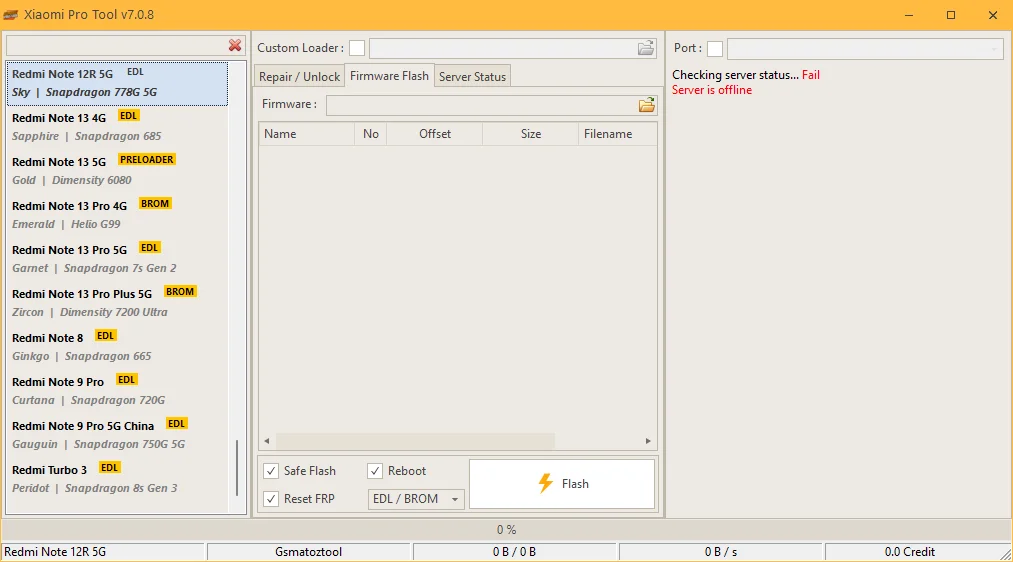
Supported Xiaomi, Redmi, and POCO Devices:
Published descriptions list selected devices across several product families, including Redmi Note, Redmi K, standard Redmi, and POCO models. The tool is associated with both Qualcomm and MediaTek platforms.
Examples appearing in published V7.0.8 feature lists include selected variants of the Redmi 10C, Redmi 11 Prime 4G, Redmi 12R, Redmi 13C, Redmi Note 10, Redmi Note 11, Redmi Note 12, Redmi Note 13, Redmi K-series, and POCO X6 Pro 5G.
This is not a guarantee of universal compatibility. The same model name may have different chipset variants, and support for a particular operation can change with firmware and security updates. Always check the exact model code and the tool’s release notes before attempting a repair.
System Requirements and Preparation:
Before using Xiaomi Pro Tool V7.0.8, prepare the computer and device carefully:
- Use a compatible Windows computer.
- Install the required USB drivers from a trustworthy source.
- Confirm the exact phone model, chipset, and firmware version.
- Use a reliable USB cable and a stable connection.
- Back up important data before performing operations that may erase it.
- Verify whether the required function needs registration, credits, or authorization.
- Scan the downloaded package with reputable security software.
Avoid modified installers and unverified activators. Never disable security protection simply because an unknown package requests it.
Common Problems and Troubleshooting:
The Phone Is Not Detected
Check the USB cable, port, driver installation, and phone connection mode. Confirm that the selected mode is supported for your specific device.
A Servicing Operation Fails
Review the displayed error and verify the device model, chipset, firmware, and authorization requirements. Do not repeatedly run an operation if the reason for failure is unclear.
The Phone Does Not Boot Normally
A failed update or firmware operation can cause startup problems. Use an appropriate official recovery method or consult a qualified technician rather than trying random firmware packages.
Account Verification Remains on the Screen
FRP and Mi Account protection are separate security mechanisms. Use the appropriate official recovery process and ensure that you have the owner’s authorization before requesting professional servicing.
Advantages and Limitations:
Xiaomi Pro Tool V7.0.8 brings several advertised servicing functions together in one Windows application. Its listed support for multiple connection modes and selected Qualcomm and MediaTek devices may be useful for experienced repair technicians.
Its main limitations are model-specific compatibility, possible authorization or credit requirements, and the risk associated with advanced firmware and partition operations. Since V7.0.8 is an older release, users should not assume that it supports every current Xiaomi or HyperOS device.
Final Words:
Xiaomi Pro Tool V7.0.8 is a third-party servicing utility associated with factory resets, firmware maintenance, device information, and selected FRP- and Mi Account-related operations. Its usefulness depends on the exact phone model, chipset, firmware, security configuration, and required authorization. For safer results, verify compatibility, protect user data, and use official account-recovery methods for locked devices. Advanced servicing operations should be handled only by authorized and knowledgeable technicians.