Vivo RPMB Parser and Editor Tool Latest Version 2026
Vivo RPMB Parser and Editor Tool – Features, File Analysis, and Repair Guide
Introduction
The Vivo RPMB Parser and Editor Tool is a specialized utility designed for advanced users and mobile phone technicians who work with Vivo device RPMB files. It helps users inspect supported files, parse stored information, identify device model details, and manage file data for technical analysis and authorized repair workflows. The tool is particularly relevant to technicians who need to examine low-level smartphone data while maintaining the original file structure.
RPMB stands for Replay Protected Memory Block, a protected storage area used by supported storage systems to help safeguard sensitive data and security-related operations. Because RPMB-related information can be closely connected to device security and hardware configuration, working with these files requires technical knowledge and careful handling.
What Is Vivo RPMB Parser and Editor Tool?
Vivo RPMB Parser and Editor Tool is a Windows utility associated with Vivo RPMB file analysis. Its published feature information describes the ability to load supported files, display selected information, detect certain device model details, and save file changes. It is intended primarily for users familiar with smartphone servicing, firmware structures, and data integrity.
The tool is not a general-purpose Android flashing application. Instead, its main purpose is to help users inspect and manage specific RPMB-related file formats. Compatibility and available features can depend on the software version and the structure of the file being analyzed.
Key Features of Vivo RPMB Parser and Editor Tool:
RPMB File Parsing
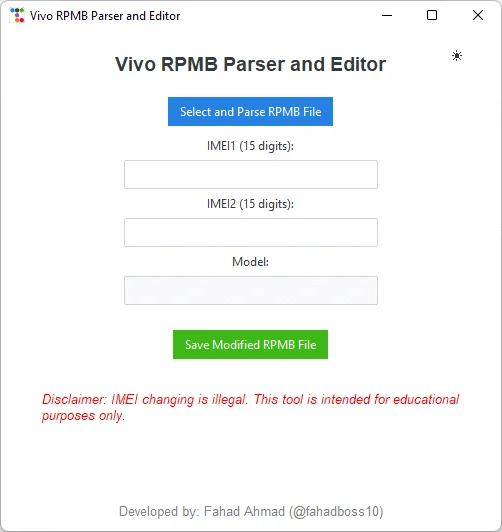
- Vivo RPMB Parser and Editor Tool is designed to parse supported RPMB-related files and display recognized information in a more readable form. This can help technicians investigate file contents and understand the data available for a particular repair or research task.
Support for Common File Extensions
- Published feature information lists support for file formats such as BIN, IMG, and RPMB. The tool may also recognize files with RPMB-related names. However, a supported extension does not guarantee that every file can be parsed correctly, because file structure and source compatibility also matter.
Device Model Identification
- The utility is described as having a model-detection feature that can identify certain Vivo device information from a loaded file. This can help a technician verify that a file appears relevant to the device being serviced before proceeding with any authorized repair.
IMEI Information Display
- The published feature list describes the ability to display IMEI-related information from supported files. Such information should be handled carefully and only for legitimate diagnostic or authorized repair purposes. IMEI modification may be restricted or illegal depending on local telecommunications laws, so users should not alter identifiers without clear legal authorization.
File Editing and Saving
- The tool includes file-editing and saving capabilities for supported data. Users should preserve an untouched backup of the original file before making any changes. Saving a modified file does not guarantee that it will work correctly on a device, and an incorrectly altered file may cause serious functionality or security problems.
File Structure Preservation
- The project describes safeguards intended to preserve file structure when saving changes. Even with such safeguards, users should verify the output and retain the original file. No file-editing utility can guarantee that every unsupported or damaged file will remain usable.
Simple User Interface
- The software is designed to provide a straightforward interface for loading, inspecting, and saving supported files. Published project information also describes light and dark display modes, allowing users to choose a preferred viewing appearance.
Why Do Technicians Use RPMB Analysis Tools?
RPMB analysis tools can help experienced technicians understand specialized device files during troubleshooting and research. Examining file information may assist with identifying a file, checking whether it appears to match a particular device, or investigating a problem involving device storage data.
However, RPMB is associated with protected storage and security mechanisms. It should not be treated like an ordinary document that can be freely edited and transferred between phones. Device-specific data, cryptographic protections, and hardware differences can make an otherwise valid-looking file unsuitable for another device.
Supported Files and Compatibility:
Vivo RPMB Parser and Editor Tool is primarily associated with Vivo RPMB files. Its published descriptions list BIN, IMG, and RPMB formats, but actual compatibility depends on the contents of the file and the release being used.
Before working with a file, confirm its source, intended device, and format. Do not assume that a file from one Vivo model will work on another model, even if both files have the same extension. If the utility cannot recognize a file correctly, stop rather than forcing an edit or saving uncertain changes.
Basic Preparation Before Using the Tool:
Before starting an authorized diagnostic task, keep these precautions in mind:
- Obtain the software from a source you trust and scan downloaded files with reputable security software.
- Keep an untouched backup of the original RPMB-related file in a separate location.
- Confirm the device model and the origin of the file before analyzing it.
- Avoid modifying protected data unless you understand the consequences and have the required authorization.
- Record the original file name and relevant diagnostic details so that your work can be reviewed later.
- If a file is damaged or its format is unclear, consult an experienced technician instead of experimenting with critical device data.
These precautions are important because errors involving protected device storage can lead to data loss, device malfunction, or additional repair costs.
Important Security and Legal Considerations:
IMEI numbers are device identifiers used by mobile networks. Changing an IMEI may violate telecommunications laws or regulations, depending on the country and circumstances. This tool should therefore be used for lawful file inspection, education, and authorized diagnostics rather than unauthorized identifier changes or attempts to defeat device protections.
If a Vivo phone has a network, identity, or security-related problem, use the manufacturer’s authorized repair channels or a qualified service provider. Preserve original device information and follow applicable laws and service procedures.
Advantages of Vivo RPMB Parser and Editor Tool:
The main benefit of the utility is its focus on a specialized file-analysis task. Its described format support, readable data display, model-identification feature, and save options may help experienced users organize their work more efficiently than manual inspection alone.
Its focused design can also be useful in a repair-lab environment where technicians need to review files and keep records of diagnostic activity. Nevertheless, results depend on file compatibility, correct interpretation, and the user’s technical experience. The tool should not be considered a guaranteed solution for every Vivo device issue.
Final Words:
Vivo RPMB Parser and Editor Tool is a specialized option for technicians and advanced users who need to inspect supported Vivo RPMB-related files. Its published features include file parsing, selected device-information display, support for common file extensions, and file-saving functions. Careful backups, compatibility checks, and lawful use are essential when dealing with protected device data. For repairs involving IMEI or other security-sensitive information, use authorized procedures and consult a qualified professional when necessary.