SSC Defeat Tool by Sengkoyo Service Center Download For Windows 2026 Updated
SSC Defeat Tool by Sengkoyo Service Center – Android Repair and MediaTek Servicing Tool
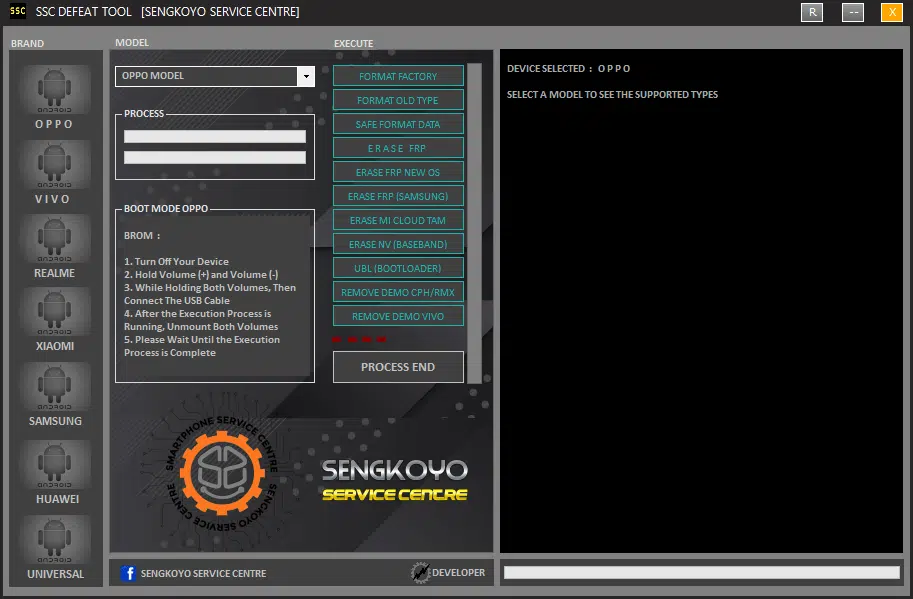
SSC Defeat Tool by Sengkoyo Service Center is a mobile servicing utility designed primarily for technicians working with supported MediaTek (MTK) Android devices. It is associated with device formatting, software troubleshooting, selected factory-reset operations, and other servicing functions. The tool has been mentioned in third-party mobile repair publications as a solution for working with compatible devices from brands such as Oppo, Vivo, Realme, Xiaomi, Samsung, and Huawei. However, actual support depends on the phone model, chipset, software version, and security configuration.
What Is SSC Defeat Tool?
SSC Defeat Tool is a Windows-based mobile repair utility intended to bring several device maintenance functions into one interface. It is commonly associated with BootROM (BROM) communication for supported MediaTek devices, allowing technicians to perform selected low-level servicing operations.
The tool’s published descriptions list functions such as factory formatting, data formatting, selected Factory Reset Protection (FRP) servicing, and demo-mode management. These are third-party advertised capabilities, not a guarantee that every feature will work on every device. Users should verify the available release information and supported model list before attempting any operation.
Key Features of SSC Defeat Tool:
Factory Format
- The factory-format function is intended to reset compatible devices during software troubleshooting. A reset can remove locally stored data, applications, and settings. Before using this function, make a backup whenever possible and confirm that the device owner understands the consequences.
Safe Data Formatting
- The Tool is also associated with a safe-format option for selected supported devices. The exact meaning and behavior of this feature may vary by version and device configuration. Do not assume that an operation will preserve personal files unless the tool’s documentation explicitly confirms this for the specific model.
Selected FRP Servicing
- SSC Defeat Tool is advertised with FRP-related functions for certain Android devices. FRP is an ownership protection feature that may request the Google Account previously associated with a phone after a factory reset. Support can differ across Android versions and manufacturer security updates.
- For a device you own, use Google’s account-recovery process if you cannot sign in. If the phone was purchased second-hand, ask the previous owner to remove their account through the appropriate official process. Any servicing should be performed only with the owner’s authorization.
MediaTek BROM Support
- BootROM communication is a major part of the tool’s advertised MediaTek functionality. BROM is a low-level startup mode used by compatible devices for certain firmware and diagnostic operations. Whether a device can connect successfully depends on its chipset, hardware design, security configuration, drivers, and the tool’s supported protocols.
Selected Demo-Mode Servicing
- Third-party descriptions list demo-mode functions for selected Oppo, Realme, and Vivo devices. Demo units may be configured for retail display and can have restrictions controlled by the retailer or manufacturer. Only authorized technicians should service such devices, with approval from the responsible owner or organization.
Multi-Brand Device Support
- Published model lists mention selected devices from Oppo, Vivo, Realme, Xiaomi, Samsung, Huawei, and other manufacturers. These lists should be treated as a starting point rather than proof of universal compatibility. Two phones from the same brand may use different chipsets, firmware, and security systems, so always check the exact model number.
System Requirements and Preparation:
SSC Defeat Tool is distributed in Windows-based packages according to third-party descriptions. Exact operating-system requirements can vary by release. A compatible computer, a reliable USB data cable, and the appropriate device drivers may be necessary for supported servicing operations.
Before getting started, consider these precautions:
- Verify the exact device model and chipset.
- Confirm that the tool version supports the intended device and operation.
- Back up important data before performing resets or firmware-related work.
- Obtain the installer from a source you can reasonably verify.
- Scan downloaded files with reputable security software.
- Avoid disabling antivirus protection simply to run an unknown installer.
- Keep the device connected and the computer powered during an active operation.
- Never use the tool on a device without the owner’s permission.
Benefits for Mobile Repair Technicians:
A multi-function servicing utility can simplify certain repair workflows by grouping related operations in one application. For technicians who regularly work with supported MediaTek devices, SSC Defeat Tool may be useful for selected formatting and diagnostic tasks.
Its practical value depends on the reliability of the software package, the supported model list, and the availability of compatible drivers and device files. A clear understanding of the phone’s condition is important before selecting any repair function.
Limitations and Safety Considerations:
SSC Defeat Tool should not be considered a universal unlocking solution. Modern Android devices use different security implementations, and manufacturer updates can change which operations are available. A function that works on one device may fail on another, even when both phones share a similar chipset.
Some operations may erase data, affect device functionality, or require additional files and authorization. Incorrect low-level operations can also lead to boot problems or require professional recovery. Be especially cautious with unofficial installers, password-protected archives, and download pages that ask users to disable security software.
Account locks, demo restrictions, and other ownership protections should be handled through authorized recovery or servicing procedures. The tool’s advertised capabilities do not establish that every security restriction can be safely or legitimately removed.
Final Words:
SSC Defeat Tool by Sengkoyo Service Center is a MediaTek-focused mobile servicing utility associated with factory formatting, selected FRP-related operations, BROM communication, and demo-mode servicing for supported devices. It may be relevant to experienced mobile repair technicians, but compatibility and functionality must be checked for each phone.
Before using SSC Defeat Tool, verify the software source, confirm the device model, protect personal data, and follow authorized repair practices. Careful preparation helps reduce the risk of data loss, failed operations, and unnecessary device damage.