Sam Yemen Arabic Android Tool V2.0 Fix The Arabic language Latest Setup 2026
Sam Yemen Arabic Android Tool V2.0 Free Download – Fix Arabic Language on Android
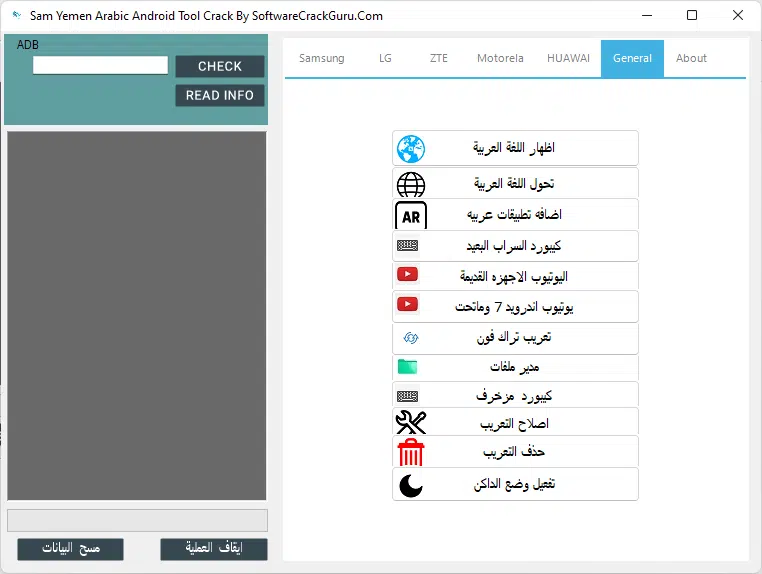
Sam Yemen Arabic Android Tool V2.0 is a Windows utility designed to improve Arabic language support on compatible Android smartphones. It is intended for users who want to display Arabic text correctly, add Arabic applications and keyboards, or adjust language settings on devices that do not provide complete Arabic localization by default. The tool lists support for several manufacturers, including Samsung, LG, ZTE, Motorola, and Huawei. It also includes features for older Android devices, such as legacy YouTube support and file manager integration. Actual compatibility depends on the phone model, Android version, firmware, and the method used to apply language changes.
What Is Sam Yemen Arabic Android Tool V2.0?
Sam Yemen Arabic Android Tool is a specialized Android localization utility that focuses on Arabic language display and related customization options. Some smartphones, particularly older models or devices originally intended for different regional markets, may have limited language settings or incomplete Arabic text rendering. This utility aims to provide additional options for handling those situations.
The tool groups its features into manufacturer-specific sections and a general section. This organization can help users identify options intended for their particular device instead of searching through unrelated utilities. However, not every option is suitable for every phone, and some localization methods may modify system settings or depend on device-specific requirements.
Main Features of Sam Yemen Arabic Android Tool V2.0:
1. Arabic Language Support
- The primary purpose of the tool is to improve Arabic language support on compatible Android devices. Depending on the device and available method, it may help users display Arabic text and apply supported localization settings.
- Correct Arabic rendering is especially important for messaging applications, websites, contact names, notifications, and documents. Results can vary on devices with older firmware or limited language resources.
2. Samsung Arabic Localization
- The Tool includes a dedicated Samsung section with options associated with different Android versions. Its published feature list mentions localization methods for several releases, including Android 6 through newer versions.
- Samsung compatibility varies by model, firmware, and security patch. Users should select only the option intended for their exact device and avoid applying modifications that have not been verified for that software version.
3. LG Device Support
- The LG section includes options for reading device information, displaying Arabic text, and applying supported language-related changes. It also lists additional keyboard support for compatible devices.
- These functions may be useful for older LG phones that lack convenient Arabic localization settings. The available features depend on the handset and its installed software.
4. ZTE and Motorola Localization
- Sam Yemen Arabic Android Tool provides separate sections for ZTE and Motorola devices. The advertised options include displaying Arabic language content, adding Arabic applications, and applying selected language conversions.
- Some functions may rely on installing applications rather than modifying the entire system language. Users should check whether the chosen method provides system-wide Arabic support or only improves Arabic input and application compatibility.
5. Huawei Arabic Language Options
- The Huawei section includes options for Arabic display, language conversion, and adding Arabic applications on supported devices. These functions may help users customize phones intended for other regions.
- Huawei models can differ considerably in their software platforms and regional configurations. Confirm the exact model and firmware before using any modification feature.
6. Arabic Keyboards
- The tool’s published description mentions keyboard options such as Far Mirage and a decorative keyboard. These options are intended to provide additional Arabic typing choices for compatible devices.
- Installing a keyboard can improve text entry, but it does not necessarily change the language of the entire Android interface. Always review keyboard permissions and install input methods only from sources you trust.
7. Turkish Phone Arabization
- Some device-specific options are designed for phones originally configured for Turkish or other regional markets. The tool aims to provide additional Arabic language and application support for compatible handsets.
- The term Arabization can refer to different changes, from installing Arabic applications to modifying system localization. Check the exact function before applying it, as the scope of changes may differ.
8. Arabic Language Repair and Removal
- The software’s published descriptions mention options for fixing or removing existing Arabic localization. These may be relevant when a previous language modification has caused display problems or when a user wants to return to the earlier configuration.
- Before changing localization settings, back up important data and make sure you understand the selected operation. Removing a modification may not restore every original system file if other changes have also been made.
9. Support for Older Android Devices
- Sam Yemen Arabic Android Tool also advertises legacy YouTube support and file manager integration for older devices. These features may be helpful when working with phones that run outdated Android versions.
- Older operating systems may no longer support current application releases and can have unpatched security vulnerabilities. Use compatible software carefully and avoid storing sensitive information on devices that no longer receive security updates.
How to Install Sam Yemen Arabic Android Tool V2.0 on Windows?
Before installing the program, prepare a Windows computer and any USB drivers required by your Android device.
- Obtain the software package from a source you trust.
- Scan the downloaded archive and executable files with reputable security software.
- Extract the package into a dedicated folder.
- Review the included instructions and check whether additional components are required.
- Run the installer, if included, and follow the displayed setup prompts.
- Launch the program and select the section matching your device manufacturer.
- Connect your phone only if the selected function requires a USB connection.
- Read the instructions for the chosen operation before making any changes.
The setup procedure can differ between releases. Do not disable antivirus protection simply to make an unfamiliar installer run, and avoid packages that request unnecessary permissions.
How to Use Sam Yemen Arabic Android Tool V2.0?
After opening the utility, identify your device manufacturer and review the available options. Start with basic information gathering and confirm that the selected feature is intended for your phone’s model and Android version.
If your goal is simply to type in Arabic, installing a trusted Arabic keyboard may be sufficient. If you need Arabic text to display correctly throughout the system, check whether your phone already provides the language through its official settings before using third-party modifications.
For system-level localization changes, back up your data and follow the instructions for your specific device. Do not interrupt an operation that is actively modifying system files.
System Requirements and Compatibility:
Sam Yemen Arabic Android Tool V2.0 is distributed as a Windows utility. Exact Windows requirements and supported device configurations should be verified against the particular package.
Compatibility may depend on:
- Phone manufacturer and model
- Android version and firmware build
- Regional software configuration
- USB drivers and connection requirements
- Available language resources
- Permissions required by the selected function
Support listed for a manufacturer does not guarantee that every model from that brand will work. Newer firmware may also behave differently from older versions.
Benefits of Sam Yemen Arabic Android Tool V2.0:
The main benefit of the tool is its focus on Arabic localization across several Android manufacturers. Its separate device sections help users find relevant options, while keyboard and application support can provide additional convenience for Arabic-speaking users.
The utility may be particularly useful when working with older phones or devices intended for other regions. Nevertheless, built-in Android language settings remain the preferred starting point whenever they provide the required functionality.
Important Safety Recommendations:
Always use a trusted software source, scan downloaded files, and back up important information before modifying your phone. Check keyboard permissions carefully, especially when installing third-party input methods.
If a device does not support a particular localization method, do not force an incompatible operation. For persistent display issues, consult the manufacturer’s documentation or an authorized technician.
Final Words:
Sam Yemen Arabic Android Tool V2.0 is a Windows-based utility focused on Arabic language display, localization, keyboard options, and selected support features for compatible Samsung, LG, ZTE, Motorola, and Huawei devices. It may help users improve Arabic usability on supported phones, especially older models or devices configured for other regions. Before using the software, verify its source, confirm device compatibility, and choose the least invasive method that meets your language requirements.