QLMFlasherPro MediaTek Edition Tool Latest Version 2026
QLMFlasherPro MediaTek Edition Tool – Firmware Flashing and Android Repair
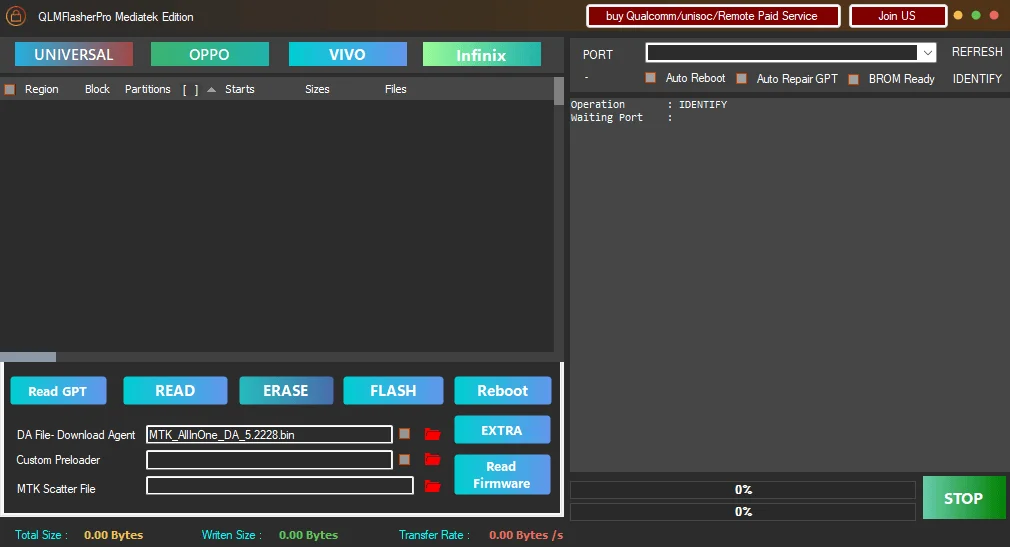
QLMFlasherPro MediaTek Edition Tool is a Windows-based mobile servicing utility designed for selected Android devices powered by MediaTek (MTK) chipsets. It is developed for technicians and experienced users who need tools for firmware flashing, partition management, device recovery, and software troubleshooting. The utility is associated with functions such as reading firmware information, generating scatter files, reading partition tables, and repairing certain partition-related problems. Its supported features depend on the device model, chipset, security level, and required authentication files.
What Is QLMFlasherPro MediaTek Edition Tool?
QLMFlasherPro MediaTek Edition Tool is a specialized edition of the QLMFlasherPro platform focused on MediaTek devices. It is intended to bring several common mobile repair functions together in one interface, helping technicians manage supported devices during software maintenance and recovery.
The published feature information lists functions such as factory reset, partition management, firmware reading and flashing, GPT reading, and automatic GPT repair. Some third-party descriptions also advertise account-lock servicing functions. These should be treated as model-dependent capabilities rather than guaranteed results for every Android phone.
Key Features of QLMFlasherPro MediaTek Edition:
MediaTek Device Support
- QLMFlasherPro MediaTek Edition Tool lists support for selected MediaTek chipsets, including MT6781, MT6789, MT6855, MT6886, MT6895, MT6983, and MT8985. Support may require an appropriate Download Agent (DA) file or a compatible connection method, especially on devices using newer security protocols. A chipset appearing in a support list does not guarantee compatibility with every phone that uses it.
Firmware Flashing
- Firmware flashing is one of the main functions associated with QLMFlasherPro MediaTek Edition. Technicians can use compatible firmware packages to address certain software problems, restore supported devices, or reinstall system software. Firmware must match the exact device model and hardware variant. An incorrect firmware package can cause boot failures, data loss, or an unusable device.
Firmware Reading and Scatter File Generation
- The published feature list includes firmware reading and scatter file generation. These functions can help technicians prepare device-specific firmware information for supported maintenance workflows. Backing up relevant data before making changes is important because firmware operations can affect existing partitions and stored information.
Partition Management and GPT Reading
- The tool includes partition-related functions, including reading the GUID Partition Table (GPT). Partition information can help technicians understand the device’s storage layout and diagnose selected software or partition issues. Advanced partition operations should only be performed when the correct device information and recovery files are available.
GPT Repair
- Automatic GPT repair is another advertised capability. It may be useful when a supported device has a partition-table problem, but it is not a universal solution for storage damage or firmware corruption. Technicians should verify the storage configuration and preserve appropriate backups before attempting repair operations.
Factory Reset
- The factory-reset function is intended to erase user data and restore a supported device to a clean state. A reset generally deletes locally stored information, so users should back up important files before proceeding whenever possible. A factory reset does not necessarily remove account-based security protections, and the original owner’s credentials may still be required during device setup.
Selected Preloader and Authentication Support
- Published documentation lists preloader support for selected models from Oppo, Realme, OnePlus, Vivo, Infinix, Tecno, and itel. Availability varies by chipset and device security implementation. Some newer MediaTek platforms may require a valid DA file through a custom DA option. Always verify the exact model and security requirements before attempting a connection or repair.
System Requirements and Preparation:
QLMFlasherPro MediaTek Edition is intended for use on a Windows computer. Exact operating-system requirements may vary by release, so check the package documentation before installation. Depending on the device, the workflow may require compatible USB drivers, a reliable data cable, the correct firmware package, and appropriate device-specific files.
Before using the tool, follow these precautions:
- Confirm the exact phone model and MediaTek chipset.
- Back up important data whenever possible.
- Obtain firmware and device files from sources you can verify.
- Check that the USB drivers are appropriate for your device.
- Keep the computer powered and avoid disconnecting the phone during an active operation.
- Scan downloaded files with reputable security software.
- Do not disable antivirus protection simply because an unofficial installer requests it.
Benefits of QLMFlasherPro MediaTek Edition:
One potential advantage of QLMFlasherPro MediaTek Edition is that it groups several repair and firmware-related functions in a single utility. Instead of using separate applications for every supported task, technicians may be able to inspect partition information, prepare firmware, and carry out selected repair operations through one interface.
Its chipset-specific focus may also be helpful for technicians who regularly service compatible MediaTek phones. However, the practical benefit depends on the exact device, the available firmware, and whether the required security or authentication method is supported.
Important Limitations and Safety Considerations:
QLMFlasherPro MediaTek Edition should not be considered a universal Android unlocking or repair solution. Device manufacturers frequently change bootrom security, authentication requirements, and firmware formats. Consequently, an operation that works on one model may fail on another model with a similar chipset.
Unofficial downloads can also carry security risks. Verify the publisher and file integrity when possible, avoid unknown modified packages, and do not install software that asks you to expose account credentials or disable essential security protections without a trustworthy technical reason.
Account-related repairs should only be performed on devices you own or are authorized to service. If a phone remains protected by Google Factory Reset Protection or another ownership control, use the account recovery process or contact the device’s authorized owner rather than attempting to defeat security protections.
Final Words:
QLMFlasherPro MediaTek Edition Tool is a MediaTek-focused Windows utility associated with firmware flashing, partition management, firmware reading, GPT operations, and selected device recovery tasks. It may be useful for mobile technicians working with supported Android devices, provided they verify compatibility and prepare the correct firmware and device files.
For the best results, confirm the exact chipset and model before beginning, protect user data, and use trusted software sources. Since support and security requirements vary between devices, always treat published feature lists as guidance rather than a guarantee that every function will work on every phone.