MegaUnlocker Removal Tool Open Menu Bypass For IPhone Latest Version 2026
MegaUnlocker Removal Tool – Open Menu Removal for iPhone
The MegaUnlocker Removal Tool is a third-party iPhone servicing solution associated with open-menu account-removal services. It is discussed in the mobile repair community for helping technicians handle certain account-related issues on compatible iPhones and iPads. Before using any tool in this category, it is important to understand what an open-menu device is, which functions may be supported, and what limitations can affect the repair process.
What Is MegaUnlocker Removal Tool?
MegaUnlocker Removal Tool is a utility promoted for specific iOS device servicing tasks, particularly open-menu account removal. An open-menu iPhone generally means that the device can reach its Home Screen and its menus are accessible, but an account-related restriction may remain. This differs from an iPhone that is completely locked at the initial setup screen by Activation Lock.
The tool is intended for users and mobile technicians who need to investigate supported account-related servicing options on compatible devices. However, available third-party descriptions do not establish that every advertised feature works on all iPhone models or iOS versions. Compatibility should therefore be confirmed before purchasing a service or attempting any repair.
Key Features of MegaUnlocker Removal Tool:
Open Menu Servicing
- The Tool is advertised for open-menu servicing on supported iPhones and iPads. Depending on the device condition and service availability, the intended task may involve addressing an account-related restriction when the device remains accessible. Actual results can vary according to the model, iOS version, device status, and the service provider’s current support.
iPhone and iPad Compatibility
- Third-party service announcements mention multiple generations of Apple mobile devices. However, compatibility claims can change following iOS updates and Apple’s security changes. Users should verify the exact model and software version before relying on a particular feature.
Account-Related Repair Support
- MegaUnlocker is associated with open-menu account-removal services. These functions should not be confused with a guaranteed solution for every iCloud or Activation Lock problem. A device that is accessible through its Home Screen may have a different issue from a device that requests the previous owner’s Apple Account during activation.
Technician-Oriented Workflow
- Mobile repair technicians may consider specialized servicing utilities when diagnosing devices with known ownership and a clearly identified software issue. Before starting, technicians should check the device condition, confirm authorization, review service requirements, and explain any limitations to the customer.
Version and Service Availability
- The name MegaUnlocker Removal Tool may be used in third-party service listings and announcements. Features, supported iOS versions, and availability can change over time. The exact release, installer safety, pricing, and compatibility should be verified with a trusted provider rather than assumed from a version title or promotional claim.
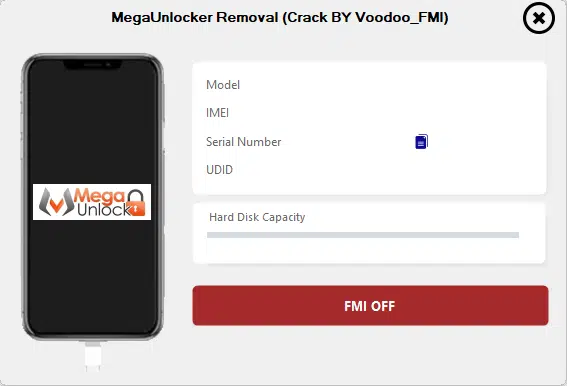
System Requirements and Preparation:
The exact system requirements for MegaUnlocker may depend on the service edition being used. If a Windows-based utility is required, prepare a reliable computer, a compatible USB data cable, and the appropriate device drivers where necessary. Follow the provider’s documented requirements instead of assuming that every edition uses the same setup.
Before performing any servicing operation, consider these precautions:
- Back up important data whenever the device is accessible and a backup is possible.
- Confirm that you own the device or have explicit authorization from its owner.
- Check the exact iPhone model and installed iOS version.
- Use software from a source you can verify and scan downloaded files with reputable security software.
- Avoid sharing Apple Account passwords or verification codes with unknown service providers.
- Understand that servicing operations may affect data, account access, cellular functionality, or future software updates.
Open Menu Removal vs. Activation Lock:
Understanding the difference between open-menu servicing and Activation Lock is essential. An open-menu device can reach the Home Screen, while an Activation-Locked device may require the Apple Account previously associated with it during setup. These situations are not interchangeable, and a tool advertised for one may not resolve the other.
If the iPhone belongs to you and you cannot remove the associated account, use Apple’s supported account-recovery options. If you purchased the device second-hand, ask the previous owner to remove it from their account through the official process. If you have valid proof of purchase, Apple Support may be able to review an Activation Lock request. Devices managed by a company or school should be handled by the responsible administrator.
Advantages and Limitations:
A dedicated servicing utility can give experienced technicians a focused workflow for specific, supported repair tasks. It may also reduce the need to switch between unrelated utilities when the required function is available.
However, third-party tools are not guaranteed to work with every device or software release. Promotional claims should be treated cautiously, particularly when they promise universal compatibility or permanent removal of Apple security restrictions. Some services may be paid, may require a particular device state, or may stop working after software changes. A successful servicing operation should never be assumed before compatibility and ownership have been established.
Is MegaUnlocker Removal Tool Worth Considering?
MegaUnlocker Removal Tool may be worth researching for technicians who regularly handle authorized open-menu iPhone servicing. The most important considerations are the exact supported models, current iOS compatibility, service terms, data risks, and the reliability of the provider.
For ordinary users, official Apple account recovery and previous-owner removal are generally the safest first options. A third-party utility should not be treated as a universal iCloud unlocker or as a substitute for proof of ownership.
Final Words:
MegaUnlocker Removal Tool is associated with open-menu account-removal services for selected Apple devices. Its suitability depends on the iPhone’s condition, model, iOS version, and the specific service being offered. Verify all compatibility and safety details before proceeding, protect your personal information, and use authorized methods to resolve account or Activation Lock issues. Careful preparation can help prevent unnecessary data loss, wasted expenses, and problems with device functionality.