MediaTek GSM Tool Download by Sahirl Techno Latest Version GSM Tools 2026
MediaTek GSM Tool Download by Sahirl Techno – Latest Version Features and Overview
Introduction to MediaTek GSM Tool by Sahirl Techno
MediaTek GSM Tool Download by Sahirl Techno is a Windows-based mobile servicing utility designed for technicians who work with compatible MediaTek-powered smartphones. The tool is discussed in mobile repair communities for its advertised device maintenance, firmware-related, backup, and troubleshooting functions.
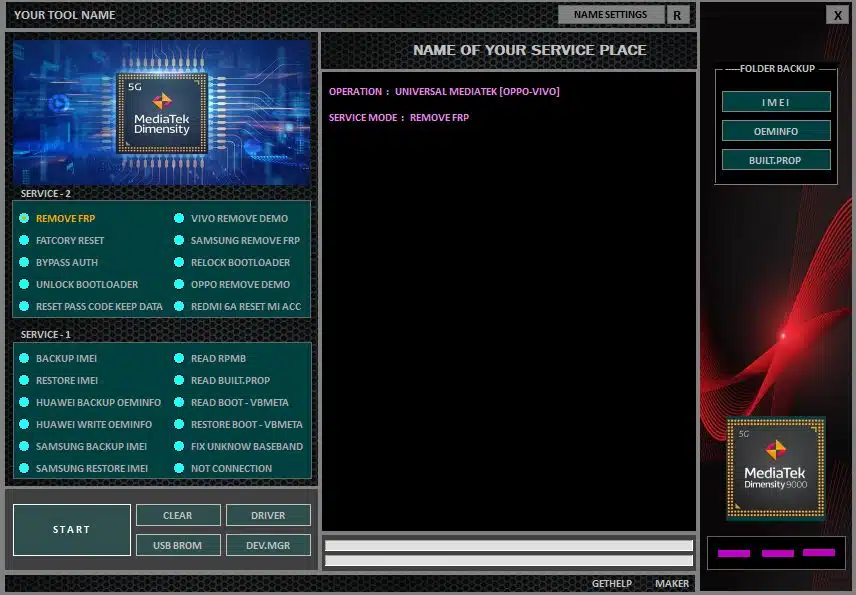
Depending on the release and supported device, published feature descriptions mention factory reset operations, FRP-related servicing, bootloader management, device information reading, and backup or restoration of selected device data. Some descriptions also list support for selected Samsung, Xiaomi, Huawei, OPPO, Vivo, Realme, Tecno, Infinix, and other Android devices.
Actual functionality depends on the phone model, chipset, firmware, security patch, and tool version. A brand appearing in a compatibility list does not guarantee support for every device from that manufacturer.
What Is MediaTek GSM Tool?
MediaTek GSM Tool Download is a desktop utility intended to bring multiple mobile servicing functions together in one interface. MediaTek processors are used in smartphones across several price ranges, and specialized servicing software can assist technicians with diagnosing certain software problems and managing supported maintenance operations.
The version associated with Sahirl Techno has been described in third-party listings as supporting selected MediaTek-based devices and certain additional device platforms. Because available descriptions are largely from third-party sources, users should verify the advertised features against the documentation supplied with the specific release.
Main Features of MediaTek GSM Tool:
1. Device Information
- MediaTek Device information functions can help technicians identify a connected phone and review available hardware or software details. This information is useful when confirming the model and determining whether a particular servicing operation is appropriate.
- The information accessible to the tool depends on the device’s connection mode, permissions, and software configuration.
2. Factory Reset Support
- Published feature lists mention factory-reset operations for supported devices. A factory reset can help resolve certain software problems, but it generally removes personal data and settings stored on the phone.
- Before proceeding, back up important information whenever possible and confirm that you can access the accounts associated with the device after the reset.
3. FRP-Related Servicing
- Factory Reset Protection is an Android security feature that helps prevent unauthorized use after a device has been reset. Third-party descriptions of MediaTek GSM Tool advertise FRP-related functions for selected devices.
- Compatibility is not universal, and security updates can affect the availability of servicing options. For legitimate ownership-verification problems, use Google’s official account-recovery process or contact an authorized repair provider. If the phone was purchased second-hand, ask the previous owner to complete the appropriate account-removal process.
4. Bootloader Management
- Some published descriptions list bootloader unlock and relock functions. A bootloader controls aspects of how a device starts its operating system, and changing its state can affect device security and software integrity.
- Bootloader operations may erase data, trigger security warnings, or prevent normal startup if performed incorrectly. Check the manufacturer’s supported procedure and the exact model requirements before attempting any change.
5. Backup and Restore Options
- Third-party listings mention backup and restoration features for selected device-specific information. Such functions can be valuable during authorized maintenance, but the data involved may be essential to the phone’s operation.
- Only use verified backups that belong to the correct device. Do not modify or restore sensitive device identifiers or configuration data unless the operation is lawful, authorized, and supported by the manufacturer.
6. Firmware and Boot-Related Troubleshooting
- Some descriptions refer to operations involving boot-related files and device configuration information. These functions may be relevant when investigating certain software failures, but they require a precise understanding of the target device.
- Using incompatible files or writing to the wrong partition can cause boot loops, loss of connectivity, or other serious problems. Verify firmware compatibility and maintain a recovery plan before undertaking advanced servicing.
7. Support for Multiple Brands
Although the tool is associated primarily with MediaTek servicing, third-party descriptions list several smartphone manufacturers, including:
- Xiaomi and selected Redmi devices
- OPPO, Vivo, and Realme
- Samsung devices with supported configurations
- Huawei smartphones
- Tecno and Infinix
- Lenovo, Nokia, and selected additional brands
This is a general overview of brands mentioned in published descriptions, not a verified list of universally supported models. Exact compatibility must be confirmed for each phone and function.
System Requirements:
MediaTek GSM Tool Download by Sahirl Techno is distributed as Windows desktop software. Requirements can differ between releases, so review the package documentation before installing it.
A typical setup may require:
- A compatible Windows computer
- Sufficient free storage
- Appropriate USB drivers
- A reliable USB data cable
- The exact phone model and firmware information
- Verified files for any supported maintenance operation
Some operations may require a specific connection mode or additional manufacturer-specific components. Do not assume that every feature works on every version of Windows or every MediaTek chipset.
Download and Installation Safety:
When looking for MediaTek GSM Tool by Sahirl Techno, choose a source that provides clear version information and reliable package details. The title of a download file alone does not prove that it is genuine or safe.
Scan downloaded archives and installers with a trusted security application. Avoid disabling antivirus protection to run unverified software, and stop if a package produces suspicious warnings or requests unexpected permissions.
Also check whether the particular release has any licensing, activation, or connectivity requirements. A tool described as free by a third-party page may have different conditions in another release.
Advantages of MediaTek GSM Tool:
The utility may be useful to mobile repair technicians who need a centralized interface for selected device information, reset, backup, and troubleshooting functions. Its advertised multi-brand coverage may also be convenient for repair shops handling different smartphone manufacturers.
However, the value of the tool depends on the accuracy of its feature list, the quality of the software package, and compatibility with the target device. No single release should be considered a universal repair solution.
Important Precautions:
Before carrying out any servicing operation, confirm the exact device model and make a backup of accessible data. Use firmware and configuration files only when their compatibility has been verified.
FRP and other device security protections exist to safeguard ownership and personal information. Only service devices that you own or have explicit authorization to repair. For account verification, organization-managed devices, or other ownership restrictions, use the appropriate official recovery or administrator process.
Final Words:
MediaTek GSM Tool Download by Sahirl Techno is a mobile servicing utility described by third-party sources as supporting selected MediaTek devices and offering functions related to device information, factory reset, FRP servicing, bootloader management, and backup or restoration operations.
Before installing a release, verify its source, version, compatibility, and actual feature availability. Safe download practices, correct firmware selection, and responsible servicing are essential to reducing the risk of data loss or device damage.