Jommarn Huawei Reader Tool Free Download For Windows 2026
Jommarn Huawei Reader Tool Free Download
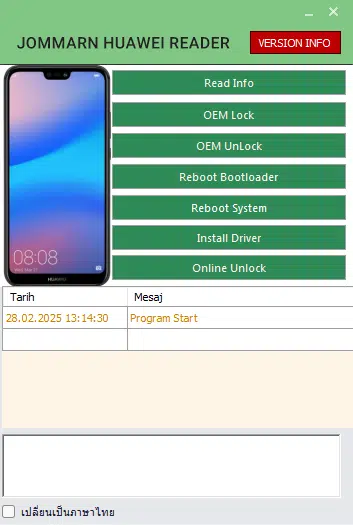
Jommarn Huawei Reader Tool is a Windows-based utility designed for reading device information and performing selected maintenance operations on supported Huawei and Honor smartphones. It provides options for checking model and software details, managing supported bootloader settings, restarting a device into Fastboot mode, and installing the necessary drivers. The tool is intended for mobile technicians and experienced Android users who need a convenient interface for basic device inspection and troubleshooting. Its actual capabilities depend on the phone model, chipset, firmware version, connection mode, and available authorization.
What Is Jommarn Huawei Reader Tool?
Jommarn Huawei Reader Tool is a device-information and servicing utility developed for supported Huawei-related devices. It brings several common functions together in one interface, allowing users to check device information and access selected bootloader and reboot operations from a Windows computer.
The tool’s published description also mentions an online unlocking feature. Availability may depend on the service, device compatibility, and authorization requirements. Users should verify the source and supported models before relying on any advertised feature.
Main Features of Jommarn Huawei Reader Tool:
1. Read Device Information
- The Read Info function is designed to display available device details, such as the model name, build version, and security patch information. These details can help technicians identify a handset before selecting compatible firmware or investigating software-related problems.
- The information displayed may vary depending on whether the phone is connected through ADB or Fastboot and whether its bootloader is locked or unlocked.
2. OEM Lock and Unlock Options
- Jommarn Huawei Reader Tool includes OEM Lock and OEM Unlock options for supported devices. Bootloader settings affect whether certain firmware modifications and development operations are permitted.
- Unlocking a bootloader may erase the device’s data and change its security state. Relocking it with incompatible or modified firmware can prevent the phone from booting correctly. Always confirm manufacturer requirements and firmware compatibility before attempting these operations.
3. Reboot to Bootloader
- The Reboot Bootloader function helps restart a compatible phone into its bootloader or Fastboot interface. This mode is commonly used for device inspection and authorized firmware maintenance.
- The operation requires a supported connection and may behave differently across Huawei and Honor models.
4. Reboot System
- The Reboot System option allows users to restart a connected device into its normal operating mode. It can be useful after completing a supported diagnostic task or leaving the bootloader interface.
- A normal reboot does not repair every software problem, so persistent boot errors may require additional diagnosis.
5. Driver Installation
- The tool provides a driver-installation option intended to help the Windows computer communicate with a connected device. Correct drivers can improve device detection and reduce connection problems when using supported ADB or Fastboot functions.
- Driver requirements depend on the handset and Windows configuration. If automatic installation does not work, consult the device manufacturer’s official support resources.
6. Online Unlock Feature
- The published feature list includes an online unlocking option for supported Huawei and Honor devices. Online services may have separate compatibility requirements, account requirements, or authorization conditions.
- Check the service’s legitimacy and terms before using it. Do not assume that the feature is free, available for every model, or guaranteed to work.
How to Install Jommarn Huawei Reader Tool on Windows?
Before installing the software, prepare a Windows computer, a reliable USB cable, and the appropriate device drivers.
- Obtain the tool package from a source you trust.
- Scan the downloaded archive and executable files with reputable security software.
- Extract the archive into a dedicated folder.
- Read any included instructions and check for additional dependencies.
- Launch the tool using the permissions required for its intended functions.
- Install the appropriate drivers if the computer does not recognize the phone.
- Connect the supported Huawei or Honor device and select the appropriate connection mode.
- Confirm that the device is detected before attempting any operation.
Installation steps can vary between releases. Avoid unofficial packages that request unnecessary permissions or instruct you to disable security software.
How to Use Jommarn Huawei Reader Tool?
After launching the utility, connect your phone and confirm that the correct device is recognized. Begin with the Read Info function to identify the model and available software information.
For other operations, review the purpose of the selected option and check the manufacturer’s instructions first. Bootloader-related changes should only be performed when necessary and when you understand their consequences.
Back up important data before performing operations that could affect the bootloader, firmware, or device configuration. If the tool fails to detect the phone, check the USB cable, drivers, connection mode, and authorization settings before trying again.
System Requirements and Device Compatibility:
Jommarn Huawei Reader Tool is intended for Windows computers. Exact Windows requirements and supported device models should be confirmed using the documentation provided with the particular release.
Compatibility may depend on:
- Huawei or Honor model and chipset
- Android version and firmware build
- Bootloader status and supported Fastboot commands
- Correct USB drivers and cable
- Required service authorization
- Availability of the online unlocking service
Not every device supports the same commands, and newer firmware may restrict operations that worked on older models.
Benefits of Jommarn Huawei Reader Tool:
The main advantage of Jommarn Huawei Reader Tool is its collection of device-information, reboot, driver, and bootloader-related options in one Windows interface. The Read Info function can help technicians identify a handset before troubleshooting, while the reboot options make it easier to switch between supported operating modes.
However, advanced servicing operations carry risks. Users should verify compatibility and understand each operation rather than relying solely on the presence of a button in the program.
Important Safety Tips:
Download the utility only from a trusted source and scan all files before running them. Keep a backup of important data, use compatible drivers, and avoid interrupting an operation once it has started.
For account verification or Factory Reset Protection problems, use official account recovery or an authorized service provider with proof of ownership. Only service devices you own or have permission to maintain.
Final Words:
Jommarn Huawei Reader Tool is a Windows utility for reading supported Huawei device information, managing selected bootloader settings, rebooting into supported modes, and installing drivers. Its online unlocking feature is subject to availability and device-specific requirements. Before using the tool, verify the download source, check compatibility with your exact handset, and understand the potential risks of bootloader changes. Careful preparation can help reduce connection issues and avoid unnecessary data loss.