iTechMo Shop GSM Tool V2.0 With Unlock Your Android Devices 2026 Updated
iTechMo Shop GSM Tool V2.0 – Android Unlocking and Mobile Repair Tool
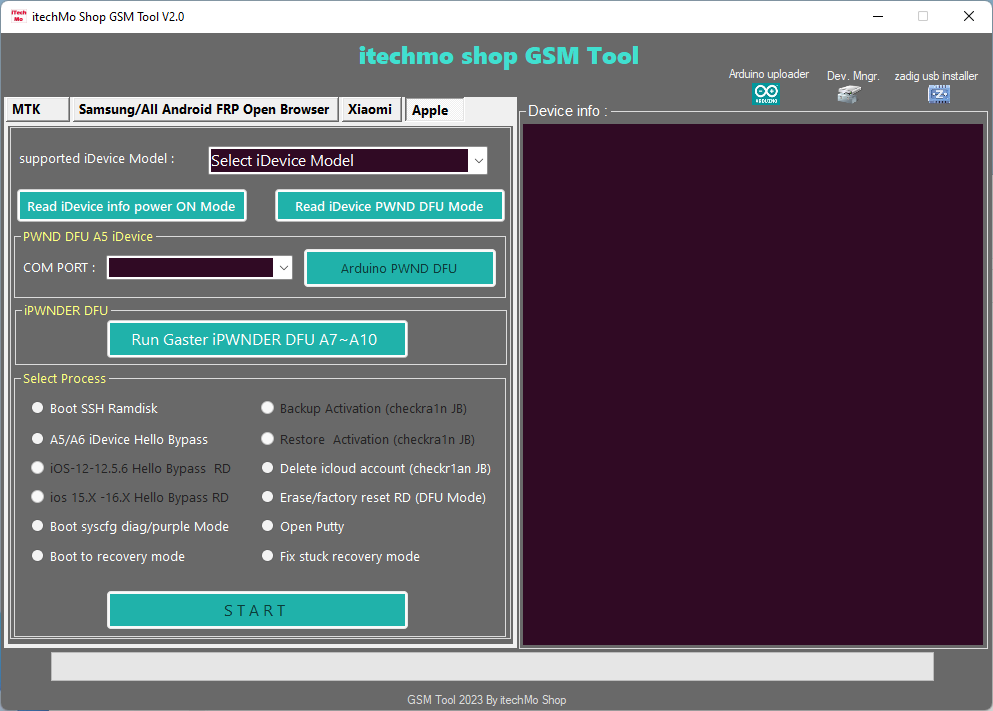
iTechMo Shop GSM Tool V2.0 is a third-party Windows-based mobile servicing utility advertised for technicians who work with Android smartphones and selected Apple devices. The tool is promoted as a multi-function solution for device diagnostics, software maintenance, factory resets, and selected account-related servicing tasks. It brings several advertised functions together in one interface, potentially making common mobile repair workflows more convenient for technicians and repair shops.
Online descriptions of iTechMo Shop GSM Tool V2.0 mention support for selected Samsung, Xiaomi, and MediaTek-based devices, along with certain Apple device diagnostic functions. However, the available information comes mainly from third-party listings and video descriptions, rather than comprehensive official documentation. Actual capabilities depend on the software package, device model, firmware, and security configuration.
What Is iTechMo Shop GSM Tool V2.0?
iTechMo Shop GSM Tool V2.0 is a mobile servicing program designed to communicate with compatible devices through supported connection modes. It is advertised for tasks involving Android device maintenance, firmware-related troubleshooting, and selected diagnostic operations.
The software is intended primarily for mobile technicians and experienced users who understand device servicing. As a third-party utility, it should not be confused with official tools provided by Google, Samsung, Xiaomi, or Apple.
Key Features of iTechMo Shop GSM Tool:
1. Android Device Servicing
- The Tool is promoted for selected Android servicing tasks, including device identification, maintenance, and troubleshooting. Supported functions depend on the connected phone and the version of the software being used.
2. Samsung Device Support
- Third-party descriptions advertise selected Samsung-related servicing functions. Depending on the device and supported workflow, these may include device detection and certain software-maintenance operations. Compatibility should be checked for the exact model and Android security version.
3. Xiaomi and Mi Account Troubleshooting
- The tool is advertised for selected Xiaomi device-management and account-related servicing tasks. Such features may not work on every MIUI or HyperOS release. For account restrictions, users should prioritize the official Xiaomi account-recovery process and authorized support.
4. MediaTek Support
- The software is also promoted for selected MediaTek-based smartphones. Depending on the supported model, available operations may involve device detection, connection checks, and selected maintenance functions. Correct drivers and a stable USB connection are important for reliable communication.
5. Factory Reset and Software Maintenance
- Some third-party feature lists mention factory-reset and related maintenance functions. A factory reset generally erases user data and may not remove account verification or other security protections. Back up important information before proceeding.
6. Apple Device Diagnostics
- Certain online descriptions also advertise selected Apple device diagnostic and recovery-related functions. These claims should be verified against the actual release documentation. The presence of an Apple-related menu does not guarantee support for every iPhone or iOS version.
7. USB and Device Detection
- Device detection and connection management are important parts of a servicing workflow. Depending on the release, the software may use USB, ADB, Fastboot, or other supported device modes. Available modes vary by manufacturer and model.
Version Information and Availability:
The software is commonly listed as iTechMo Shop GSM Tool V2.0. Third-party pages and video descriptions advertise it as a free utility, but a fully verified official release history and current support list are not readily available. Users should confirm the version, package source, and licensing requirements before installing it.
A download advertised as free does not automatically mean that every feature is available without activation, payment, or additional services.
System Requirements:
Before using iTechMo Shop GSM Tool, prepare the following:
- Operating system: A compatible Windows computer.
- USB cable: A reliable data cable suited to the connected device.
- Drivers: Appropriate USB and device-specific drivers.
- Storage: Enough space to extract and run the downloaded package.
- Firmware: Correct files for the exact model when required.
- Authorization: Permission to service the device.
The precise requirements may differ between packages, so check any included documentation before running the program.
How to Prepare iTechMo Shop GSM Tool?
First, identify the device model and determine which operation is required. Obtain the software from a source you trust and scan the downloaded archive before opening it. Install the appropriate drivers and connect the phone using a suitable USB cable.
Confirm that the software recognizes the device before selecting a maintenance function. Read the operation’s description carefully and back up important data before resetting or modifying firmware. Avoid unknown packages that request unnecessary permissions or instruct you to disable security software.
Benefits for Mobile Repair Technicians:
A multi-function servicing utility can help technicians organize supported diagnostic and maintenance tasks within one interface. Device identification and connection checks can also make it easier to determine whether a particular phone is compatible before starting a repair.
Nevertheless, broad claims about universal unlocking, account removal, or compatibility should be treated cautiously. Features may be restricted by modern security protections, device-specific requirements, or the particular release.
Safety Tips:
Only service devices you own or have authorization to repair. Use official account-recovery procedures for FRP and account restrictions, and contact the relevant administrator or service provider when a device is organization-managed.
Firmware changes and factory resets may erase data or prevent a phone from starting correctly if performed incorrectly. Verify files, back up important information, and avoid modifying device identifiers or defeating another person’s security protections.
Final Words:
iTechMo Shop GSM Tool V2.0 is a third-party mobile servicing utility advertised for selected Android and Apple device workflows. Its published descriptions mention device diagnostics, maintenance, reset functions, and certain account-related services. Because comprehensive official documentation is limited, verify the download source and supported-device information before using it. Careful preparation and authorized servicing practices can help reduce the risk of data loss and device damage.