HFZ Activator A12+ Premium Tool Download iPhone iCloud Bypass & Activation Latest Setup 2026
HFZ Activator A12+ Premium Tool iPhone iCloud Bypass and Activation
HFZ Activator A12+ Premium Tool Download is a third-party iPhone and iPad servicing utility advertised for certain activation-related issues on compatible Apple devices. It is commonly discussed in connection with the iPhone XR, iPhone XS series, iPhone 11 family, and selected iPads. The tool is designed for specific device and software configurations, so compatibility should always be verified before use. This guide covers its advertised features, supported-device considerations, system requirements, common issues, and important precautions for users who need to troubleshoot an activation screen.
What Is HFZ Activator A12+ Premium Tool?
HFZ Activator A12+ Premium Tool Download is a computer-based utility associated with activation troubleshooting on selected A12-and-newer Apple devices. The Windows edition is promoted for particular iPhone and iPad configurations, although available features may differ between releases and platforms.
Apple’s Activation Lock is a security feature that helps prevent unauthorized use of a lost or stolen device. A phone displaying the Hello screen or an Activation Lock message may require the Apple Account previously associated with it. Users should establish ownership and check official recovery options before considering third-party servicing software.
Key Features of HFZ Activator A12+ Premium Tool:
1. Activation-Related Device Checks
- The utility is advertised for selected iPhones and iPads that encounter activation-related restrictions. Compatibility depends on the exact model, iOS version, device state, and available service.HFZ Activator A12+ Premium Tool Download.
2. Support for Selected A12 and Newer Devices
- HFZ Activator A12+ Premium Tool Download publishes compatibility information for specific iPhone and iPad models. The iPhone XR, XS, XS Max, and selected later devices appear in its model resources, but a model listing alone does not guarantee that every release supports every device configuration.
3. Windows-Based Workflow
- The Windows edition provides a computer-based interface for supported servicing tasks. Depending on the release, the workflow may require a compatible USB connection, an internet connection, and access to the relevant service.
4. Version-Specific Functionality
- Features and supported iOS versions can change between releases. Before installing or purchasing a service, check the precise version number, official release notes, supported devices, and any stated limitations.
5. Compatibility Verification
- Checking the device’s model and software version before servicing can help identify whether the advertised service is appropriate. This is particularly important when the device has a different issue, such as a forgotten passcode, carrier restriction, or organizational Remote Management screen.
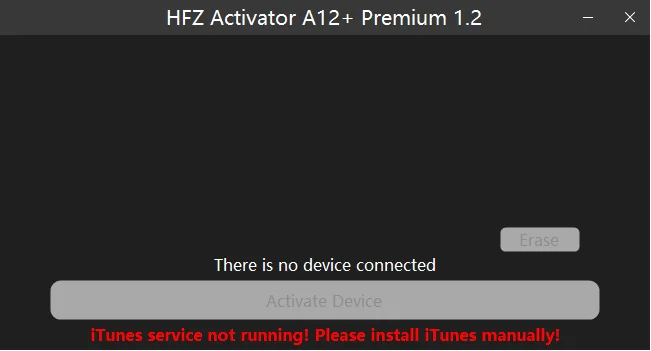
Supported Devices and iOS Compatibility:
HFZ Activator A12+ Premium is advertised for selected A12-and-newer Apple devices, but the exact supported range depends on the release and service type. The tool’s compatibility claims should not be interpreted as guaranteed support for every iPhone from the XR through the newest generation.
Before proceeding, verify:
- The exact iPhone or iPad model.
- The installed iOS or iPadOS version.
- Whether the device is on the Hello screen or another lock screen.
- Whether the relevant HFZ release supports the specific configuration.
- Whether server access, licensing, or other service requirements apply.
System Requirements:
The requirements may vary by version, but users should generally prepare the following:
- A compatible Windows computer, with Windows 10 or 11 commonly specified for newer releases.
- A reliable USB cable that supports data transfer.
- A stable internet connection if the service requires online verification.
- The correct device drivers or supporting components, where required.
- Access to the legitimate software source and any necessary license.
Always consult the current release information rather than relying on requirements published for an older edition.
How to Prepare Your iPhone for Troubleshooting?
Step 1: Identify the Device
Confirm the iPhone model and gather any available software-version information. If the phone is on the setup screen, use the identification details available on the device or its packaging.
Step 2: Check the Activation Status
Determine whether the device is asking for the original owner’s Apple Account, displaying a general activation error, or showing a different restriction. These issues do not all have the same solution.
Step 3: Review Official Recovery Options
If the device belongs to you, try Apple’s supported account-recovery or Activation Lock assistance process. If you bought the device second-hand, contact the previous owner to remove it from their account when appropriate. Organizations should contact their device administrator.
Step 4: Verify the Software Source
Download utilities only from a source you can verify. Avoid suspicious installers, unknown configuration profiles, and services that request unnecessary personal information.
Step 5: Protect Your Data
Back up the device whenever it is accessible. Some recovery or restore procedures can erase information, and a backup may not be possible while the device remains locked.
Common Problems and Limitations:
Device Not Supported
The model or iOS version may not be compatible with the selected release. Check the current compatibility information before proceeding.
Activation Still Fails
Activation errors can be caused by account security, network connectivity, Apple’s activation services, or device restrictions. A third-party utility should not be assumed to fix every cause.
USB Connection Problems
Use a data-capable cable, check the computer’s USB connection, and follow the manufacturer’s troubleshooting guidance. Avoid repeated attempts if the tool reports that the device is unsupported.
Features May Not Work as Advertised
Cellular service, notifications, account sign-in, and other functions may depend on the device and the particular service. Verify these limitations before paying for any third-party service.
Is HFZ Activator A12+ Premium Tool Download Safe?
The risks depend on the software source, service conditions, and the device’s configuration. Unverified installers may expose your computer or personal information to security risks, while unsupported servicing can leave a device in an unusable or limited state.
Use such utilities only on devices you own or are authorized to service. For Activation Lock, prioritize official Apple recovery and ownership-verification options rather than relying on claims of universal unlocking.
Final Words:
HFZ Activator A12+ Premium Tool Download is a third-party utility advertised for activation-related troubleshooting on selected iPhones and iPads. Its features and compatibility depend on the specific release, device model, software version, and service conditions. Verify these details before use, protect your personal information, and understand any potential limitations. For legitimate Activation Lock problems, Apple’s official recovery options and proof-of-ownership support remain the recommended starting points.