 Posted by
Haafedk iCloud Free Tool V13 Download – iCloud Troubleshooting Utility
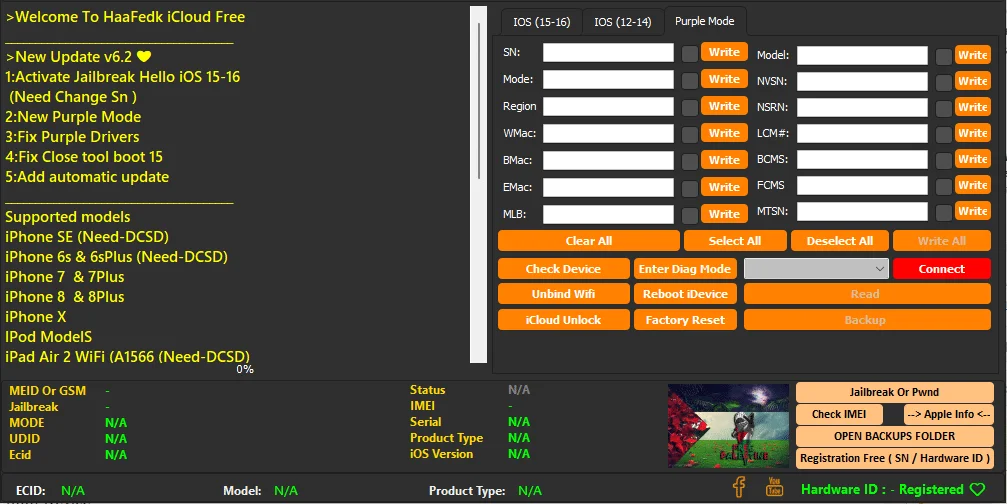
Haafedk iCloud Free Tool V13 Download is a utility associated with iOS device servicing and iCloud-related troubleshooting. It is aimed at users and mobile repair technicians who want to learn about supported Apple devices, software compatibility, and available servicing functions. Before using any iCloud-related utility, it is important to confirm the exact version, supported device model, and iOS compatibility, as features can vary between releases.
What Is Haafedk iCloud Free Tool V13?
Haafedk iCloud Free Tool V13 Download is known from online tool listings and tutorials covering iCloud-related device servicing. The name is commonly associated with Apple-device activation and troubleshooting topics. However, publicly available information does not establish that every advertised function works on all iPhone and iPad models. Users should therefore verify the tool’s release notes and compatibility information rather than assuming universal support.
Key Features:
iCloud-Related Device Servicing
- The Haafedk iCloud Free Tool V13 Download is promoted for iCloud-related servicing tasks. Actual capabilities may depend on the device generation, iOS version, connection status, and the specific release being used. A feature listed in a tutorial should not be treated as confirmation that it will work on every device.
Device Compatibility Information
- Checking compatibility is an important part of any Apple-device repair workflow. Before running third-party software, identify the exact iPhone or iPad model and installed iOS version. Avoid proceeding if the software’s requirements are unclear or if the available documentation does not confirm support for your device.
Windows-Based Workflow
- Tools in this category are commonly presented as desktop utilities for technicians. Check the original publisher’s documentation for supported Windows versions, required drivers, connection requirements, and any activation or account restrictions. Do not assume that a package described as free includes every feature without payment or registration.
Technician and Troubleshooting Use
- A device-service utility may help technicians organize troubleshooting tasks, but it should be used only on devices they own or are authorized to service. Back up accessible data before repair work, keep a record of the device’s current condition, and avoid untrusted executables that request unnecessary credentials or security permissions.
Things to Check Before Using the Tool:
- Confirm that the download comes from a source you can verify.
- Check the version number and compatibility details before installation.
- Scan the downloaded file with reputable security software.
- Use a reliable USB cable and avoid interrupting an active device-service operation.
- Never share your Apple Account password or verification codes with an unknown utility.
- Understand that restoring or servicing a device may erase data.
Important Information About iCloud Activation Lock:
Activation Lock is an Apple security feature designed to prevent unauthorized use of a lost or stolen device. If your own iPhone or iPad displays an Activation Lock screen, use the Apple Account credentials associated with the device, contact the previous owner to remove the device from their account, or follow Apple’s official support process if you have valid proof of purchase. Devices managed by a business or school should be handled by the relevant administrator. A third-party tool should not be assumed to permanently remove Apple’s server-side security protections.
Is Haafedk iCloud Free Tool V13 Safe?
Safety depends on the exact installer and where it was obtained. Third-party download pages can distribute modified, outdated, or bundled files, so verify the publisher and scan the installer before running it. Be cautious of sites that promise guaranteed results for every iPhone, request sensitive account details, or require you to disable your computer’s security protections.
Final Words:
Haafedk iCloud Free Tool V13 Download is discussed online as an iCloud-related Apple-device servicing utility, but its precise features and compatibility should be confirmed from reliable release information before use. For a device you own, start with official Apple account recovery and Activation Lock support whenever possible. Mobile repair professionals should use third-party utilities carefully, respect device ownership, and protect customer data throughout the servicing process.