TMT Qualcomm Tool V2.0 Download Frp Bypass Factory Reset & Driver Latest version 2026
TMT Qualcomm Tool V2.0 Download – FRP, Factory Reset and Driver Utility
TMT Qualcomm Tool V2.0 Download is a Windows-based mobile servicing utility discussed for selected Qualcomm-powered OPPO and Realme smartphones. The tool is associated with device maintenance functions, factory-reset operations, driver access, and EDL-mode servicing. It is primarily relevant to mobile repair technicians who need to identify compatible devices and understand the requirements for Qualcomm-based repair work. Compatibility is model-specific, so users should confirm the exact phone model, chipset, storage type, and software version before considering any operation.
What Is TMT Qualcomm Tool V2.0?
TMT Qualcomm Tool V2.0 Download is described in third-party tool listings as a utility for selected Qualcomm devices, particularly certain OPPO and Realme models. Its advertised functions include factory reset, FRP-related servicing, and EFS-related operations. The available documentation is not entirely consistent about the release naming, so verify the actual version and its supported functions before installing or using it.
Key Features of TMT Qualcomm Tool V2.0:
1. Factory Reset Support
- The Tool is advertised for factory-reset operations on supported devices. A factory reset can erase personal information, applications, settings, and other locally stored data. Always obtain the owner’s permission and back up accessible data before starting a reset.
2. Qualcomm EDL Mode Support
- Emergency Download (EDL) mode is a low-level service mode used on some Qualcomm-powered devices. Access and supported operations vary by device model, chipset configuration, bootloader state, and firmware. Not every Qualcomm phone supports the same procedures, and an incompatible operation may cause the device to stop booting.
3. FRP-Related Servicing
- Some listings advertise FRP-related functions. Factory Reset Protection is an Android anti-theft feature that may request the Google Account previously associated with a device after a reset. Owners should use the appropriate Google Account recovery process, while authorized technicians should verify ownership and follow legitimate service procedures.
4. Qualcomm Driver Access
- The utility is also described as providing access to driver resources or a shortcut to Device Manager. Correct drivers help Windows identify a connected phone, but driver installation alone does not guarantee that the device will be detected in EDL mode. Use trusted driver packages and avoid unknown installers.
5. EFS-Related Functions
- Some third-party descriptions list an EFS erase function. EFS and related device-specific partitions may contain important radio, network, or identity configuration data. Erasing them can cause serious problems, including loss of network connectivity or other device functions. Do not run such operations as routine troubleshooting, and make sure any service work is properly authorized and supported by reliable documentation.
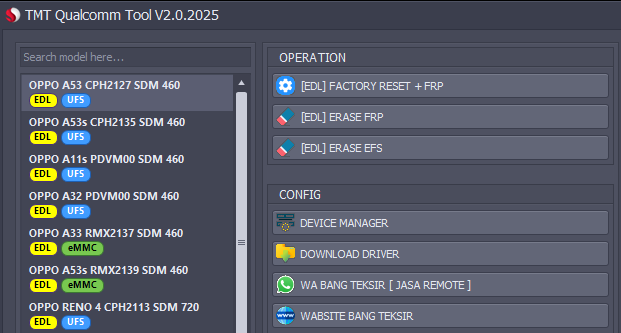
Supported Devices and Compatibility:
Third-party listings associate TMT Qualcomm Tool V2.0 Download with selected models, including OPPO A53, A53s, Reno-series devices, and Realme 6 Pro, 7 Pro, and 8 Pro. These references should be treated as an indicative list rather than a guarantee of compatibility with every regional variant or firmware release.
Before using the tool, verify the complete model number, chipset, storage configuration, Windows compatibility, and any required service authorization. A similar model name does not necessarily mean the same hardware or supported procedure.
System Requirements and Preparation:
For a smoother and safer repair workflow, prepare a Windows computer with sufficient free storage, a reliable USB cable, and the correct device drivers. Keep the computer connected to stable power, close unnecessary phone-management applications, and back up any data that can still be accessed. Check the software package with reputable security tools before opening it.
Download availability does not necessarily mean that the utility is officially maintained, completely free, or safe. One third-party file listing for a TMT Qualcomm Tool package has displayed a malware warning, so do not assume that every copy circulating online is trustworthy.
Safety Tips Before Using TMT Qualcomm Tool:
- Verify the download source and scan the package before installation.
- Confirm that the exact device model is supported.
- Obtain the owner’s authorization before resetting or servicing a phone.
- Avoid unnecessary EFS or other low-level partition operations.
- Never disable security software just to run an unverified executable.
- Use official account-recovery options when a phone requests previously linked Google Account credentials.
Final Words:
TMT Qualcomm Tool V2.0 Download is presented online as a servicing utility for selected Qualcomm-based OPPO and Realme devices, with advertised factory-reset, FRP-related, driver, and EDL functions. However, version details and compatibility claims should be verified before use. Prioritize data protection, trusted software sources, device-owner authorization, and official account recovery whenever a phone is protected by FRP.