 Posted by
GSM RK Tool V1.1 Download – Android Unlocking and FRP Troubleshooting Tool
GSM RK Tool V1.1 Download is a Windows-based Android servicing utility designed for mobile technicians and users who need to diagnose device connection problems, read phone information, and perform selected software maintenance tasks. The tool brings together ADB, Fastboot, firmware-related utilities, and chipset-specific functions in one interface. It is also advertised for certain FRP-related servicing operations on supported Android devices. Compatibility depends on the phone model, chipset, Android version, security patch, and available connection mode, so users should verify the requirements before attempting any repair.
What Is GSM RK Tool V1.1?
GSM RK Tool V1.1 Download is a mobile repair application developed for Windows computers. It provides a graphical interface for selected Android servicing operations, helping technicians work with compatible devices without switching between multiple utilities for every task.
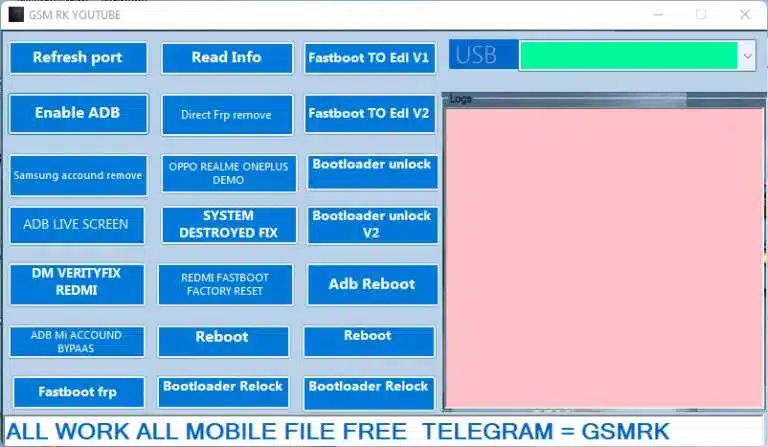
The tool is associated with several Android platforms, including Qualcomm, MediaTek, and Rockchip, along with common ADB and Fastboot functions. Some releases also list device-information reading, reboot controls, firmware troubleshooting, and FRP-related service options.
The availability of these features varies by device and software configuration. GSM RK Tool should not be considered a universal solution for every Android lock, account restriction, or firmware problem.
Key Features of GSM RK Tool V1.1:
1. Device Information Reading
- The GSM RK Tool V1.1 Download can retrieve available information from supported connected devices. This may help technicians identify a phone’s model, chipset, software build, and other information before selecting an appropriate maintenance operation.
2. ADB Functions
- Android Debug Bridge (ADB) provides communication between a computer and a compatible Android device. GSM RK Tool advertises ADB-related functions such as device detection, information reading, and reboot controls.
- ADB functions generally require USB debugging and authorization on the connected phone.
3. Fastboot Utilities
- Fastboot is used for supported bootloader-level maintenance and device-management operations. GSM RK Tool includes advertised Fastboot features for compatible devices, with the available functions depending on the phone and its bootloader configuration.
4. FRP-Related Servicing
- Factory Reset Protection (FRP) helps protect Android devices against unauthorized use after a factory reset. GSM RK Tool V1.1 Download advertises FRP-related functions for selected devices and configurations.
- If you own a phone that requests a previously synchronized Google account, start with Google’s official account-recovery options. For a second-hand device, contact the previous owner when appropriate. Use servicing functions only when you are authorized to manage the device.
5. Qualcomm, MediaTek, and Rockchip Support
- The tool is promoted for selected operations involving Qualcomm, MediaTek, and Rockchip-based devices. These platforms use different drivers, communication modes, and servicing requirements, so the available functions are not interchangeable across all devices.
6. Firmware and Software Troubleshooting
- Selected functions are intended to assist with supported firmware-related maintenance and software troubleshooting. Incorrect firmware or incompatible operations can cause boot failures, instability, or data loss, so verify the exact model and firmware before proceeding.
7. Additional Device Maintenance Options
- Depending on the release, the interface may include reboot controls, device detection, and other maintenance utilities. Check the release-specific documentation to determine which options are available in V1.1.
Supported Devices and Compatibility:
GSM RK Tool V1.1 Download is advertised for selected Android devices from multiple manufacturers. Third-party listings mention brands such as Samsung, Xiaomi, Redmi, Tecno, Infinix, Vivo, Oppo, Realme, and OnePlus, but support differs by model and function.
Before using the tool, check:
- The exact manufacturer and model number.
- The chipset and supported connection mode.
- The Android version and security patch.
- The required USB drivers.
- Whether the intended operation is supported by the installed release.
A device appearing in a general brand list does not guarantee that every function will work on it.
System Requirements:
Before running GSM RK Tool V1.1 Download, prepare a compatible Windows computer and review the package’s requirements.
- Operating system: Windows 7, 8, 10, or 11, subject to release compatibility.
- Architecture: 32-bit or 64-bit Windows, as supported by the package.
- RAM: 4 GB or more is a practical starting point.
- Storage: Sufficient free space for the utility and related files.
- USB drivers: Appropriate Android or chipset drivers may be required.
- Connection: A reliable USB data cable.
- Internet: May be required for selected online functions.
These are general preparation guidelines rather than a guarantee that every release will work on every computer.
How to Prepare and Use GSM RK Tool V1.1?
Step 1: Verify the Download
Obtain the utility from a source you trust. Confirm that the downloaded package is the intended version and scan it with reputable security software before opening it.
Step 2: Extract the Package
If the file is supplied as a compressed archive, extract it using a trusted archive utility. Review the included documentation before launching the program.
Step 3: Install Required Drivers
Install the appropriate USB drivers for the phone and connection mode. Driver requirements may differ between Qualcomm, MediaTek, Rockchip, and standard ADB or Fastboot operations.
Step 4: Connect the Android Device
Use a reliable data cable and select the connection mode required for the intended task. If using ADB, enable USB debugging where available and authorize only a computer you trust.
Step 5: Identify the Device
Use the tool’s supported detection or information-reading functions to confirm the connected phone’s details. Check the model and software configuration before selecting a maintenance option.
Step 6: Choose a Compatible Operation
Review the available functions and select only an operation appropriate for the device and your authorized repair purpose. Avoid changing protected account settings or performing destructive operations without understanding their consequences.
Step 7: Verify the Result
After a supported maintenance operation, check whether the phone starts normally and whether essential functions remain available. Keep backups and relevant device information available for troubleshooting.
Common Problems and Solutions:
Device Not Detected
Check the USB cable, drivers, connection mode, and computer port. Some operations require the phone to be in a specific state before Windows can recognize it.
ADB Connection Error
Confirm that USB debugging is enabled and that the device has authorized the connected computer. If the phone is managed by an organization, debugging may be restricted.
Fastboot Function Not Available
The selected function may not support the phone’s model or bootloader configuration. Check the release documentation and avoid experimenting with unsupported bootloader commands.
Firmware Operation Fails
An incompatible firmware package, missing driver, interrupted USB connection, or unsupported software build can cause an error. Stop and verify compatibility before trying again.
FRP Verification Remains
FRP is an Android security protection, and the available recovery process depends on the device and account status. Use official Google account recovery or contact the previous owner rather than relying on claims of universal unlocking.
Important Safety Tips:
GSM RK Tool V1.1 Download can access functions that affect device software and settings, so use it carefully.
- Back up important information whenever possible.
- Confirm the exact device model before performing maintenance.
- Do not use firmware intended for another model.
- Avoid unverified packages and suspicious modified installers.
- Do not disable antivirus protection simply because a download site recommends it.
- Use the tool only on devices you own or have permission to service.
- Understand that resets and firmware operations can erase data.
Frequently Asked Questions?
Is GSM RK Tool V1.1 free?
Some third-party listings describe V1.1 as a free utility. However, licensing and access requirements should be confirmed for the exact package you obtain.
Does GSM RK Tool support all Android phones?
No. Compatibility depends on the device model, chipset, Android version, security patch, and selected function.
Can GSM RK Tool help with firmware problems?
It advertises selected firmware and software-maintenance functions. Whether a particular problem can be resolved depends on its cause and the device’s compatibility.
Is GSM RK Tool suitable for beginners?
Its graphical interface may make basic device identification easier, but advanced servicing operations require care. Beginners should understand the purpose and risks of an operation before proceeding.
Final Words:
GSM RK Tool V1.1 Download combines several Android servicing functions in a Windows interface, including ADB, Fastboot, device information, chipset-related utilities, and selected firmware troubleshooting options. It may be useful for technicians working with compatible devices, but it does not guarantee that every Android phone or FRP-related issue can be resolved. Verify the software source, check compatibility, and protect important data before using any repair utility.