Fix WhatsApp Tool V2 Latest Version Free Download 2026
Fix WhatsApp Tool V2 Latest Version Free Download
Fix WhatsApp Tool V2 is a Windows-based utility promoted for troubleshooting selected WhatsApp issues on Android devices. It is described as a solution for problems such as messages failing to send after restoring an account, media-related errors, Arabic keyboard issues, and certain installation problems. The tool is particularly associated with troubleshooting on some Huawei devices and selected Android 14 and early Android 15 configurations. However, compatibility depends on the phone, WhatsApp version, Android build, and the specific release of the utility.
What Is Fix WhatsApp Tool V2?
Fix WhatsApp Tool V2 is an unofficial WhatsApp troubleshooting utility distributed through third-party mobile servicing websites and forums. Its published feature list includes application management, backup and recovery options, media repair functions, ADB-related utilities, and installation options for certain Android configurations.
The purpose of this type of utility is to help users investigate software problems without immediately resorting to a factory reset. However, the exact results are not guaranteed, and the tool should not be considered an official WhatsApp product or an approved solution for every account or device issue.
Key Features of Fix WhatsApp Tool V2:
1. WhatsApp Troubleshooting
- Fix WhatsApp Tool V2 is promoted for addressing selected WhatsApp errors, including issues that may occur after restoring an account or reinstalling the application. Such problems can also result from outdated software, incomplete backups, storage restrictions, network problems, or incompatibility between application and Android versions.
2. Backup and Recovery Options
- The published feature list includes backup and recovery-related functions. Before reinstalling WhatsApp or attempting a repair, users should create a verified backup through the application’s supported backup options. Backup availability and restoration results depend on the account, storage location, Android configuration, and backup format.
3. Application Installation and Reinstallation
- Fix WhatsApp Tool V2 is advertised with options to uninstall and reinstall WhatsApp or install certain application versions. Reinstallation can sometimes help with corrupted application files, but uninstalling an app may remove locally stored data. Confirm that important chats and media are backed up before making changes.
4. Media Repair Functions
- Some listings describe functions intended to address WhatsApp media problems, including photos or other files that are not displayed correctly. These functions may be useful for troubleshooting, but they cannot guarantee recovery of deleted, overwritten, or permanently damaged media.
5. Arabic Keyboard Issue Support
- The tool’s published description mentions an attempt to address an Arabic keyboard-related issue. This is a specialized claim rather than a universal feature, so users should check whether the issue matches their device and software configuration before relying on it.
6. ADB-Related Functions
- The utility is also described as including ADB-related operations for connected Android phones. ADB requires suitable drivers, USB debugging where applicable, and authorization from the device. The presence of ADB functions does not guarantee compatibility with every manufacturer or Android version.
7. Support for Selected Android Versions
- Third-party descriptions mention Android 14 and some early Android 15 devices. These claims should be treated as limited compatibility information rather than confirmation of full support across every device running those operating systems. Later Android updates may change application installation, storage access, and security behavior.
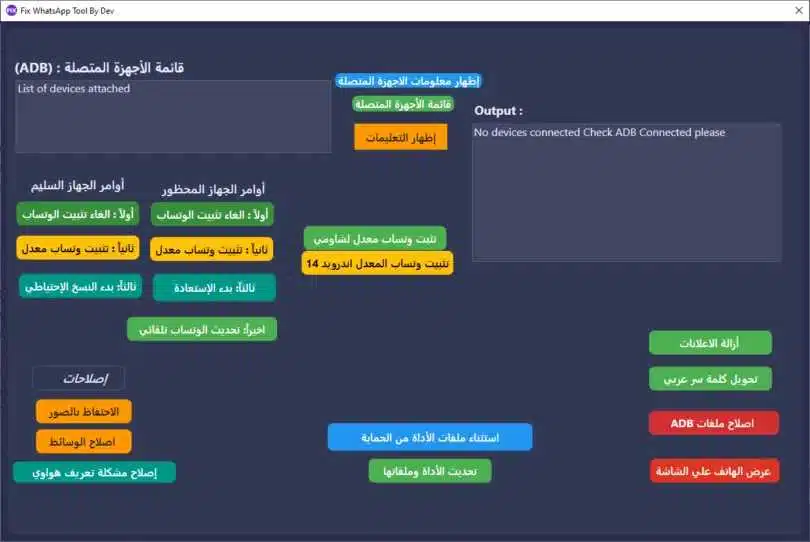
Benefits of Fix WhatsApp Tool V2:
The main advantage of a dedicated troubleshooting utility is convenience. It may bring several repair and application-management options into one interface, potentially reducing the need to use multiple programs for basic diagnostics.
It can also encourage users to investigate a software issue before performing a complete device reset. Nevertheless, the safest first steps are to update the official WhatsApp application, check available storage and network connectivity, restart the phone, and verify the backup status.
System Requirements and Preparation:
Before installing Fix WhatsApp Tool V2, review the requirements for the exact release. The package is described as a Windows utility, and some operations may require a USB cable, appropriate Android drivers, and ADB authorization.
Use a reliable computer, scan the installer with reputable security software, and avoid modified packages from unknown sources. Back up important WhatsApp chats and media before uninstalling applications or changing their installation state.
Is Fix WhatsApp Tool V2 Free and Safe?
The tool is advertised on third-party pages as a free download, but users should verify the licensing terms and authenticity of the installer. Unofficial utilities may be outdated, modified, or bundled with unwanted software. Their advertised features may also differ from the actual behavior of the downloaded version.
Avoid entering WhatsApp verification codes, account passwords, or other sensitive credentials into an unknown program. Be cautious of tools that promise guaranteed account unbanning or ask you to disable security protections.
Important Safety Tips:
- Back up chats and media before attempting a repair or reinstallation.
- Prefer the official WhatsApp application from a trusted app store.
- Verify that the tool supports your specific Android version and device.
- Avoid unofficial modified WhatsApp builds because they can introduce privacy and account-security risks.
- Do not share account verification codes with third-party software providers.
- If your account is banned or restricted, use WhatsApp’s official review and support options.
Final Words:
Fix WhatsApp Tool V2 is presented as an unofficial Windows utility for troubleshooting selected WhatsApp problems on Android devices. Its advertised functions cover application installation, backup and recovery, media-related issues, and ADB-assisted maintenance. Actual results depend on device compatibility and the specific software release. Protect your chats, verify the installer, and use official WhatsApp support for account restrictions or security-related problems.