F3arRa1n Tool Download v5.5.0 iCloud Bypass On iPhone 2026 Updated
F3arRa1n Tool Download v5.5.0 – iCloud Activation Lock and iPhone Servicing Guide
Introduction to F3arRa1n Tool
F3arRa1n Tool Download v5.5.0 is an iOS device servicing utility associated with iPhone and iPad activation troubleshooting, device compatibility checks, and selected activation-related services. It has been discussed in the mobile repair community as a computer-based tool for working with compatible Apple devices.
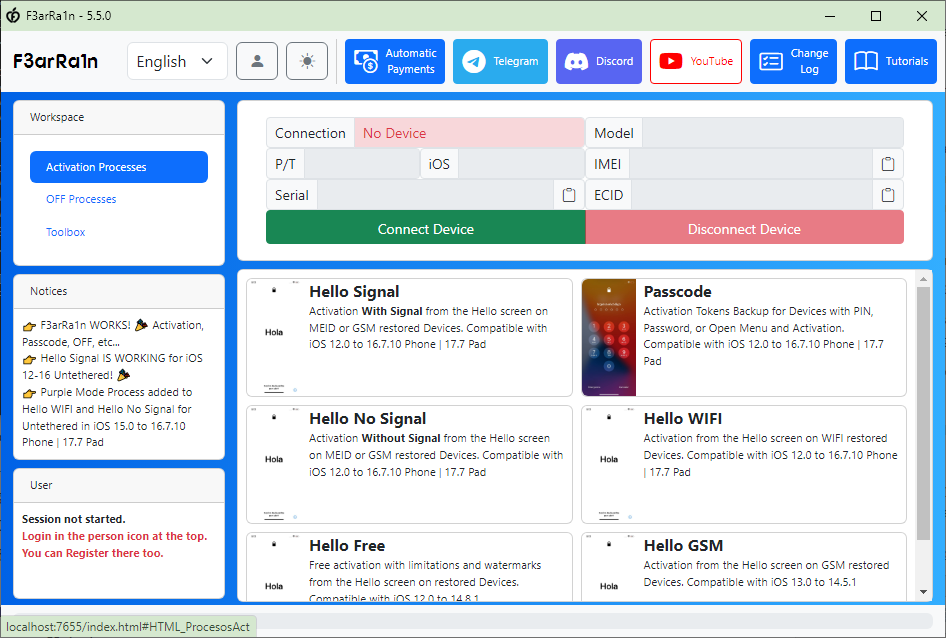
The tool’s published descriptions mention different activation processes for devices displaying the Hello screen, as well as support that varies by iOS version and hardware. Some functions may require a compatible jailbreak, an account, paid service credits, or an internet connection. Because support changes between releases, users should verify the exact version and device compatibility before using the software.
F3arRa1n Tool Download is a third-party utility, not an official Apple application. Its features and results should not be assumed to apply to every iPhone or iPad.
What Is F3arRa1n Tool v5.5.0?
F3arRa1n Tool Download is designed for selected iOS device activation and servicing scenarios. The V5.5.0 release is listed on third-party software pages, while the official F3arRa1n website provides its own installation instructions and newer release information.
Activation Lock is an Apple security feature that helps prevent another person from using a lost or stolen device. It is associated with the owner’s Apple Account and Find My settings. An activation-related error can also arise from connectivity problems, an incomplete restore, or other setup issues, so it is important to identify the actual cause before attempting a repair.
Main Features Associated with F3arRa1n:
1. Activation Compatibility Checks
- F3arRa1n Tool Download provides compatibility-checking functions to help determine whether a particular activation process is available for a connected device. Results can depend on the device model, iOS version, hardware generation, and current service support.
- A compatibility result should not be interpreted as a guarantee that all device features will work afterward.
2. Hello Screen Activation Services
- Published descriptions include activation-related services for compatible devices at the initial Hello setup screen. Available options vary by device and software version.
- If a device is asking for the previous owner’s Apple Account, the recommended solution is to have the owner remove the device from their account or contact Apple Support with valid proof of purchase.
3. Selected iOS Device Support
- F3arRa1n has been associated with different iPhone and iPad generations, but compatibility is release-specific. The V5.5.0 feature claims should not be confused with capabilities introduced in later releases.
- Before installing a version, check its published compatibility list and whether it supports the exact model and iOS build you have.
4. Windows and macOS Availability
- The official F3arRa1n documentation describes installation options for Windows and macOS. Additional requirements, such as Apple device drivers or iTunes components on Windows, may apply depending on the release.
- Always follow the current documentation for your operating system rather than relying on outdated instructions written for an older version.
5. Additional Activation and Diagnostic Options
- Different releases have included additional device processing and diagnostic options. Availability can vary, and certain operations may require account registration or paid credits.
- Review the current feature list and pricing before purchasing a service. Avoid third-party pages that promise universal, permanent, or completely free unlocking without verifiable evidence.
System Requirements and Preparation:
Before installing F3arRa1n Tool Download, confirm the supported operating system and the requirements for your selected release. Prepare a reliable computer, a working USB data cable, and the necessary Apple device support components.
Back up your device whenever possible before performing software maintenance. Keep the phone connected to a reliable power source where appropriate, and do not interrupt an authorized restore or update process.
How to Download F3arRa1n Tool Safely?
The official F3arRa1n website provides installation documentation and release information. Check the version displayed by the official source before downloading, because V5.5.0 may be older than the current release.
Download the installer from a source you can verify, check the publisher and file details, and scan it with reputable security software. Do not assume that a third-party archive is safe simply because it carries the correct version name.
If antivirus software flags an installer, do not automatically disable protection or restore the file from quarantine. Verify the alert with the software publisher and your security provider before proceeding.
Important Limitations and Security Notes:
F3arRa1n’s advertised capabilities may vary by device, iOS version, activation state, and service availability. Some activation processes may have limitations involving cellular connectivity, updates, or other functions. Read the release documentation carefully before relying on any advertised result.
Activation Lock is intended to protect device ownership. Use servicing tools only on devices you own or have explicit permission to repair. For a device linked to someone else’s Apple Account, ask the previous owner to remove it properly or contact Apple Support with proof of ownership.
Final Words:
F3arRa1n Tool Download v5.5.0 is a third-party iOS servicing utility associated with activation troubleshooting and selected iPhone and iPad activation services. Its compatibility and available features depend on the specific release and device configuration.
Before downloading, compare the version with the official release information, check compatibility, and review any licensing requirements. For genuine Activation Lock issues, Apple’s official account recovery and support options remain the safest route.