BigBroActivator Auto FMI OFF Tool Unlock All Devices Download For Windows 2026 Updated
BigBroActivator Auto FMI OFF Tool – iPhone and iPad Servicing Utility
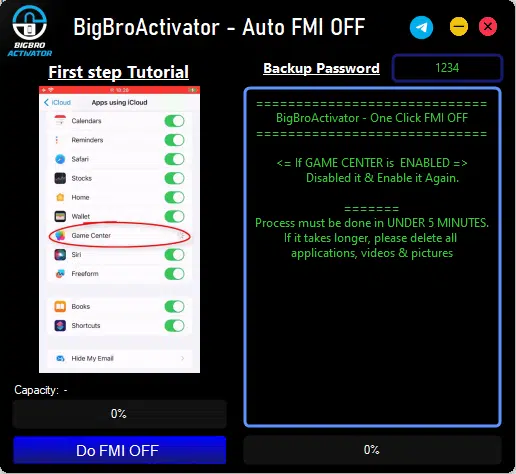
BigBroActivator Auto FMI OFF Tool is a third-party utility associated with Find My iPhone (FMI) status management and selected open-menu iOS servicing operations. It is promoted for use with compatible iPhones and iPads, particularly devices that can access the Home Screen. The advertised feature set includes automatic backup-related functions and other iOS maintenance options. Actual functionality depends on the device model, iOS version, security configuration, and tool release.
What Is BigBroActivator Auto FMI OFF Tool?
BigBroActivator Auto FMI OFF Tool is an iOS servicing utility associated with the broader BigBroActivator All in One Tool. FMI stands for Find My iPhone, Apple’s feature for locating and protecting an Apple device. Third-party descriptions advertise an automatic FMI OFF option for certain open-menu devices, alongside additional diagnostic and maintenance functions.
It is important to understand that Find My status, iCloud account access, and Activation Lock are related but distinct concepts. A tool advertised for open-menu servicing should not be assumed to remove every account restriction or permanently unlock every iPhone. Compatibility claims should be verified before any servicing operation.
Key Features of BigBroActivator Auto FMI OFF Tool
Automatic FMI OFF Function
- BigBroActivator Auto FMI OFF Tool published feature list includes an open-menu FMI OFF option with an automatic backup-related feature. Its advertised purpose is to assist with Find My-related servicing on selected compatible devices. The exact behavior and availability of this function should be confirmed for the particular model and software version.
Open-Menu Device Support
- The utility is promoted for iPhones and iPads that can access the Home Screen. This device state differs from an iPhone stuck on the initial Hello screen and requesting the previous owner’s Apple Account during activation. Identifying the actual device condition is essential before choosing a repair method.
Automatic Backup-Related Functions
- Third-party feature descriptions mention automatic backup support alongside FMI-related operations. Backup availability and behavior may differ between releases and devices. Users should make a separate, verified backup of important information whenever possible rather than relying exclusively on an advertised automated process.
iOS Device Detection
- The broader BigBroActivator tool is advertised with recovery-mode detection for selected Apple devices. Device detection can help technicians identify a connection state before performing supported maintenance operations. Successful communication may depend on the computer, USB connection, required drivers, device generation, and software version.
Additional iOS Servicing Options
- The wider BigBroActivator feature set also mentions selected ramdisk, jailbreak-related, recovery, and device-management functions. These are separate capabilities and should not be assumed to be included in every edition or release of the Auto FMI OFF utility.
Compatibility Considerations
- Third-party descriptions of BigBroActivator mention a range of older and newer iOS versions. These claims do not establish universal support, and a function that works with one device may fail on another. Always check the exact model, iOS version, and release documentation before relying on a feature.
System Requirements and Preparation:
BigBroActivator is presented in third-party listings as a Windows-based utility. The exact requirements for the Auto FMI OFF edition may vary, so verify the package documentation before installation.
Before using any iOS servicing software:
- Confirm the exact iPhone or iPad model and installed iOS version.
- Back up important data whenever possible.
- Use a reliable USB data cable and compatible computer.
- Download software only from a source you can reasonably verify.
- Scan downloaded files with reputable security software.
- Avoid sharing Apple Account credentials or verification codes with unknown providers.
- Understand the possible effects on data, account access, and future device updates.
Benefits for Mobile Repair Technicians:
A dedicated iOS servicing utility can provide a central interface for supported diagnostic and maintenance operations. For technicians who handle compatible open-menu devices, the advertised automatic backup-related and FMI servicing functions may be relevant to their workflow.
However, the practical value depends on the tool’s reliability, the exact device configuration, and the availability of supported functions. Promotional claims such as universal compatibility or guaranteed results should not be treated as verified technical specifications.
Important Limitations and Safety Considerations:
BigBroActivator Auto FMI OFF Tool should not be considered a guaranteed solution for every iCloud or Activation Lock issue. Apple’s security protections are designed to prevent unauthorized use of lost or stolen devices, and third-party utilities cannot be assumed to remove those protections reliably.
If you own the device and need to turn off Find My, use the normal settings and authenticate with the associated Apple Account. If you have forgotten your credentials, use Apple’s official account-recovery process. If you bought the device second-hand, ask the previous owner to remove it from their account. Apple Support may also review eligible Activation Lock requests with valid proof of purchase.
Be cautious of unofficial installers, requests to disable antivirus protection, or claims that every model can be unlocked with one click. Unverified software may put your computer or personal information at risk.
Final Words:
BigBroActivator Auto FMI OFF Tool is a third-party iOS servicing utility advertised for selected open-menu Find My-related operations and automatic backup-related functionality. Its suitability depends on the iPhone or iPad model, iOS version, and the capabilities of the specific release.
Before considering the tool, verify its source and compatibility, protect your data, and ensure you have authorization to service the device. For account and Activation Lock problems, Apple’s official recovery and owner-removal options remain the recommended starting points.