BigBroActivator All in One Tool Latest Version 2026
BigBroActivator All in One Tool – iOS Jailbreak, Device Repair and Activation Utility
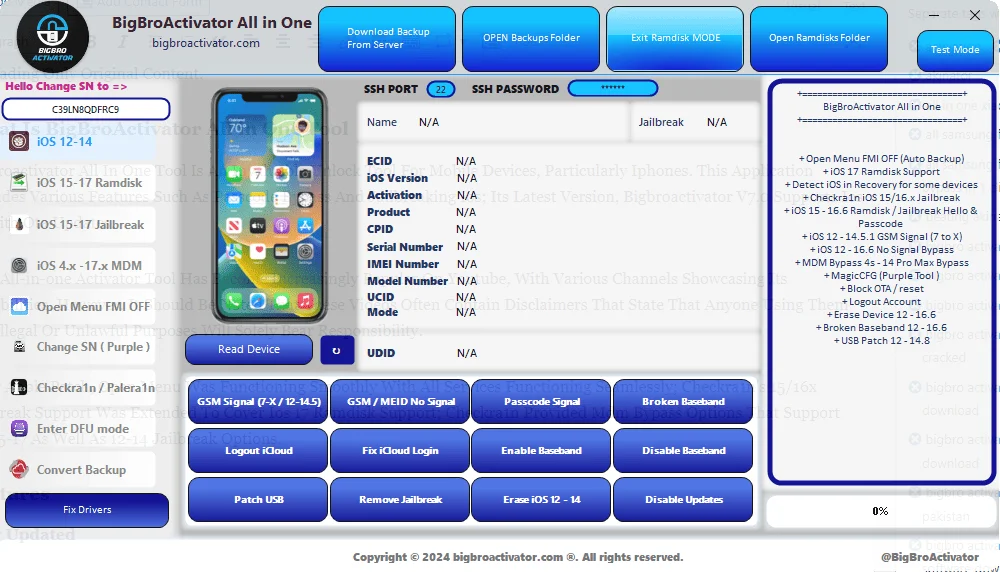
BigBroActivator All in One Tool is a Windows-based utility designed for selected iPhone and iPad servicing tasks. It is associated with iOS jailbreak workflows, device diagnostics, recovery-mode detection, ramdisk operations, and certain account or device-management troubleshooting functions. Third-party descriptions advertise support for several iOS versions, including selected devices running iOS 12 through iOS 17. However, the actual capabilities depend on the device model, processor, iOS version, security patch, and the particular tool release.
What Is BigBroActivator All in One Tool?
BigBroActivator is an all-in-one iOS servicing application promoted for technicians and experienced users who work with compatible Apple devices. Its advertised functions combine several types of operations in one interface, reducing the need to switch between separate utilities for every supported task.
The tool is associated with Checkra1n-related workflows, ramdisk functions, device recovery detection, and selected open-menu or device-management servicing options. These features should not be interpreted as guaranteed support for every iPhone or iPad. Compatibility claims found on third-party download pages should be verified before attempting a repair.
Key Features of BigBroActivator All in One Tool
iOS Device Detection
- Third-party descriptions list the ability to detect certain iOS devices while they are in recovery mode. This can help technicians identify the device’s connection state before performing compatible maintenance or recovery operations.
- Successful detection may depend on the correct USB drivers, a working cable, the device model, and the installed software version.
Checkra1n-Related Support
- BigBroActivator is advertised with Checkra1n-related jailbreak functionality for selected compatible devices and iOS versions. Jailbreaking changes aspects of the operating system’s security model and can affect device stability, app compatibility, and future updates.
- Users should understand these risks and confirm that any intended operation is supported by reliable documentation before proceeding.
Ramdisk Operations
- The tool’s published feature lists mention ramdisk-related workflows for selected iPhones and iPads. A ramdisk environment can provide a specialized operating environment for certain diagnostic or servicing tasks.
- Support varies by hardware generation and software version. A feature advertised for one device family may not work on another, even if the iOS versions are similar.
Open-Menu Device Servicing
- BigBroActivator is also promoted for selected open-menu account-related servicing tasks. An open-menu device is generally one that can reach its Home Screen, even though an account-related restriction may remain in its settings.
- This is different from a device that is locked at the initial Hello screen by Activation Lock. The appropriate solution depends on the actual device state and ownership. For a device you own, use Apple’s official account-recovery options or ask the previous owner to remove the device from their account.
Device Management (MDM) Support
- Third-party descriptions advertise certain MDM-related functions. Mobile Device Management is used by organizations to configure and control company- or school-owned devices. Any management changes should be authorized by the organization responsible for the device.
- If a device was previously enrolled by an employer, school, or other organization, contact its IT administrator to have the device released properly.
Recovery and Device Maintenance
- The advertised feature set includes selected recovery, erase, and device-maintenance options. These may help technicians address certain software issues on supported devices, but erase operations can delete personal information.
- Always make a backup when possible and confirm that you have the required account credentials before restoring or resetting an iPhone or iPad.
Selected iOS Version Compatibility
- Online descriptions mention support for selected versions within the iOS 12–17 range. These are third-party compatibility claims and do not confirm that every feature works across that entire range. Hardware revisions, operating-system updates, and changes to Apple’s security systems can affect functionality.
- Check the exact iPhone or iPad model and installed iOS version before relying on a particular feature.
System Requirements and Preparation:
BigBroActivator is presented as a Windows utility in third-party listings. The precise requirements depend on the release and the operation being performed.
Before using the application, prepare the following where required:
- A compatible Windows computer.
- A reliable USB data cable.
- Appropriate Apple device drivers and connectivity components.
- Sufficient battery charge on the iPhone or iPad.
- A backup of important information, whenever possible.
- Verified compatibility information for the specific device and operation.
Download software only from sources you can reasonably verify. Scan installers with reputable security software, avoid modified or suspicious packages, and never share your Apple Account password or verification codes with an unknown service provider.
Benefits of BigBroActivator All in One Tool:
The main advertised benefit is its combined interface for selected iOS diagnostics and servicing functions. Experienced technicians may find it convenient to have device detection, recovery-related options, and supported maintenance features available in one application.
Its practical usefulness depends on actual device compatibility, the reliability of the software package, and whether the required function remains supported. A broad feature list alone is not proof that a particular operation will succeed.
Limitations and Safety Considerations:
BigBroActivator should not be considered a universal iCloud unlocking or Activation Lock removal solution. Apple’s account and activation protections are designed to protect devices and personal information. Third-party tools cannot be assumed to remove these restrictions reliably or permanently.
Jailbreaking and unofficial device modifications can introduce security risks, cause instability, and complicate software updates. Some operations may also erase data or affect device functionality. Always confirm the purpose of a function before using it.
For Activation Lock on a device you own, recover the associated Apple Account or contact Apple Support with valid proof of purchase. If you purchased the device second-hand, ask the previous owner to remove it from their account. For organization-managed devices, contact the responsible administrator.
Final Words:
BigBroActivator All in One Tool is a third-party iOS servicing utility associated with jailbreak-related workflows, ramdisk operations, recovery detection, and selected device-maintenance functions. It may be relevant to technicians working with compatible iPhones and iPads, but its advertised capabilities vary by device, iOS version, and release.
Before proceeding, verify compatibility, protect personal data, use a trustworthy software source, and make sure all servicing is authorized. Careful preparation helps reduce the risk of data loss, device problems, and security issues.