 Posted by
ZeroKnox Removal Tool V2.4 – Samsung FRP & Knox Security Bypass Solution
ZeroKnox Removal Tool V2.4 Download is a Samsung-focused mobile servicing utility designed to provide selected device information, firmware management, connection, and troubleshooting functions through a Windows-based interface. The tool is associated with MTP and ADB communication, firmware flashing, reboot options, and certain FRP-related servicing functions for compatible Samsung devices. According to the developer’s release information, ZeroKnox Removal 2.4 added an FRP-related function for Android 16 and included bug fixes. However, support depends on the device model, Android version, security patch, and connection mode. Users should verify compatibility and use the software only on devices they own or are authorized to service.
What Is ZeroKnox Removal Tool V2.4?
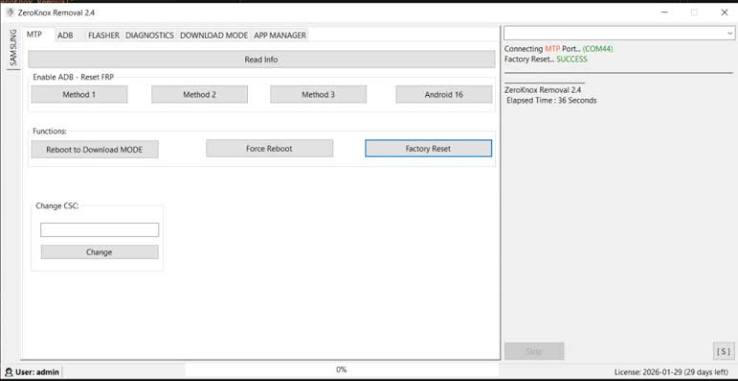
ZeroKnox Removal Tool V2.4 Download is a mobile servicing application associated with Samsung phone diagnostics, firmware operations, and selected software maintenance tasks. Its interface organizes available functions into sections such as MTP, ADB, Flasher, and Download Mode.
The tool is designed to give technicians access to supported functions without switching between multiple separate applications. Depending on the connected device, users may be able to read device information, manage supported firmware files, restart a phone into a particular mode, or perform selected troubleshooting operations.
The official ZeroKnox website identifies version 2.4 as a release that added an FRP-related option for Android 16 and fixed certain bugs. This does not mean that all Android 16 Samsung devices or security patch levels are supported. <Cite refs={[“turn430999search0″,”turn430999search2”]}/>
Key Features of ZeroKnox Removal Tool V2.4:
1. MTP Connection Functions
- MTP is commonly used by Android devices to communicate with a computer for file transfer and certain supported servicing operations. ZeroKnox Removal Tool V2.4 Download advertises MTP-based device information and maintenance options.
- Available functions depend on the phone’s connection state, firmware, and security configuration.
2. ADB Connectivity
- Android Debug Bridge is a diagnostic interface that allows an authorized computer to communicate with an Android device. ZeroKnox includes an ADB section for supported operations, including device information and selected maintenance functions.
- ADB access may require USB debugging and computer authorization. It should not be assumed to work when a phone is locked or has not authorized the connected computer.
3. Firmware Flashing
- The Flasher section is advertised with options for supported Samsung firmware packages and components, including BL, AP, CP, CSC, and USERDATA files.
- Firmware operations can help with certain software recovery tasks, but using the wrong firmware or selecting incompatible options may cause data loss or boot problems. Always verify the exact device model and firmware package before proceeding.
4. Reboot and Download Mode Options
- The ZeroKnox Removal Tool V2.4 Download provides options intended to restart compatible devices or enter Download Mode. These can be useful during authorized diagnostics and firmware recovery when the phone supports the requested operation.
- The available options depend on the device’s state and software version.
5. Device Diagnostics
- ZeroKnox Removal Tool V2.4 Download also advertises device information and diagnostic functions. Such tools can help technicians inspect available system details and check whether a connected phone is communicating properly with the computer.
- Diagnostic information should be treated as a starting point rather than a complete assessment of hardware health.
6. Android 16 Compatibility Claims
- The developer’s version 2.4 release announcement specifically mentions an FRP-related feature for Android 16. Its published support information also places limits on the Android versions and security patch levels supported by particular functions.
- Check the developer’s current compatibility information before relying on any Android 16 feature. Support for one security patch does not establish compatibility with every later update. <Cite refs={[“turn430999search0″,”turn430999search2”]}/>
Understanding Samsung FRP and Knox Security:
Factory Reset Protection (FRP) is an Android security feature that helps prevent unauthorized use of a device after a factory reset. Depending on the phone’s configuration, setup may require a Google account previously synchronized with the device.
Samsung Knox is a broader security platform that includes device protection and enterprise security features. Knox Guard can also be used by authorized organizations to manage device restrictions related to fraud prevention, theft protection, or financing arrangements.
These systems serve different purposes. A third-party servicing utility should not be treated as a guaranteed way to remove every FRP, Knox Guard, or organization-management restriction. Samsung documents Knox Guard as an authorized management service with account, licensing, and device-enrollment requirements. <Cite refs={[“turn430999search3″,”turn430999search9”]}/>
System Requirements:
Before installing ZeroKnox Removal Tool V2.4 Download, prepare the following:
- A Windows computer compatible with the application.
- A reliable USB data cable.
- Appropriate Samsung USB drivers.
- A compatible Samsung smartphone or tablet.
- The correct firmware package if performing an authorized firmware repair.
- Sufficient disk space for the application and related files.
- A verified installer from a trusted source.
Additional activation or connection requirements may apply to specific features. Check the developer’s documentation for the exact release before installation.
How to Prepare ZeroKnox for Authorized Servicing?
- Identify the Samsung phone’s exact model number and firmware version.
- Check whether the required function is supported by that version of ZeroKnox.
- Back up important information whenever possible.
- Obtain the application from a source you can verify.
- Install the required drivers and confirm that Windows detects the phone.
- Review the instructions for the intended diagnostic or firmware task.
- Proceed only when the operation is appropriate for the device and you have authorization to perform it.
Avoid experimenting with firmware components or partition options. An incorrect operation can erase data or leave the device unable to boot.
Common Problems and Troubleshooting:
The Phone Is Not Detected
Check the USB cable, port, driver installation, and available connection mode. If the selected function requires ADB, confirm that the phone and computer have completed the necessary authorization.
The FRP Function Does Not Work
Compatibility may depend on the exact model, Android version, and security patch. For a device you own, use Google’s official account recovery process if you cannot complete account verification.
Firmware Flashing Fails
Verify the firmware variant, model number, and selected components. Do not repeat failed operations using random firmware packages, because this can make recovery more difficult.
Knox Guard or Organization Restrictions Remain
If the phone is managed by an organization, carrier, or financing provider, contact the responsible administrator or provider to resolve the restriction. Samsung Knox Guard is designed for authorized device management, and its status may require action by the organization that enrolled the phone. <Cite refs={[“turn430999search3”]}/>
The Application Is Flagged by Security Software
Verify the publisher and installer source before proceeding. Avoid modified packages or instructions that require disabling security protections without a clear, verifiable reason.
Safety Tips Before Downloading:
Use a trusted source and scan the installer with reputable security software. Do not provide your Google or Samsung account password to an unknown third-party application.
Before performing any factory reset or firmware operation, understand that personal data may be erased. For locked, lost, second-hand, or organization-managed devices, use official account recovery and authorized service channels.
Final Words:
ZeroKnox Removal Tool V2.4 Download is a Samsung servicing utility with advertised MTP, ADB, firmware flashing, reboot, and diagnostic functions. Its developer’s release information mentions an Android 16 FRP-related addition and bug fixes, but compatibility remains dependent on the specific device and security patch. Verify the exact requirements before installing the tool, protect important data, and use official recovery or authorized management procedures for FRP and Knox-related restrictions.