Vip Pro Support Tool V2.6 Latest Version Free Download 2026
VIP Pro Support Tool V2.6 Latest Version Free Download
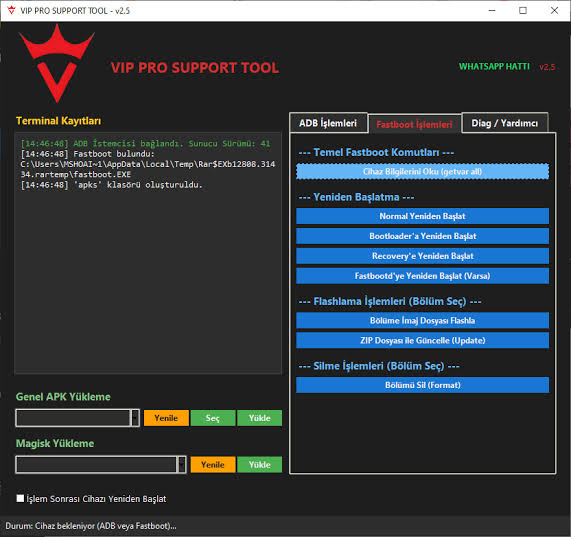
VIP Pro Support Tool V2.6 is a Windows-based Android servicing utility designed for mobile technicians and advanced users who need a convenient interface for ADB, Fastboot, device information, and software maintenance tasks. The tool is reported to support a wide range of Android brands and provides different connection and reboot options for supported devices.
What Is VIP Pro Support Tool V2.6?
VIP Pro Support Tool is an all-in-one Android service utility that brings several common device-management functions into a single Windows application. It can be useful for reading device information, managing ADB connections, accessing Fastboot-related functions, rebooting supported phones into different modes, and performing other authorized maintenance operations.
The tool is aimed mainly at GSM technicians, repair shops, and advanced Android users who regularly work with smartphones from different manufacturers.
Key Features of VIP Pro Support Tool V2.6:
ADB Functions
- VIP Pro Support Tool includes ADB-related features for communicating with compatible Android devices. ADB can be useful for diagnostics, application management, device information, and other authorized maintenance operations.
Fastboot Functions
- Fastboot support allows technicians to work with compatible devices that use the Fastboot environment. It can be useful for firmware maintenance, recovery-related servicing, and other supported device-management operations.
Device Information
- The tool provides information-reading functions that can help identify a connected smartphone before servicing. Device information is especially useful when determining the correct firmware, connection mode, and maintenance procedure.
Multiple Reboot Modes
- VIP Pro Support Tool provides convenient reboot options for supported Android devices, including Recovery, Download, Fastboot, EDL, and normal system modes.
- These options can save time for technicians who frequently need to move a device between different service environments.
Cross-Brand Support
- Public descriptions mention support for brands and platforms including Samsung, Xiaomi, Huawei, Vivo, HTC, and other Android manufacturers. Actual functionality can vary according to the phone model, Android version, chipset, and security patch.
APK Management
- The tool also includes APK-related functions for supported devices. This can help technicians manage applications during authorized troubleshooting and device maintenance.
Diagnostic Functions
- VIP Pro Support Tool includes diagnostic and servicing options designed to help technicians identify connection problems and manage supported Android devices from a single interface.
Supported Android Devices:
VIP Pro Support Tool is designed for multiple Android manufacturers rather than a single brand. Public documentation lists Samsung, Xiaomi, Huawei, Vivo, HTC, OnePlus, Motorola, Google Pixel, Realme, OPPO, and several other Android brands among its supported ecosystem.
However, compatibility should always be checked for the exact device. A feature that works on one model may not work on another model from the same manufacturer.
VIP Pro Support Tool for Samsung:
Samsung devices can benefit from the tool’s ADB, Download Mode, device information, and other supported servicing functions. Technicians should verify the exact Samsung model, Android version, firmware build, and security level before performing any advanced operation.
Security-related functions should only be used on devices that the technician owns or is authorized to service.
VIP Pro Support Tool for Xiaomi:
Xiaomi, Redmi, and POCO devices can use supported ADB and Fastboot functions. These modes are commonly useful for diagnostics and authorized firmware maintenance.
Because Xiaomi devices can have different bootloader and security requirements, compatibility should be checked before attempting advanced servicing.
VIP Pro Support Tool for Other Android Brands:
The tool is also described as supporting various devices from OnePlus, Motorola, Lenovo, Google Pixel, Realme, OPPO, Vivo, Huawei, HTC, and other manufacturers.
The available functions can differ considerably depending on the manufacturer and device generation.
Windows Compatibility:
VIP Pro Support Tool is designed for Windows computers. Public information lists compatibility with Windows 7, Windows 8, Windows 10, and Windows 11, with appropriate Android USB drivers recommended for device communication.
A stable USB connection and correct drivers are important for reliable communication between the phone and computer.
Benefits for Mobile Technicians:
VIP Pro Support Tool V2.6 can be useful in a repair-shop environment because it combines several commonly needed Android functions in one interface.
Some notable advantages include:
- ADB device management
- Fastboot support
- Device information reading
- Multiple reboot modes
- Cross-brand Android support
- APK management
- Diagnostic functions
- Convenient Windows interface
- Useful functions for professional servicing
Common Troubleshooting:
Device Not Detected
If the phone is not detected, check the USB cable, USB port, Android drivers, and connection mode. Restarting the device and Windows computer can also resolve temporary communication problems.
ADB Connection Problem
ADB communication generally requires the appropriate driver and, where applicable, USB debugging authorization on the device. If the connection fails, verify the driver installation and device authorization.
Fastboot Connection Problem
Make sure the phone is actually in Fastboot mode and that the appropriate drivers are installed. A different USB port or cable may also help resolve connection problems.
Feature Not Supported
Not every feature works on every Android device. Differences in chipset, Android version, firmware, bootloader configuration, and security patch can affect functionality.
Safety Precautions:
Advanced Android servicing can result in data loss or software problems if performed incorrectly. Always verify the device model and firmware information before making system-level changes.
Important precautions include:
- Back up important data whenever possible.
- Use compatible firmware and drivers.
- Keep the USB connection stable.
- Avoid interrupting active firmware operations.
- Verify device compatibility before using advanced functions.
- Only service devices you own or are authorized to repair.
Security protections such as Factory Reset Protection should not be circumvented on devices without proper authorization.
Final Words
VIP Pro Support Tool V2.6 is a versatile Windows Android servicing utility that combines ADB, Fastboot, device information, reboot modes, APK management, and other maintenance features in one interface. Public sources describe support for multiple Android brands, making it potentially useful for technicians who work with different smartphones.
As with any Android servicing software, compatibility depends on the individual device, firmware, Android version, chipset, and security level. For reliable results, technicians should verify compatibility and use the tool only for authorized repair and maintenance work.