UIT IT-Admin Fix Tool V1 Fix Android Issues Download Latest Version 2026
UIT IT-Admin Fix Tool V1 Fix Android Issues Free Download
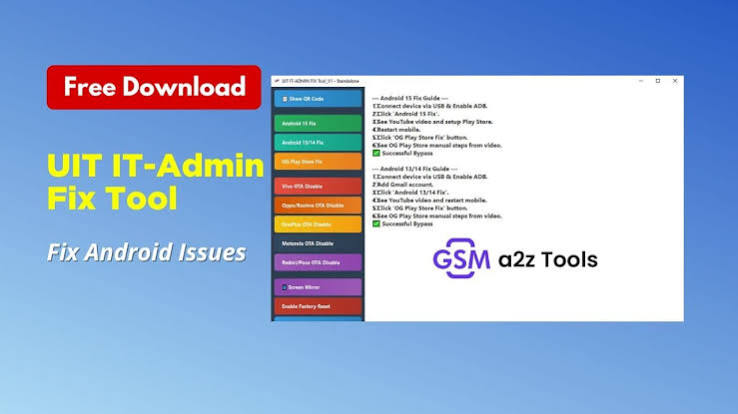
UIT IT-Admin Fix Tool V1 is a Windows-based Android servicing utility designed to help mobile repair technicians and advanced users handle a range of software-related device issues. Available information about the tool describes functions for Android 13, Android 14, and Android 15 devices, along with options related to Play Store repair, OTA management, screen mirroring, factory-reset functionality, and IT-admin or MDM-related servicing.
What Is UIT IT-Admin Fix Tool V1?
UIT IT-Admin Fix Tool V1 is presented as a compact Android repair suite for GSM technicians. Its purpose is to bring several device-maintenance functions into one Windows application instead of requiring a separate utility for every basic software task. Published feature information includes Android 13/14 fixes, Android 15 support, Play Store restoration, OTA disabling for selected brands, screen mirroring, and factory-reset-related functions.
The tool can therefore be useful in repair-shop environments where technicians regularly troubleshoot Android phones affected by software restrictions, configuration problems, update-related issues, or other supported maintenance scenarios.
UIT IT-Admin Fix Tool V1 Features:
Android 13, 14 and 15 Support
- One of the notable features associated with UIT IT-Admin Fix Tool V1 is support for newer Android versions. Published descriptions specifically mention Android 13/14 and Android 15-related repair functions. Actual compatibility can vary according to the phone model, security patch, Android build, and supported servicing method.
Play Store Fix
- The tool includes an option described as an original or OG Play Store fix/restore function. This can be useful when the Play Store is unavailable or experiencing software-related configuration problems on a supported device.
OTA Disable Functions
- UIT IT-Admin Fix Tool V1 is also reported to include OTA disabling functions for selected brands and device families. Listed examples include Vivo, Oppo, Realme, OnePlus, Motorola, Redmi, and Poco. Support should always be confirmed for the specific model before performing a system modification.
Screen Mirroring
- Another useful feature is screen mirroring. The published feature list identifies a screen-mirroring option, allowing technicians to view the device screen from the computer during supported servicing workflows.
Factory Reset Function
- The tool also includes an option described as enabling factory reset functionality. Factory reset operations can erase user information, so technicians should make sure important data is backed up whenever possible and that they have authorization to service the device.
Built-In Guides and Progress Information
- Published descriptions also mention built-in video guides as well as real-time progress and logs. These features can make it easier for technicians to understand the current operation and identify problems when a supported procedure does not complete successfully.
Why Use UIT IT-Admin Fix Tool V1?
Android repair can involve several different software problems, and technicians often need multiple utilities to diagnose or correct them. UIT IT-Admin Fix Tool V1 is designed around several common maintenance tasks in one interface.
For repair technicians, having a centralized utility can simplify the workflow when working with supported devices. Instead of moving between multiple applications for basic configuration and maintenance operations, the technician can use the relevant functions available in the tool.
The application can be particularly useful for technicians who frequently handle Android devices affected by administrative restrictions, OTA configuration problems, Play Store issues, or other supported software conditions.
Android Repair and IT-Admin Functions:
IT-admin restrictions are commonly associated with managed devices that are controlled by an organization or enterprise. A repair technician may encounter such restrictions when servicing a phone that has previously been enrolled in an administrative management system.
UIT IT-Admin Fix Tool V1 is marketed toward this type of servicing environment, with published descriptions referring to IT-admin and MDM-related functions. These capabilities should only be used on devices that the technician owns or has explicit authorization to service.
Preparing Your Windows PC:
Before using UIT IT-Admin Fix Tool V1, it is important to prepare the Windows computer correctly. The required Android USB drivers should be installed and functioning properly so that the computer can communicate with the smartphone.
A stable USB cable and reliable USB port should also be used. Poor-quality cables, loose connections, and unstable USB hubs can cause communication failures during servicing.
It is also recommended to close unnecessary phone-management applications that may interfere with USB communication.
Preparing the Android Device:
Before starting any repair operation, identify the exact smartphone model and software version. Android devices with similar names can have different hardware variants, firmware configurations, or security implementations.
The phone should have sufficient battery power, and important personal data should be backed up whenever possible. Some repair operations, particularly factory-reset-related procedures, can erase user data.
Technicians should also confirm that they have authorization to modify the device before beginning any servicing operation.
How to Install UIT IT-Admin Fix Tool V1?
The installation process described for the tool generally involves extracting the downloaded package, opening the tool folder, and running the included setup application. The published installation instructions then describe proceeding through the Windows installer until the software is installed.
After installation, the application can be opened from the desktop or installation directory. Running a servicing application with the appropriate Windows permissions may be necessary for functions that require access to connected Android devices.
How to Use UIT IT-Admin Fix Tool V1?
The exact workflow depends on the operation and device being serviced. In general, technicians should first connect the Android phone to the prepared Windows computer using a reliable USB cable.
The required device mode should then be selected according to the instructions for the particular operation. Once the device is detected, the technician can select the appropriate supported function.
Before confirming an operation, carefully review the selected device and function. Avoid disconnecting the phone while an active operation is in progress.
Common Android Issues It Can Help Address:
Depending on device compatibility, UIT IT-Admin Fix Tool V1 can be relevant to several software-maintenance scenarios, including:
- Android software configuration issues
- Play Store-related problems
- OTA update management
- Supported IT-admin or MDM servicing
- Factory-reset-related maintenance
- Screen-mirroring requirements
- Android 13/14 servicing
- Android 15 servicing
- General GSM technician workflows
The availability of each feature depends on the phone model and software environment.
Supported Brands and OTA Management:
Published feature information specifically mentions OTA-related functions for Vivo, Oppo, Realme, OnePlus, Motorola, Redmi, and Poco. This does not necessarily mean that every model from these brands is supported. Compatibility can change based on Android version, security patch, chipset, and device configuration.
For this reason, technicians should verify model-specific compatibility before applying any OTA-related operation.
Advantages of UIT IT-Admin Fix Tool V1:
One advantage of the tool is its focus on multiple Android maintenance functions within a single application. Its feature set combines repair-oriented functions with configuration and diagnostic conveniences such as screen mirroring and progress information.
The tool is also aimed at GSM technicians, making it relevant to professional repair environments where Android software problems are handled regularly.
Another advantage is that the published feature list covers several recent Android versions, including Android 13, Android 14, and Android 15.
Troubleshooting Connection Problems:
If the tool does not detect the connected smartphone, check the USB cable and USB port first. Try another cable or direct USB connection if necessary.
Next, verify that the appropriate Android drivers are installed. Windows Device Manager can help determine whether the phone is being recognized correctly.
The device may also need to be placed in a specific supported mode. A phone connected in its normal operating mode may not be detected for a procedure requiring another service mode.
Troubleshooting Failed Operations:
If an operation fails, do not repeatedly run the same procedure without identifying the cause. Check the exact error message and confirm that the device model and Android version are supported.
Firmware, security patches, drivers, USB communication, and device configuration can all affect servicing results. If a particular function is unavailable, it may simply not be supported for that device.
Safety and Responsible Use:
Android servicing tools can make changes to system settings and device configuration. Some operations may also erase user data. For this reason, users should always maintain backups when possible and carefully review the operation before confirming it.
IT-admin and MDM-related features should only be used for legitimate servicing of devices that the user owns or has permission to manage. These tools should not be used to gain unauthorized access to managed devices or bypass organizational security without authorization.
UIT IT-Admin Fix Tool V1 for GSM Technicians:
For GSM technicians, UIT IT-Admin Fix Tool V1 can serve as a specialized Android maintenance utility. Its combination of Android repair functions, Play Store-related fixes, OTA management, screen mirroring, and factory-reset functionality makes it relevant to various service-shop workflows.
Technicians should still maintain other appropriate manufacturer and diagnostic tools because no single utility supports every Android smartphone or every security configuration.
Final Words:
UIT IT-Admin Fix Tool V1 is a Windows-based Android servicing utility aimed primarily at GSM technicians and advanced users. Its published feature set includes Android 13/14 and Android 15 servicing, Play Store restoration, OTA management for selected brands, screen mirroring, factory-reset functionality, and IT-admin/MDM-related repair capabilities.
The tool can be a useful addition to an Android repair toolkit when used with compatible devices. Before performing any operation, users should verify device compatibility, install the necessary drivers, maintain a stable USB connection, back up important information, and ensure that they are authorized to service the device.