UIT IT-Admin Fix Tool V1 Fix Android Issues Free Download For Windows 2026
UIT IT-Admin Fix Tool V1 Free Download – Android Troubleshooting Utility
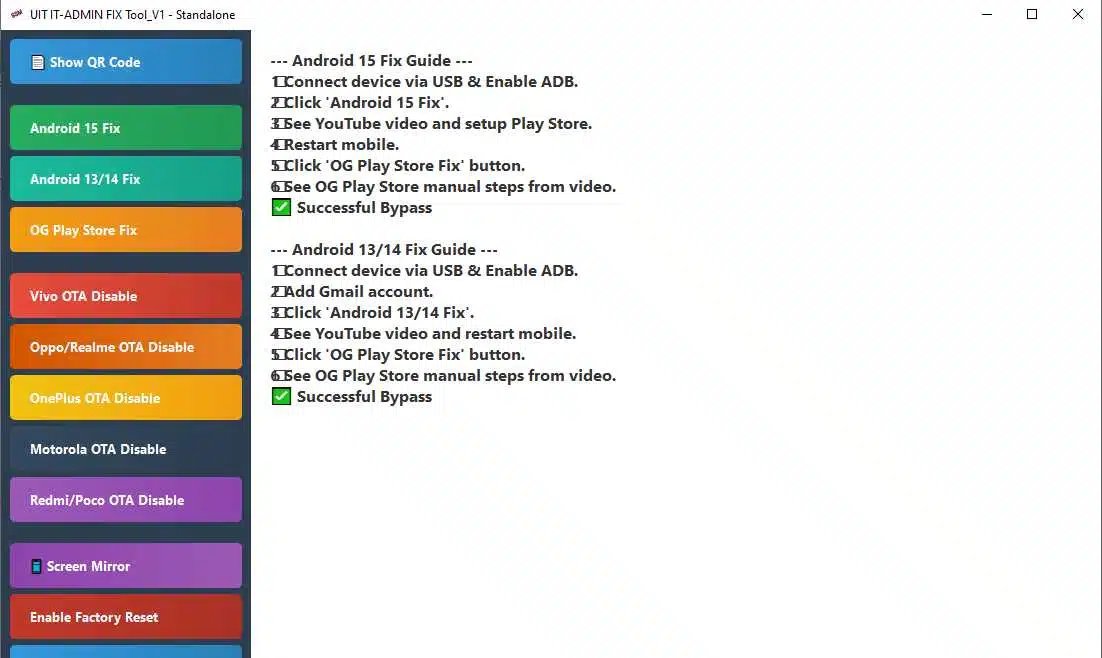
UIT IT-Admin Fix Tool V1 is a Windows utility promoted for troubleshooting selected Android software issues and managing certain device settings. According to its published feature list, the tool includes options related to Google Play Store troubleshooting, Android version-specific fixes, manufacturer OTA update settings, screen mirroring, QR code display, and factory-reset controls. It is intended for users and mobile repair technicians who need a centralized interface for supported Android maintenance tasks. Actual functionality depends on the device model, Android version, security patch, and the particular release being used.
What Is UIT IT-Admin Fix Tool V1?
UIT IT-Admin Fix Tool V1 is a third-party Android servicing utility distributed through mobile repair software websites. Its listing describes a Windows application with features intended to help technicians investigate selected application and system issues on supported Android phones.
The software is also associated with IT administration and device-management settings. These settings may be controlled by a business, school, or other organization, so users should confirm ownership and authorization before attempting changes to a managed device.
Key Features of UIT IT-Admin Fix Tool V1:
1. Android Version-Specific Fixes
- The published feature list includes options labelled for Android 13, Android 14, and Android 15. These labels indicate the versions the publisher claims to target, but they do not guarantee compatibility with every device running those operating systems. Manufacturer customizations and security updates can affect whether a function works.
2. Google Play Store Troubleshooting
- UIT IT-Admin Fix Tool V1 advertises a Google Play Store-related fix. This may be relevant when investigating certain application or service problems, although the listing does not establish that it can resolve every Play Store error. Users should first check their internet connection, available storage, date and time settings, and the status of Google Play services.
3. Manufacturer OTA Update Settings
- The feature list includes options related to over-the-air (OTA) updates for selected brands, including Vivo, OPPO, Realme, OnePlus, Motorola, Redmi, and POCO. The availability and effect of these settings can vary by model and firmware.
- Disabling system updates may prevent important security patches and bug fixes from being installed. Only change update settings when there is a clear, legitimate reason and a plan to keep the device secure.
4. Screen Mirroring
- UIT IT-Admin Fix Tool V1 lists a screen-mirroring feature that may help users view a connected device on a computer. The exact connection requirements and supported devices should be checked in the software documentation before use.
5. QR Code Display
- The published feature list also includes a QR code display option. Its precise purpose and compatibility should be confirmed in the specific release, particularly before using it as part of a device setup or administration workflow.
6. Factory-Reset Controls
- The tool advertises a factory-reset-related function for supported devices. A factory reset can erase local data, installed applications, and personal settings. Back up important information and confirm that the device owner has authorized the operation before proceeding.
- A reset does not necessarily remove organizational management or account-based security protections. Managed devices should be handled through the organization’s authorized administrator.
Benefits of UIT IT-Admin Fix Tool V1:
The main advantage of a multi-function servicing utility is convenience. By placing several troubleshooting options in one Windows interface, it may help technicians organize routine checks and access functions relevant to supported devices.
However, the presence of a feature in a menu does not guarantee that it will work on a particular phone. Results depend on hardware, Android build, USB drivers, permissions, and software compatibility.
System Requirements and Installation Preparation:
Before installing UIT IT-Admin Fix Tool V1, review the release information for supported Windows versions and required drivers. Prepare a reliable USB cable if your intended function requires a connected phone, and make sure the computer has enough storage for the installer and any backup files.
Download the package only from a source you can verify. Scan the installer with reputable security software, and avoid disabling Windows protection to run an unknown executable.
Is UIT IT-Admin Fix Tool V1 Free?
The publisher’s listing presents UIT IT-Admin Fix Tool V1 as a free download. However, users should confirm the exact version and licensing terms because third-party packages can differ, and a free installer does not guarantee that every advertised feature is available without additional requirements.
Important Safety Considerations:
- Confirm device ownership and authorization before making system changes.
- Back up personal data before using reset or repair functions.
- Verify compatibility with the exact phone model and Android build.
- Avoid disabling security updates without a clear maintenance plan.
- Do not attempt to remove workplace or school management restrictions without administrator authorization.
- Use official account recovery and device-management support when security protections prevent access.
Final Words:
UIT IT-Admin Fix Tool V1 is promoted as a Windows utility for selected Android troubleshooting and maintenance tasks, including Play Store fixes, version-specific options, OTA settings, screen mirroring, and factory-reset controls. Its actual capabilities may vary by device and software version. Verify the installer, check compatibility, and use authorized procedures when working with managed Android devices.