TMT Xiaomi Bootloader Tool V1.0 Free Version 2026
TMT Xiaomi Bootloader Tool V1.0 – Features, Uses & Android Servicing Guide
TMT Xiaomi Bootloader Tool V1.0 is a Windows-based utility designed for technicians and advanced Android users who work with Xiaomi devices and bootloader-related servicing tasks. Xiaomi, Redmi, and POCO smartphones commonly require specialized utilities for device identification, bootloader status checking, ADB/Fastboot communication, and firmware-related maintenance. TMT Xiaomi Bootloader Tool V1.0 brings several of these functions together in a straightforward interface, making it useful for repair shops, mobile technicians, and experienced users who need a dedicated Xiaomi servicing environment.
What Is TMT Xiaomi Bootloader Tool V1.0?
TMT Xiaomi Bootloader Tool V1.0 is primarily focused on Xiaomi bootloader and device-management operations through supported communication modes. The tool can work with Android interfaces such as ADB and Fastboot when the connected device and drivers support them. Its simple interface can make common servicing tasks easier to organize without requiring technicians to depend entirely on separate command-line utilities.
Bootloader-related work is an important part of Android servicing because the bootloader controls how a device starts and which software components can be loaded. Xiaomi devices may require an officially supported unlocking process before certain advanced maintenance operations can be performed.
Main Features:
Xiaomi Device Support
- The Tool is designed around Xiaomi’s ecosystem, including compatible Xiaomi, Redmi, and POCO smartphones. Actual functionality can vary according to the device model, Android version, bootloader state, and available drivers.
Bootloader Information
- One of the key purposes of a bootloader utility is helping technicians determine the current bootloader state of a compatible device. This can be useful before performing firmware maintenance or other advanced servicing operations.
ADB Communication
- ADB can be useful for communicating with an Android device while the operating system is running and USB debugging is enabled. A supported utility can help technicians identify connected devices and prepare them for legitimate maintenance tasks.
Fastboot Support
- Fastboot is commonly used for Android firmware and bootloader maintenance. TMT Xiaomi Bootloader Tool V1.0 can be useful in workflows where a compatible Xiaomi device needs to communicate through Fastboot mode.
Device Detection
- Proper device detection is essential when working with Android servicing utilities. The tool can help identify connected compatible devices when the required USB drivers and communication modes are correctly configured.
Simple Interface
- The utility is intended to provide a relatively straightforward environment for Xiaomi-related bootloader tasks. A clear interface can reduce confusion when technicians are working with multiple devices or checking device communication before maintenance.
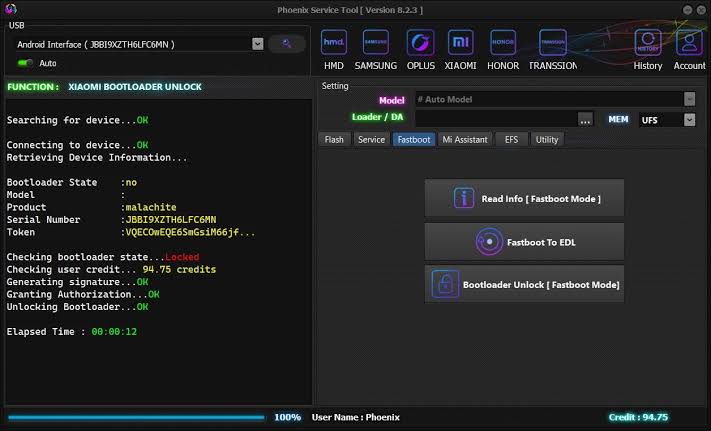
Xiaomi Bootloader Servicing:
Xiaomi devices use bootloader security mechanisms to protect the operating system and user data. Bootloader unlocking is therefore not simply a matter of running a third-party utility. Supported Xiaomi devices generally require the manufacturer’s official authorization and procedures.
TMT Xiaomi Bootloader Tool V1.0 can be considered a supporting utility for technicians who already understand Xiaomi’s bootloader requirements. Users should always follow official authorization procedures and avoid attempting to circumvent account, security, or device-protection mechanisms.
ADB and Fastboot Compatibility:
ADB and Fastboot are two of the most important communication interfaces used in Android servicing. ADB generally operates when Android is running with the necessary debugging permissions, while Fastboot provides communication with the bootloader environment.
For reliable operation, Windows should have the appropriate USB drivers installed. A poor USB connection, incompatible driver, unsupported device, or incorrect mode can prevent the utility from detecting the phone.
Firmware Maintenance:
Bootloader tools are often used alongside firmware utilities during Android repair workflows. After confirming the device model and software configuration, technicians may use appropriate manufacturer firmware packages and supported flashing procedures.
It is important to use firmware intended specifically for the device model and regional configuration. Incorrect firmware can cause boot failures, software instability, or loss of important functionality.
Windows Requirements:
TMT Xiaomi Bootloader Tool V1.0 is intended for Windows computers. Before using it, technicians should make sure that:
- Windows USB drivers are properly installed.
- The Xiaomi device has sufficient battery power.
- A reliable USB cable is being used.
- A compatible ADB or Fastboot mode is available.
- Security software is not unnecessarily blocking the application.
- Important user data has been backed up before advanced servicing.
Keeping Windows and required device drivers updated can also improve connection reliability.
Common Connection Problems:
If the Xiaomi device is not detected, the first step is usually to check the USB connection and driver installation. Try another USB port or a known-good cable if necessary. The phone should also be placed in the communication mode required for the intended task.
ADB detection problems can occur when USB debugging is disabled or authorization has not been accepted on the phone. Fastboot detection problems may instead be related to bootloader mode or missing Fastboot drivers.
Technicians should avoid repeatedly disconnecting a device during firmware-related operations because interruptions can sometimes lead to software problems.
Benefits for Technicians:
TMT Xiaomi Bootloader Tool V1.0 can be useful for technicians who regularly handle Xiaomi-family devices and want a dedicated utility for bootloader and communication-related tasks. Having device information, ADB/Fastboot communication, and bootloader-oriented functions available through one interface can make routine diagnostics more organized.
The tool can also be useful as part of a larger servicing toolkit alongside official Xiaomi utilities, USB drivers, firmware packages, and diagnostic applications.
Safety and Responsible Use:
Bootloader servicing can affect device security and user data. Before performing any advanced operation, technicians should verify device ownership and make sure the work is authorized.
Users should not attempt to bypass Google account protection, Xiaomi account security, anti-theft features, enterprise restrictions, or other security controls without proper authorization. Bootloader operations may also erase data or change the security state of a device, so backups and manufacturer documentation should be considered before proceeding.
Final Words:
TMT Xiaomi Bootloader Tool V1.0 is a specialized Windows utility aimed at Xiaomi-related bootloader servicing and Android device communication. Its focus on bootloader information, ADB/Fastboot connectivity, device detection, and servicing workflows can make it a useful addition to a technician’s toolkit. For the best results, users should install the correct drivers, confirm device compatibility, follow official Xiaomi procedures, and perform all bootloader-related operations responsibly.