TMT Mediatek Universal Tool V2.0 For MediaTek Free FRP Bypass 2026
TMT MediaTek Universal Tool V2.0 – Features, MediaTek Servicing & FRP Support
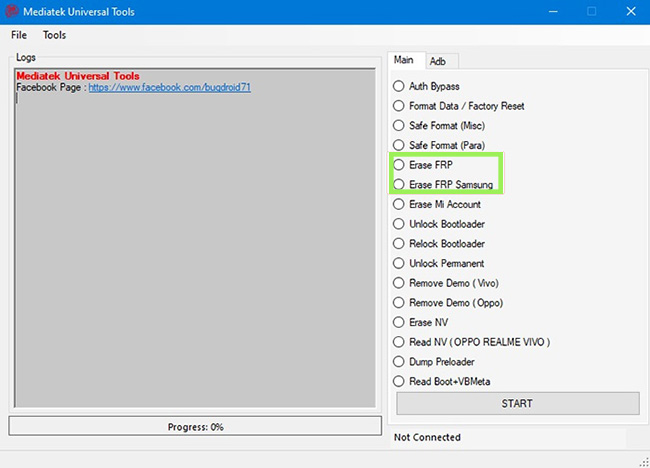
TMT MediaTek Universal Tool V2.0 is a Windows-based Android servicing utility designed for technicians working with compatible MediaTek-powered smartphones and tablets. MediaTek devices can require specialized communication methods for diagnostics, firmware maintenance, device information, and software repair. A universal servicing tool can bring several of these functions into a single interface, helping technicians organize common maintenance tasks more efficiently. TMT MediaTek Universal Tool V2.0 is particularly aimed at MediaTek platforms and may be useful in professional repair environments where supported devices need diagnostic or software-related attention.
What Is TMT MediaTek Universal Tool V2.0?
TMT MediaTek Universal Tool V2.0 is a MediaTek-focused service utility for Windows computers. It is intended to assist with supported Android servicing workflows, including device detection, communication, software diagnostics, and firmware-related maintenance.
The term “Universal” generally refers to its goal of supporting multiple MediaTek chipsets and device models rather than being limited to a single smartphone manufacturer. Actual compatibility can vary depending on the chipset, Android version, security patch level, device configuration, and drivers installed on the computer.
Main Features:
MediaTek Device Detection
- The tool is designed to communicate with compatible MediaTek-powered devices. Proper detection allows technicians to identify the connected phone and determine which servicing options may be available.
MediaTek Platform Support
- MediaTek produces a wide range of mobile chipsets used by different smartphone manufacturers. A universal utility can be useful when a repair technician handles devices from several brands that use MediaTek hardware.
Device Information
- Device information can be useful during troubleshooting. Technicians may need to identify hardware and software details before selecting an appropriate maintenance procedure or firmware package.
FRP-Related Servicing
- Factory Reset Protection, commonly known as FRP, is an Android security feature designed to help protect a device after an unauthorized factory reset. Service tools may include functions described as FRP-related operations for legitimate repair scenarios.
- Because FRP is a security mechanism, any account or protection-related servicing should only be performed on devices that the technician owns or has explicit authorization to service. Users should follow the manufacturer’s supported account-recovery and device-verification procedures rather than attempting to defeat security protections on unauthorized devices.
Firmware Maintenance
- MediaTek servicing often involves firmware packages, system recovery, software diagnostics, or other maintenance procedures. A compatible service utility can be part of a technician’s larger firmware-maintenance toolkit.
- Firmware should always match the exact device model and hardware configuration. Using an incorrect package can cause boot problems, instability, or loss of functionality.
USB Communication
- Reliable USB communication is essential for Android servicing. The correct MediaTek drivers and a stable USB connection can help Windows recognize the device properly.
MediaTek Devices and Service Modes:
MediaTek smartphones can use different communication modes depending on their hardware and software configuration. During professional servicing, technicians may encounter normal Android mode, ADB communication, Fastboot, or specialized MediaTek service interfaces.
The available mode depends on the individual device. Therefore, users should not assume that every MediaTek phone supports every feature offered by a universal service utility.
Why Drivers Are Important?
USB drivers play an important role in MediaTek servicing. If Windows does not have the appropriate driver, the phone may appear as an unknown device or may disconnect when entering a service mode.
Before beginning maintenance, technicians should verify that the necessary drivers are installed correctly and that Windows recognizes the connected hardware without errors.
FRP and Responsible Device Servicing:
FRP exists to prevent unauthorized access to Android devices after a factory reset. It can require the previously associated Google account or another supported verification method before the device can be fully configured.
If a customer legitimately owns a phone but cannot access the associated account, the preferred solution is official account recovery or manufacturer-supported assistance. Service technicians should verify ownership before handling any FRP-related request.
TMT MediaTek Universal Tool V2.0 should therefore be viewed as a professional servicing utility rather than a means of defeating security on devices that do not belong to the user.
Firmware and Software Repair:
Software problems on MediaTek devices can include boot loops, failed updates, system instability, application crashes, or other firmware-related issues. Technicians may use appropriate diagnostic and firmware tools to identify the cause and restore supported software.
Before performing any firmware operation, it is important to confirm the exact model, chipset, region, firmware version, and available backup options.
Windows Compatibility:
TMT MediaTek Universal Tool V2.0 is intended for Windows environments. For a more reliable servicing setup, users should have:
- A compatible Windows computer
- Proper MediaTek USB drivers
- A high-quality USB cable
- Sufficient battery power on the device
- Correct firmware or service files when required
- A stable USB connection
- A backup of important user data where possible
Disabling important Windows security features unnecessarily is not recommended. If a legitimate service application is blocked, users should verify the source and application integrity before changing security settings.
Common Problems:
One common issue is that the connected MediaTek device is not detected. This can result from missing drivers, an unsuitable USB cable, incorrect service mode, or a damaged USB port.
Another issue can occur when the selected operation does not match the device’s chipset or software configuration. In such cases, technicians should verify compatibility before continuing.
Firmware-related operations can also fail because of incorrect files or interrupted communication. Maintaining a stable connection and using device-specific firmware can reduce these risks.
Advantages for Mobile Technicians:
A MediaTek-focused utility can save technicians time by bringing several servicing functions into one application. Instead of relying on unrelated utilities for every diagnostic task, technicians can use a dedicated environment for supported MediaTek devices.
Its usefulness is greatest when combined with correct drivers, manufacturer documentation, compatible firmware, and proper device-service procedures.
Safety Considerations:
Advanced Android servicing can modify important software components and may result in data loss. Users should back up important information whenever possible and confirm device compatibility before performing maintenance.
Account protection, FRP, enterprise management, carrier restrictions, and other security mechanisms should never be bypassed on devices without authorization. Technicians should also avoid changing device identifiers or performing operations that could violate applicable laws or manufacturer policies.
Final Words:
TMT MediaTek Universal Tool V2.0 is a MediaTek-oriented Windows servicing utility designed to support compatible Android devices during diagnostics, device detection, software maintenance, and other professional repair workflows. Its MediaTek focus can make it useful for technicians who work across different brands and chipsets. For FRP-related situations, users should always verify ownership and use official account-recovery or manufacturer-supported procedures rather than attempting unauthorized security bypasses.