Qst Pro Tool V4 Unlocking Frp On Samsung Phones 2026
Qst Pro Tool V4 Unlocking FRP on Samsung Phones
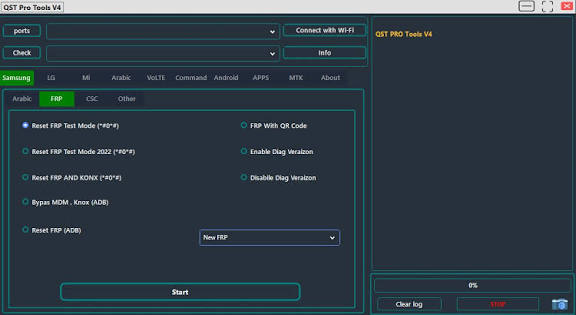
Qst Pro Tool V4 is a Windows-based mobile servicing utility designed for technicians and advanced users who work with supported Samsung smartphones. The tool is associated with device maintenance, software servicing, diagnostics, and FRP-related operations on compatible Samsung models. FRP, or Factory Reset Protection, is a security feature designed to help protect Android devices after an unauthorized factory reset. For legitimate repair work, a compatible servicing tool can assist technicians when dealing with devices that are properly owned or authorized for repair.
What Is Qst Pro Tool V4?
Qst Pro Tool V4 is presented as a professional Android service utility focused on Samsung phone servicing. It can be useful in repair-shop environments where technicians need a dedicated Windows application for handling supported device software and security-related maintenance tasks.
The tool is intended for experienced users who understand Samsung USB drivers, device connection modes, Android software versions, and basic mobile servicing procedures. Compatibility can vary according to the exact Samsung model, chipset, Android version, security patch, and available service method.
Qst Pro Tool V4 Features:
- Qst Pro Tool V4 is mainly associated with Samsung servicing and FRP-related functions. Depending on the supported device, the tool may provide options for detecting connected phones, reading device information, performing supported maintenance operations, and working with certain security configurations.
- The available functions can differ between Samsung models, so technicians should always verify compatibility before starting any procedure.
Samsung FRP Servicing
- One of the primary reasons technicians may use Qst Pro Tool V4 is for supported FRP servicing. Factory Reset Protection is designed to prevent unauthorized use of a reset Android device. When a phone has been legitimately reset and the owner needs assistance restoring access, a technician may use an appropriate authorized servicing workflow.
- FRP operations should only be performed on devices that belong to the user or that the technician has explicit permission to service.
Samsung Device Detection
- A reliable connection between the Windows computer and Samsung phone is essential. The tool can work with supported device connection modes when the appropriate Samsung USB drivers are installed.
- Device detection allows the technician to identify the connected phone and determine whether the required operation is available.
Device Information
- Before performing a servicing operation, technicians should identify the exact model and software configuration. Device information can include the model number, Android version, build information, and other available details.
- Checking this information first helps prevent the wrong procedure from being applied to an incompatible device.
Android Software Maintenance
- Samsung phones can experience software problems such as failed updates, boot issues, application errors, or configuration problems. Depending on the model and supported functions, a professional servicing tool can be part of a broader troubleshooting workflow.
Why Use Qst Pro Tool V4?
A dedicated Samsung service utility can make certain repair tasks more organized for technicians. Instead of relying on generic Android commands, technicians can use an interface designed around mobile servicing requirements.
Qst Pro Tool V4 may be useful for repair professionals who regularly handle Samsung devices and need a specialized Windows-based utility for supported maintenance and FRP-related tasks.
Preparing Windows for Qst Pro Tool V4:
Before connecting a Samsung phone, the Windows computer should have the appropriate Samsung USB drivers installed. A reliable USB cable and stable USB port are also recommended.
It is best to close unnecessary phone-management applications because other software can sometimes interfere with device communication. The computer should also remain stable during the servicing process.
Preparing the Samsung Phone:
Before starting any repair operation, verify the exact Samsung model and software version. Samsung devices with similar names can have different hardware configurations, regional variants, and security levels.
If the device is still accessible, important user information should be backed up before performing operations that could erase data. Technicians should also confirm that the customer has authorized the repair.
FRP and Responsible Servicing:
Factory Reset Protection is an important Android security mechanism. It is designed to discourage unauthorized use of a device after it has been reset.
For this reason, Qst Pro Tool V4 and similar utilities should only be used for legitimate repair purposes. Technicians should verify ownership or obtain appropriate authorization before performing FRP-related servicing.
Troubleshooting Samsung Connection Problems:
If Qst Pro Tool V4 does not detect a Samsung phone, check the USB cable and USB port first. Then verify that the Samsung USB drivers are correctly installed.
The phone may also need to be connected in a particular service or download mode depending on the selected operation. If the computer still does not recognize the device, Windows Device Manager can be checked for driver or connection errors.
Compatibility:
Compatibility is an important consideration when using Qst Pro Tool V4. Samsung models differ considerably in chipset, Android version, security patch, bootloader configuration, and available service interfaces.
A function that works on one Samsung model may not work on another. Users should therefore verify the specific model and software version before attempting any operation.
Advantages for Mobile Technicians:
- Qst Pro Tool V4 can be useful for technicians who specialize in Samsung smartphone repair. Its focus on Samsung servicing can make it a convenient addition to a professional repair toolkit.
- A dedicated utility can also help technicians organize routine device-detection and maintenance tasks from a Windows computer.
Safety Precautions:
Before performing any advanced servicing operation, make sure the phone is properly identified and the correct procedure has been selected. Do not disconnect the USB cable during an active operation unless the software specifically instructs you to do so.
Avoid using incompatible files or procedures, as incorrect servicing can cause software problems or make the device unable to boot normally.
Final Words:
Qst Pro Tool V4 is a Windows-based Samsung servicing utility associated with FRP-related and other mobile repair operations on supported devices. It can be useful for professional technicians who need a dedicated tool for Samsung device maintenance. Because Samsung security and compatibility vary by model and Android version, users should verify device support before beginning any operation and should only perform FRP-related servicing on devices they are authorized to repair.