QCN File Editor Tool V1.0 To Edit IMEI & Fix Issues Unlock Your Phone New Version 2026
QCN File Editor Tool V1.0 To Edit IMEI & Fix Issues
QCN File Editor Tool V1.0 is a specialized utility associated with Qualcomm-based Android devices and QCN backup files. QCN files contain important Qualcomm modem and network configuration data, so tools designed to inspect or edit these files are mainly used by experienced mobile technicians for authorized diagnostics and repair. The utility can be useful when investigating modem configuration problems, connectivity issues, or restoring supported configuration data from a legitimate backup.
What Is QCN File Editor Tool V1.0?
QCN File Editor Tool is designed to work with QCN files commonly associated with Qualcomm-powered smartphones. These files can contain calibration and modem-related information required for proper cellular communication.
A technician may use a QCN editor to inspect supported parameters, compare configuration information, or work with a backup when troubleshooting a device after firmware or modem-related problems.
Because QCN data is closely connected to device identity and radio configuration, it should only be modified when there is a legitimate repair requirement and proper authorization.
Key Features of QCN File Editor Tool V1.0:
QCN File Management
- The primary purpose of the tool is working with QCN files. It can provide technicians with a convenient environment for opening, examining, and managing supported Qualcomm configuration backups.
Qualcomm Device Support
- QCN files are primarily associated with Qualcomm platforms, making this type of utility useful for technicians working with Snapdragon-powered Android phones.
- Compatibility depends on the Qualcomm chipset, device model, firmware, and QCN file structure.
Modem Configuration Troubleshooting
- A damaged or incorrect modem configuration can sometimes result in cellular connectivity problems. A QCN-focused utility can assist experienced technicians when investigating these types of software-related issues.
Backup-Based Repair
- One of the safest applications for QCN-related tools is working with a legitimate backup created from the same device. Keeping an original backup can provide an important recovery option when troubleshooting supported modem configurations.
Network Configuration Analysis
- QCN data can contain information related to Qualcomm modem configuration and calibration. Editing or comparing supported fields may help technicians understand why a device is experiencing certain network-related problems.
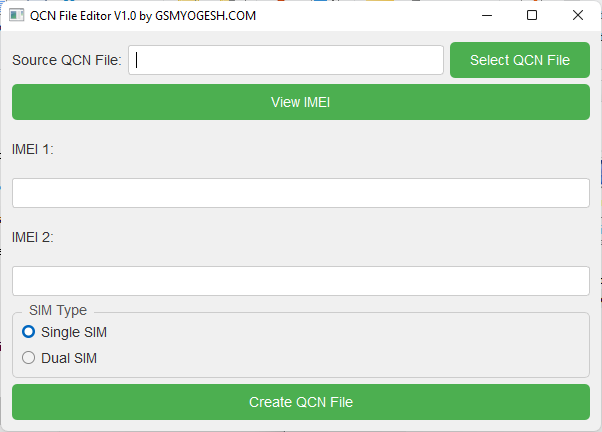
IMEI-Related Information:
- The title of QCN File Editor Tool V1.0 is often associated with IMEI editing, but IMEI is a regulated device identifier and should not be changed to another device’s identity or used to defeat carrier, ownership, or security controls.
- For legitimate repair situations, technicians should preserve the device’s original identity and follow applicable manufacturer, carrier, and legal procedures. The safest approach is to restore the device’s own valid configuration from an authorized backup or official service process.
Can QCN Files Fix Network Problems?
QCN files can contain important Qualcomm modem configuration information, so restoring a correct, legitimate backup can sometimes help resolve software-related connectivity problems.
However, not every network problem is caused by QCN data. SIM issues, carrier restrictions, damaged antennas, incorrect firmware, modem hardware faults, and network configuration can all produce similar symptoms.
Supported Qualcomm Devices:
QCN tools are generally intended for Qualcomm-powered Android smartphones. However, compatibility is not universal. Different Qualcomm chipsets, Android versions, firmware builds, and security configurations can use different structures.
Before opening or modifying a QCN file, technicians should verify that the file belongs to the correct device and platform.
Why QCN Backup Is Important?
A valid QCN backup can be valuable during professional Qualcomm servicing. It may contain device-specific calibration and modem information that is difficult to recreate manually.
Technicians should therefore keep original backups safe and avoid replacing device-specific data with files obtained from unrelated phones.
Common Problems:
QCN File Will Not Open
A QCN file may fail to open if it is corrupted, incomplete, incompatible with the tool version, or generated by a different Qualcomm platform.
Network Still Does Not Work
If restoring a legitimate configuration does not resolve the problem, the cause may be firmware, carrier configuration, hardware, SIM, or modem-related rather than the QCN file itself.
Device Is Not Recognized
For device-related servicing, check the Qualcomm USB drivers, USB cable, Windows configuration, and supported connection mode.
Incorrect Configuration
Using a QCN backup from another device can create serious compatibility problems. Always use device-specific backups and verify the source before performing any restoration.
Safety Precautions:
QCN editing is an advanced operation and should not be treated as a general-purpose phone-unlocking method. Incorrect modifications can cause loss of cellular connectivity or other modem-related problems.
Important precautions include:
- Keep the original QCN backup.
- Use only legitimate device-specific backups.
- Verify the exact Qualcomm model and chipset.
- Do not alter device identity to impersonate another device.
- Avoid using QCN files from unrelated phones.
- Keep a stable USB connection during authorized servicing.
- Follow applicable manufacturer and carrier requirements.
Final Words:
QCN File Editor Tool V1.0 is a specialized Qualcomm configuration utility intended for advanced Android servicing and troubleshooting. Its main value is working with QCN files that contain modem and device-specific configuration information.
While QCN tools are sometimes promoted for IMEI editing or phone unlocking, responsible use should focus on authorized repair, preservation of the device’s original identity, and restoration of legitimate configuration data. Technicians should always create backups and verify compatibility before working with Qualcomm modem files.