PFT-PixelFlasher Tool v7.9.3.3 Free Download Latest Version 2026
PixelFlasher Tool v7.9.3.3 Free Download Latest Version
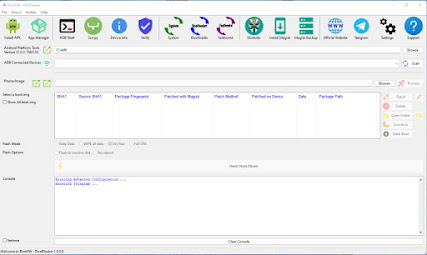
PixelFlasher Tool v7.9.3.3 is a Windows-based utility designed primarily for Google Pixel smartphones and advanced Android software management. It provides a convenient graphical interface for tasks that can otherwise require multiple ADB and Fastboot commands, making it useful for enthusiasts, developers, and technicians working with supported Pixel devices.
The tool is especially known for helping users manage factory images, OTA packages, boot images, device connections, and other Android software-maintenance tasks from a single interface.
What Is PixelFlasher Tool v7.9.3.3?
PixelFlasher is a specialized Android utility created with Google Pixel devices in mind. It simplifies several advanced software operations by providing graphical controls instead of requiring users to manually enter every ADB or Fastboot command.
Depending on the device and Android release, the software can assist with firmware flashing, boot-image management, device information, and other supported Pixel maintenance operations.
Because Pixel devices receive frequent Android and security updates, compatibility can vary between models and firmware releases. Users should therefore verify that the selected Pixel device and software package are supported before performing advanced operations.
Key Features of PixelFlasher Tool v7.9.3.3:
Google Pixel Support
- PixelFlasher is primarily designed for Google Pixel smartphones. Its interface is intended to simplify common maintenance workflows for Pixel devices across supported Android versions.
ADB and Fastboot Integration
- The tool works with standard Android communication technologies such as ADB and Fastboot. These interfaces allow a Windows computer to communicate with a compatible Pixel device for diagnostics and software maintenance.
Factory Image Support
- PixelFlasher can be useful when working with official Pixel factory images. Factory images are commonly used by advanced users and developers when restoring or updating supported Pixel software.
- Using the correct image for the exact model and build is essential.
OTA Package Support
- The utility also works with supported OTA-based firmware workflows. OTA packages can be useful for updating or restoring Android software without relying exclusively on a complete factory-image process.
Boot Image Management
- One of PixelFlasher’s advanced functions involves boot-image handling. This can be useful for developers and experienced Android users who need to work with boot components during legitimate testing or customization.
- Boot-related operations should always be performed carefully because incorrect images can prevent a device from starting normally.
Device Information
- PixelFlasher can provide useful information about a connected Pixel device, helping users identify the model and software environment before beginning an operation.
- Checking device information first can reduce the risk of selecting an incompatible firmware package.
Firmware Management
- The tool provides a centralized interface for managing supported Pixel firmware packages. This can make software maintenance easier for users who regularly work with different Android builds.
Magisk and Root-Related Workflows
- PixelFlasher is also known in the Android community for supporting workflows involving patched boot images and Magisk. These functions are intended for advanced users and developers who understand the risks associated with modifying Android system software.
- Rooting or modifying system components can affect security, updates, application compatibility, and device stability.
Why Use PixelFlasher?
PixelFlasher can be useful for users who want more control over their Pixel software environment without manually entering numerous command-line instructions.
Its graphical interface can make tasks such as selecting firmware packages, identifying connected devices, and managing supported flashing operations more straightforward.
Supported Google Pixel Devices:
PixelFlasher is primarily intended for Google Pixel hardware, including multiple generations of Pixel smartphones. However, support is dependent on the software version and the specific Android build.
A feature available for one Pixel generation may not work identically on another generation. Always verify the exact device model and firmware before proceeding.
PixelFlasher and Android Firmware:
Firmware compatibility is one of the most important considerations when using PixelFlasher. Google regularly releases security patches, Android updates, and new Pixel builds.
Before selecting a package, check:
- Exact Pixel model
- Android version
- Build number
- Region or carrier variant when applicable
- Bootloader requirements
- Firmware package type
- Current device condition
Using the wrong package can result in boot problems or other software issues.
Windows Installation:
PixelFlasher is intended for Windows-based Android servicing environments. A properly configured computer is important for reliable communication with a Pixel phone.
Users should make sure the required Android USB drivers and platform components are correctly installed. A reliable USB cable and stable USB port are also recommended.
Before starting, charge the device sufficiently and back up important data whenever possible.
Common Troubleshooting:
Pixel Device Not Detected
If PixelFlasher does not detect the phone, check the USB cable, USB port, Android drivers, and device connection mode. If ADB is being used, verify that the phone is authorized to communicate with the computer.
Fastboot Device Not Detected
Make sure the Pixel is correctly placed in Fastboot mode and that the appropriate drivers are installed. Reconnecting the device or using another USB port can sometimes resolve communication problems.
Firmware Package Not Compatible
A firmware package may be rejected when it does not match the connected Pixel model or software configuration. Confirm the exact model and build before selecting a package.
Boot Problems After Modification
If a device does not boot normally after a software modification, the cause may be an incompatible boot image, firmware mismatch, or incomplete operation. Returning to a known-good official software configuration can be an appropriate recovery approach.
Advantages of PixelFlasher Tool:
Some of the major benefits include:
- Designed specifically for Google Pixel devices
- Graphical interface for Android servicing
- ADB and Fastboot integration
- Factory image management
- OTA package support
- Boot-image management
- Device information tools
- Firmware maintenance capabilities
- Useful for advanced Android users and developers
- Reduces dependence on manual command-line operations
Safety Tips:
PixelFlasher provides advanced functions, so users should understand the consequences before making system-level changes.
Always keep an original copy of important firmware and boot files. Avoid interrupting active flashing operations and make sure the selected package corresponds to the exact Pixel model.
Rooting and bootloader-related modifications can also affect device security and warranty status. Use these features only on devices you own or are authorized to modify.
Final Words:
PixelFlasher Tool v7.9.3.3 is a useful Windows utility for Google Pixel owners, Android enthusiasts, developers, and technicians who need a graphical interface for advanced device management. Its features can simplify ADB and Fastboot workflows, firmware management, factory-image operations, OTA handling, and supported boot-image tasks.
The tool is particularly valuable for users who regularly work with Pixel firmware or advanced Android customization. However, firmware and Android security requirements change frequently, so users should always verify compatibility before performing any major operation.