PFT – Phoenix Flash Tool V3.5 Fastboot Flash & Unlock Devices Updated 2026
PFT – Phoenix Flash Tool V3.5 Fastboot Flash & Unlock Devices
PFT – Phoenix Flash Tool V3.5 is a Windows-based Android servicing utility designed for firmware flashing, Fastboot operations, device diagnostics, and software maintenance. Public descriptions of the Phoenix Flash Tool family associate it with support for multiple Android platforms, including MediaTek, Qualcomm, Unisoc, and selected Samsung devices, along with Fastboot and ADB functionality.
What Is PFT – Phoenix Flash Tool V3.5?
Phoenix Flash Tool is intended for mobile technicians and advanced Android users who need a centralized application for different device-servicing tasks. Version 3.5 is described online as a release focused on Android flashing and repair, with improvements to performance and device support.
The tool is particularly useful in repair environments where technicians regularly work with firmware packages, Fastboot devices, ADB connections, and different Android chipsets.
Key Features of PFT Phoenix Flash Tool V3.5:
Fastboot Flashing
- Fastboot is one of the major functions associated with Phoenix Flash Tool. It can be used for supported devices to work with compatible firmware images and perform software-maintenance operations.
- Fastboot flashing can be useful when repairing software problems, restoring supported firmware, or maintaining a device that is already accessible through Fastboot mode.
ADB Support
- Phoenix Flash Tool also includes ADB-related functionality. ADB allows a Windows computer to communicate with an Android device when the appropriate debugging connection is available.
- Technicians can use ADB functionality for supported device information, application management, and general diagnostic tasks.
Qualcomm Support
- The tool family is associated with Qualcomm device servicing and firmware operations. Qualcomm devices can require specialized communication modes and firmware structures, making a dedicated service utility useful for technicians.
- Compatibility depends on the exact model, chipset, firmware, and software version.
MediaTek Support
- Phoenix Flash Tool is also described with MediaTek flashing functionality. Public feature descriptions mention operations involving firmware files and supported MediaTek connection modes.
- Because MediaTek devices differ considerably between models, technicians should always verify the exact firmware and device compatibility before starting a flashing operation.
Unisoc Support
- Selected Unisoc devices are also associated with the tool. Unisoc firmware commonly uses platform-specific packages and connection methods, so the correct drivers and files are important for successful servicing.
Samsung Firmware Support
- The Phoenix Flash Tool family is also described as supporting selected Samsung firmware operations, including BL, AP, CP, and CSC packages on compatible models.
- Samsung firmware is highly model-specific, so users should confirm the complete model number and firmware/build information before proceeding.
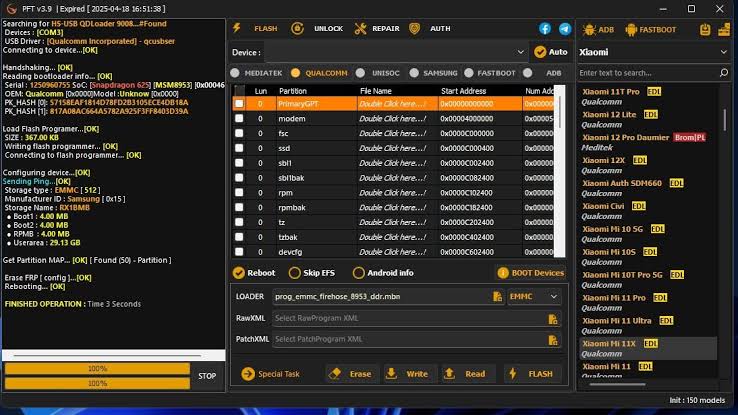
Device Repair and Software Maintenance:
One of the main purposes of Phoenix Flash Tool is software maintenance. It can be useful when an Android phone experiences problems such as failed updates, boot loops, corrupted software, or firmware-related errors.
A correct firmware package and stable connection are essential when performing any system-level maintenance.
Unlocking Functions:
Phoenix Flash Tool is commonly advertised with various unlocking and security-related functions. However, such features should only be used on devices that the technician owns or has explicit authorization to service.
Android protections such as Factory Reset Protection are designed to prevent unauthorized access. Therefore, security-related servicing should be performed only through legitimate, authorized workflows.
Advanced Connection Modes:
The Phoenix Flash Tool family is described as supporting several specialized Android connection environments, including Fastboot, ADB, BROM, EDL, META, MTP, and Sideload modes on supported devices.
These modes serve different technical purposes and are not universally available on every Android phone. The correct mode depends on the manufacturer, chipset, firmware, and device condition.
Benefits for Mobile Technicians:
PFT Phoenix Flash Tool can be useful in professional repair environments because it brings multiple Android servicing functions into a single interface.
Some potential advantages include:
- Fastboot firmware flashing
- ADB device communication
- Multi-platform Android support
- Qualcomm-related servicing
- MediaTek-related servicing
- Unisoc-related servicing
- Selected Samsung firmware support
- Device information functions
- Software troubleshooting
- Firmware maintenance
- Support for multiple connection modes
Windows Requirements and Preparation:
Before using Phoenix Flash Tool, technicians should prepare the Windows computer properly. Correct USB drivers are important because Android devices communicate with Windows through manufacturer- or chipset-specific interfaces.
It is also recommended to use a reliable USB cable, maintain sufficient battery power on the device, and close other phone-management applications that could interfere with the connection.
Always back up important personal data whenever the device is still accessible.
Common Troubleshooting Problems:
Phone Is Not Detected
- If the device is not recognized, check the USB cable, USB port, Windows drivers, and connection mode. Reinstalling the appropriate drivers or restarting Windows can sometimes resolve communication problems.
Flashing Fails
- A failed flashing process can be caused by incompatible firmware, incorrect device selection, missing drivers, unstable USB communication, or an unsupported security level.
- Verify the exact model and firmware before trying again.
Fastboot Device Not Showing
- If Fastboot does not recognize the phone, confirm that the device is actually in Fastboot mode and that the appropriate Android USB drivers are installed.
Driver Conflicts
- Multiple Android service tools can install different drivers, sometimes causing conflicts. Removing outdated or conflicting drivers and installing the appropriate package can improve device detection.
Safety Precautions:
Firmware flashing and system-level Android servicing always carry some risk. Using the wrong firmware can cause boot failures or other software problems, while interrupted flashing may leave a device in an unusable state.
For safer servicing:
- Verify the exact device model.
- Use firmware intended for that model.
- Keep the USB connection stable.
- Avoid interrupting active flashing operations.
- Maintain adequate battery power.
- Back up important data.
- Use security-related features only with authorization.
- Obtain software from trustworthy sources.
Final Words:
PFT – Phoenix Flash Tool V3.5 is a multi-purpose Android servicing utility associated with Fastboot flashing, ADB communication, firmware maintenance, and support for multiple Android platforms. Public descriptions of the Phoenix Flash Tool family mention MediaTek, Qualcomm, Unisoc, and selected Samsung devices, along with several specialized connection modes.
For technicians, its main advantage is the ability to work with different Android servicing environments from a single Windows application. However, compatibility varies by device and firmware, so users should always verify the model, chipset, firmware package, and supported operation before making system-level changes.