Multi Tool by GSMYogesh V1.0 Free Download For Windows 2026
Multi Tool by GSMYogesh V1.0 Free Download – All-in-One Android Utility
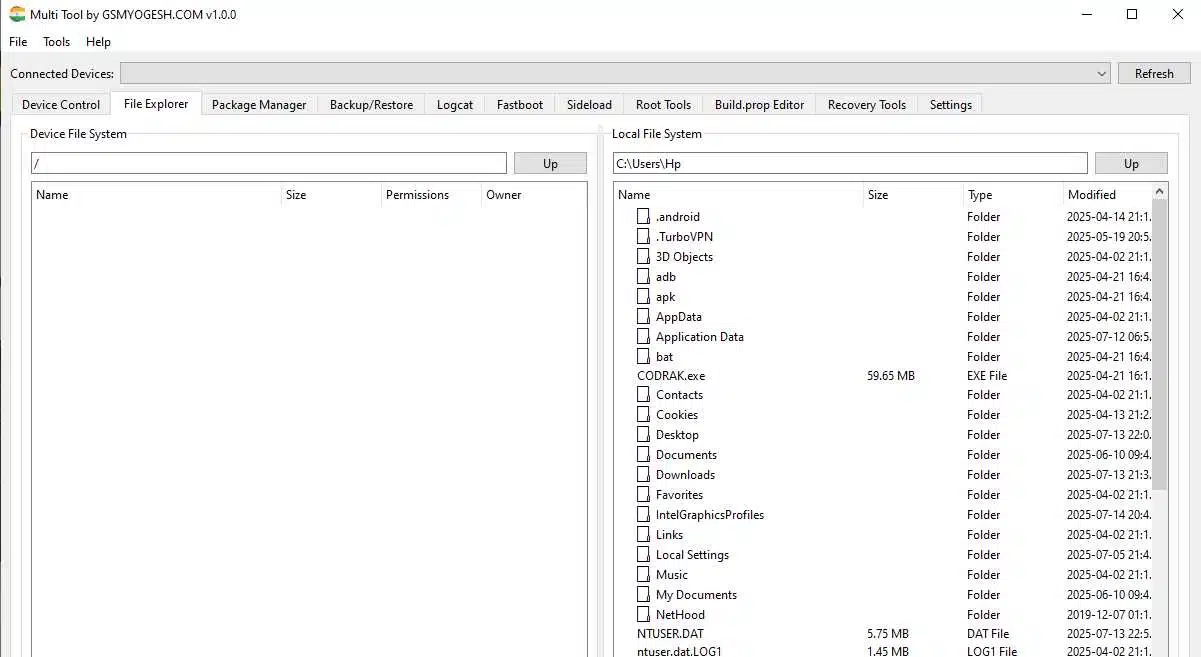
With the rapid evolution of mobile phone technology, the need for comprehensive repair tools has grown. “Multi Tool V1.0″—developed by Gsmyogesh—is an all-in-one repair solution designed specifically for mobile device technicians. The tool offers a diverse range of features, including device management, a file browser, a package manager, backup and restore functions, a system log viewer (Logcat), Fastboot-specific tools, utilities for sideloading applications and granting root access, as well as a `build.prop` editor and tools for recovery mode.
What is “Multi Tool”?
“Multi Tool V1.0” by Gsmyogesh is an all-encompassing, “all-in-one” utility designed to streamline the work of mobile phone technicians by consolidating multiple functions into a single platform. Geared toward addressing common mobile device issues, this practical tool provides a wide spectrum of services, including bypassing Factory Reset Protection (FRP), network unlocking, and mobile software repair.
Key Features of Multi Tool by GSMYogesh:
1. Android Device Management
- Multi Tool by GSMYogesh V1.0 Free Download advertises automatic detection of devices connected through supported ADB and Fastboot modes. Depending on the phone and its permissions, users may be able to view information such as the model, brand, Android version, battery status, storage details, and root status.
- It also lists reboot options for supported system, recovery, bootloader, and sideload modes. These functions can simplify basic device checks and routine maintenance without manually entering every command.
2. File Explorer
- The built-in file-management functions are designed to help users transfer files between an Android device and a Windows computer. Supported operations may include pushing files to a device, pulling files to a computer, browsing accessible locations, and viewing file properties.
- Access depends on Android permissions and the connection mode. Protected system locations may require elevated privileges, and deleting or changing files without understanding their purpose can cause application or operating-system problems.
3. Package Manager
- The package-management section lists features for viewing installed applications and inspecting details such as package names, versions, permissions, and installation paths. Advertised operations include installing APK files, enabling or disabling selected packages, clearing application data, and uninstalling supported applications.
- These functions can be useful for application troubleshooting, but system packages should be handled carefully. Disabling or removing an essential component may cause instability or affect important device functions.
4. Backup and Restore
- Multi Tool by GSMYogesh V1.0 Free Download lists ADB-based backup and restore capabilities. Depending on the Android version and device configuration, these functions may help preserve or restore supported application data and files.
- Backup support varies across Android releases, and not every phone permits a complete backup through ADB. Verify the backup contents before relying on them, and maintain a separate copy of important personal files.
5. Logcat Viewer
- The Logcat viewer is intended to display Android system and application logs in real time. Advertised functions include starting or stopping log capture, filtering messages, clearing the buffer, and saving logs for later inspection.
- Logcat can help diagnose application crashes, connection problems, and other software issues. However, logs may contain personal or device-related information, so review them before sharing them publicly.
6. Fastboot Tools
- The Fastboot section lists functions for supported bootloader operations, including flashing selected partitions, rebooting a device, and working with supported boot slots. Some versions also advertise partition erasing and bootloader management.
- These are advanced functions that can erase data or make a device unbootable when used incorrectly. A compatible firmware image and exact model identification are essential. Bootloader unlocking may erase user data and can affect the device’s security status or warranty terms.
7. ADB Sideload Support
- The utility advertises ADB Sideload support for compatible recovery environments. This feature can be useful when applying a suitable update package through a supported recovery workflow.
- Only use update files intended for the exact device model and software configuration. An incompatible package may fail to install or cause software problems.
8. Root Management Utilities
- The published feature list includes root-status checks and tools associated with Magisk, SuperSU, BusyBox, and system-level file access. Availability depends on the phone, existing root configuration, Android version, and the permissions granted to the tool.
- Rooting can weaken security, interfere with banking or protected applications, and prevent some updates from installing normally. Users should understand these consequences before making system-level changes.
9. Build.prop Editor
- The Build.prop editor is intended to load and modify Android system properties on compatible devices. Such properties can affect how parts of the operating system identify or configure the device.
- Incorrect changes may cause boot problems or unexpected behavior. Preserve the original file and avoid editing properties unless you understand their purpose and have a reliable recovery plan.
10. Recovery and TWRP Tools
- The recovery section lists options for rebooting into supported modes and working with TWRP-related backup, restore, wipe, and ZIP-installation workflows. These functions require a compatible recovery environment and appropriate device support.
- A recovery wipe may erase personal data, while installing an unsuitable package can prevent normal startup. Confirm compatibility and back up important files before proceeding.
Advantages of Using Multi Tool V1.0:
Multi Tool V1.0, developed by Gsmyogesh, offers numerous advantages. Primarily, it streamlines repair procedures by consolidating various functions into a single tool, eliminating the need for users to switch between different applications—thereby saving time and enhancing overall efficiency.
Furthermore, thanks to its user-friendly interface and comprehensive feature set, the tool is well-suited for both experienced technicians and beginners in device management tasks; among its capabilities, it allows for the removal of security protections from mobile phones.
System Requirements and Installation Preparation:
Before installing Multi Tool by GSMYogesh V1.0 Free Download, check the release documentation for supported Windows versions and any required dependencies. You should have:
- A compatible Windows computer.
- A reliable USB data cable.
- Appropriate Android USB drivers from a trusted source.
- ADB authorization enabled when required by the selected operation.
- Sufficient disk space for the application and backup files.
- A verified installer from a trustworthy source.
- Scan the downloaded package with reputable security software before running it. Do not disable Windows security protections simply to launch an unverified installer.
Is Multi Tool by GSMYogesh V1.0 Free?
The developer’s published page describes version 1.0 as free, offline, and not requiring activation. However, users should verify that the copy they obtain matches the intended release. A third-party download listing alone cannot guarantee that a file is genuine or has not been modified.
Important Safety Tips:
Use the tool only on devices you own or have permission to service. Back up important information before performing resets, wipes, partition changes, or other operations that could erase data. Verify the exact model and firmware before using Fastboot features, and avoid changing protected system files without understanding the consequences.
For phones protected by Google account verification or organizational management, use the appropriate official account recovery or administrator-authorized process rather than relying on unsupported bypass claims.
Final Words:
Multi Tool by GSMYogesh V1.0 Free Download is presented as an all-in-one Android utility for Windows, with advertised features covering device management, file transfers, package management, backups, Logcat, Fastboot, sideloading, root utilities, Build.prop editing, and recovery tasks. It may be useful for routine diagnostics and advanced Android maintenance, but not every feature will work on every device. Confirm compatibility, use a trustworthy installer, and protect your data before performing any system-level operation.
Official Download Link👇