IFrpra1n Tool Download For IPhone 5s To X Easy Activation Lock & ICloud Removal Latest Version 2026
iFRPRa1n Tool for iPhone 5s to X – Activation Lock and iCloud Troubleshooting
IFrpra1n Tool Download is a third-party utility advertised for servicing selected older iPhone and iPad models, particularly devices ranging from the iPhone 5s to the iPhone X. Its published feature descriptions mention USB connectivity, device detection, jailbreak-related functions, and Activation Lock troubleshooting for certain iOS versions. Compatibility and results can vary depending on the device model, installed iOS version, and the tool’s current release.
What Is iFRPRa1n Tool?
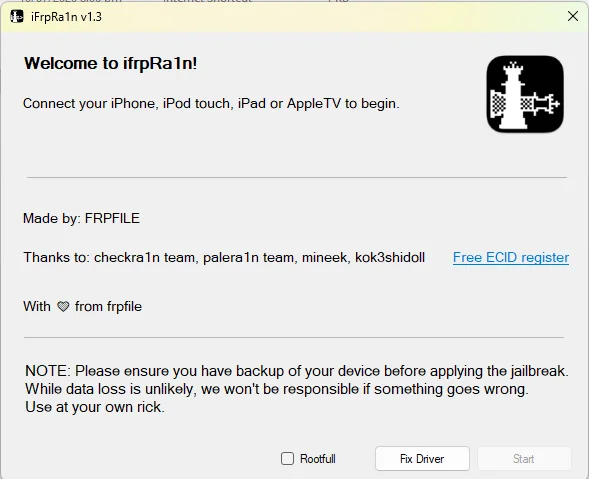
IFrpra1n Tool Download is presented as a Windows-based utility for technicians and experienced users working with compatible Apple mobile devices. Its interface is advertised as combining device detection and selected servicing options in one place. The tool’s published information mentions iOS versions in the iOS 12–17 range, although those claims should be checked against the specific device and software build before use.
It is important to understand that Activation Lock is an Apple security feature linked to the owner’s Apple Account. A third-party utility should not be assumed to remove the original account association permanently or restore every device function. Apple’s official account-recovery and Activation Lock support options remain the recommended route for legitimate owners.
Key Features of iFRPRa1n Tool:
1. Support for Selected Older iPhone Models
- The IFrpra1n Tool Download is advertised for selected devices in the iPhone 5s through iPhone X range. The published compatibility list also mentions certain iPad models. Support may vary across hardware revisions and iOS releases, so check the exact model number before relying on any advertised feature.
2. USB Device Detection
- IFrpra1n Tool Download uses a USB connection to communicate with compatible devices. Correct drivers, a reliable data cable, and a suitable computer connection can help with basic device detection. A phone not being detected does not necessarily mean the device itself is faulty; drivers, cable quality, or connection mode may be responsible.
3. Jailbreak-Related Functions
- The IFrpra1n Tool Download published interface includes jailbreak-related options for selected hardware. Jailbreaking modifies iOS security protections and may introduce instability, security vulnerabilities, application compatibility issues, or problems with future software updates. It should only be considered by users who understand these risks and have authorization to modify the device.
4. Activation Lock Information
- The utility is promoted for Activation Lock-related troubleshooting. However, Activation Lock is enforced through Apple’s activation system, and the result of any third-party method cannot be guaranteed. Some advertised methods may have limitations involving cellular service, Apple services, reactivation, or updates.
5. Windows-Based Interface
- The IFrpra1n Tool Download is presented as a computer-based utility with a graphical interface. A central interface can make it easier for technicians to review available options, but the presence of a button or feature label does not establish compatibility with every connected iPhone.
Supported Devices and iOS Compatibility:
Published descriptions list the following device families as potential targets:
- iPhone 5s
- iPhone 6 and iPhone 6 Plus
- iPhone 6s and iPhone 6s Plus
- iPhone SE (1st generation)
- iPhone 7 and iPhone 7 Plus
- iPhone 8 and iPhone 8 Plus
- iPhone X
- Selected iPad models, depending on the tool version
These are advertised compatibility claims, not a guarantee of successful activation or full device functionality. Check the tool’s current documentation for the precise iOS versions and device combinations supported by each feature.
Requirements Before Using iFRPRa1n Tool:
Before evaluating the utility, make sure you have:
- A compatible Windows computer.
- A reliable USB data cable.
- The correct Apple device model and iOS version.
- A backup of important data, if the device is accessible.
- A trusted installation package that has been checked for malware.
- Authorization to service or modify the connected device.
Avoid running unknown executables with administrator privileges unless you trust the source. Never share your Apple Account password or verification codes with third-party tool providers.
Recommended Activation Lock Recovery Options:
If your iPhone displays an Activation Lock screen, first try entering the Apple Account previously used with the device. If you have forgotten the account details, use Apple’s account-recovery process. If you purchased the phone second-hand, ask the previous owner to remove it from their account. For a device you own and can document with proof of purchase, Apple may provide an Activation Lock support request option.
Common Issues and Troubleshooting:
Device not detected: Check the USB cable, USB port, device drivers, and computer compatibility.
Compatibility error: Confirm the exact iPhone model and installed iOS version. A feature advertised for one device may not work on another.
Activation remains locked: A reset or jailbreak does not necessarily remove the device’s account association. Use Apple’s official recovery options or contact the previous owner.
Missing cellular or Apple services: Some unofficial activation methods may have significant limitations. Do not assume that cellular connectivity, iCloud, notifications, or future updates will work normally.
Final Words:
IFrpra1n Tool Download is advertised as a servicing utility for selected older iPhones and iPads, with USB detection and jailbreak-related options alongside Activation Lock troubleshooting claims. Its compatibility and results should be verified carefully before use. For a device linked to an Apple Account, official recovery or removal by the previous owner is the safest way to restore legitimate access without relying on unsupported workarounds.