iActivator Tool 2026 Download Best Hello A5 A12 Plus Ramdisk iOS 26 Latest Version
iActivator Tool 2026 Download – Hello A5, A12 Plus, Ramdisk and iOS 26 Guide
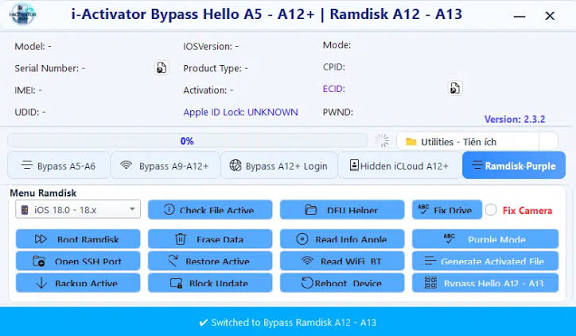
iActivator Tool 2026 is presented as an iOS-related utility associated with device diagnostics, activation troubleshooting, and selected servicing workflows. The title references Hello A5, A12 Plus, Ramdisk, and iOS 26, but actual compatibility and available functions depend on the specific software release, iPhone or iPad model, and installed iOS version. Users should verify the tool’s documentation before downloading or attempting any operation.
What Is iActivator Tool 2026?
iActivator Tool 2026 Download is described as a utility for users who work with supported Apple devices. Tools in this category may provide device information, connection checks, or selected maintenance functions through a computer-based interface.
Compatibility is particularly important for iOS servicing because Apple devices use different hardware generations and security mechanisms. A feature that works with one model or iOS version may not work with another. Therefore, users should confirm the supported-device list and requirements for the exact release of iActivator Tool 2026.
Key Features of iActivator Tool 2026:
Hello A5 and A12 Plus References
- The Tool’s title mentions Hello A5 and A12 Plus, which appear to refer to specific device or servicing categories. These labels alone do not establish which iPhone models, chipsets, or iOS versions are supported. Check the release documentation before relying on these functions.
Ramdisk-Related Functions
- A ramdisk is a temporary filesystem environment used in certain technical device workflows. Ramdisk-related operations can be highly dependent on device hardware, operating system versions, and security restrictions. Only use documented functions on devices you own or are authorized to service.
iOS 26 Compatibility
- The title advertises iOS 26 compatibility, but this should not be treated as proof that every iOS 26 device is supported. Confirm the exact iPhone or iPad model, operating system build, and feature limitations before using the tool.
Device Information and Connection Checks
- Depending on the actual release, an iOS utility may help users establish a computer connection and inspect selected device information. Compatible USB cables, computer permissions, and any required supporting components may be necessary.
Servicing and Troubleshooting
- Some Apple device utilities provide maintenance or diagnostic functions that can assist with investigating connection and software problems. The available options should be confirmed through reliable documentation, especially before performing an operation that may erase data or change device settings.
Why Compatibility Matters?
Apple devices use hardware-specific security features and software protections. As a result, compatibility may depend on the processor generation, device model, iOS build, and current device state. A tool advertised for one iOS version may not support every device running that version.
Before attempting a servicing operation, check the exact model and software build, review the release notes, and make sure you understand the expected outcome.
How to Prepare Before Using iActivator Tool?
For a safer device-servicing process, follow these general precautions:
- Identify your iPhone or iPad model and current iOS version.
- Back up important data whenever possible.
- Use a reliable USB cable and a trusted computer.
- Review the tool’s official documentation and compatibility notes.
- Download software only from a source you trust.
- Avoid interrupting a supported maintenance operation.
- Keep your Apple Account credentials and proof of ownership available when required.
These steps can help reduce connection problems and prevent avoidable data loss.
Common Problems and Troubleshooting:
The device is not detected: Check the USB cable, computer port, device connection prompt, and required Apple device support components.
The tool reports an unsupported device: Confirm the model, iOS build, and tool version. Do not assume that a feature advertised for a device family works with every model in that family.
The application does not launch: Verify the stated operating system requirements and scan the installation package with reputable security software.
The device remains activation locked: Use the Apple Account associated with the device or Apple’s official account-recovery and Activation Lock support procedures. If you purchased a second-hand device, contact the previous owner or Apple Support with appropriate proof of purchase.
Security and Responsible Use:
Activation Lock is designed to protect Apple devices if they are lost or stolen. Any servicing activity should be limited to devices you own or have explicit permission to repair. Do not use unverified tools to access another person’s device or defeat its security protections.
Unknown setup files may contain malicious software or request unnecessary permissions. Verify the source, check the documentation, and avoid disabling computer security protections simply to run an application.
Final Words:
iActivator Tool 2026 is presented as an iOS servicing utility whose advertised areas include Hello A5, A12 Plus, ramdisk-related workflows, and iOS 26. These labels do not guarantee compatibility with a particular Apple device. Before downloading the software, verify the release information, supported models, and actual features. For activation or ownership issues, Apple’s official recovery and support options remain the recommended approach.