HTH ND AIO Tool v2.7.8 Bypass Passcode & iCloud Bypass Tool 2026
HTH ND AIO Tool v2.7.8 – Features, iOS Servicing & Device Management
HTH ND AIO Tool v2.7.8 is presented as an all-in-one Windows utility for technicians working with supported Apple devices and iOS-related servicing tasks. Tools in this category are commonly used for device diagnostics, system maintenance, software troubleshooting, and managing devices that require attention after a reset or software issue. HTH ND AIO Tool brings multiple functions into a single interface, which can be useful for repair technicians who regularly work with iPhones and iPads. Because passcode protection and iCloud Activation Lock are important security mechanisms, any account or security-related servicing should only be performed on devices that the technician owns or has explicit authorization to repair.
What Is HTH ND AIO Tool v2.7.8?
HTH ND AIO Tool v2.7.8 is an all-in-one servicing utility designed to provide multiple functions through a Windows computer. Its intended audience includes mobile technicians and advanced users who need a centralized environment for supported iOS device maintenance.
The tool’s name suggests a broad collection of device-management and repair features rather than a single-purpose function. Depending on the connected device and iOS version, available functions may vary.
Main Features:
iPhone and iPad Servicing
- The Tool is aimed at supported Apple mobile devices, including iPhone and iPad models. Device compatibility can depend on hardware generation, iOS version, connection mode, and the particular function being used.
Device Detection
- Reliable device detection is an important part of iOS servicing. A Windows utility may use Apple’s device communication components to identify a connected iPhone or iPad and determine its available servicing state.
Passcode-Related Service
- Passcodes protect access to information stored on an iPhone or iPad. A legitimate repair workflow should not be used to defeat another person’s passcode protection. For an owned device, Apple’s supported recovery or erase procedures are the appropriate route when the passcode has been forgotten.
iCloud and Activation Lock
- iCloud-related security features, particularly Activation Lock, are designed to prevent unauthorized use of lost or stolen Apple devices. Any service involving an Activation-Locked device should begin with ownership verification and Apple’s official account-recovery or device-removal procedures.
- A third-party utility should not be treated as a method for obtaining unauthorized access to an Apple account or protected device.
All-in-One Interface
- An AIO utility can reduce the need to switch between several applications during routine diagnostics. Bringing supported device information and servicing functions together can make a technician’s workflow more organized.
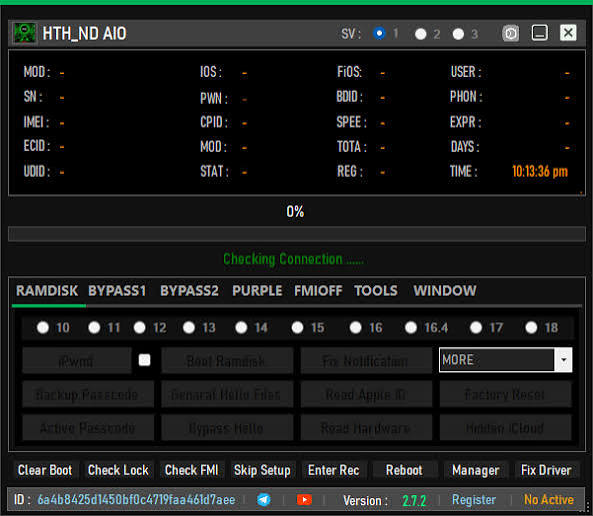
iOS Device Diagnostics:
Before performing any advanced maintenance, technicians should identify the exact iPhone or iPad model, installed iOS version, device condition, and available connection mode. This information helps determine which servicing procedures are appropriate.
Diagnostic checks can also help distinguish between software problems and hardware-related issues such as USB-port damage, battery problems, or communication failures.
Recovery and Maintenance Workflows:
Apple devices can enter different system states for recovery and software maintenance. Depending on the problem, a technician may need to work with normal operating mode or Apple’s supported recovery mechanisms.
The correct recovery method depends on the device and software condition. Interrupting an update or restoration process can create additional problems, so a stable USB connection and reliable computer are important.
Windows Requirements:
For a smoother experience, users should prepare their Windows computer before connecting an Apple device. Recommended preparation includes:
- A compatible Windows computer
- Appropriate Apple device drivers and communication components
- A reliable Lightning or USB-C cable
- Adequate device battery power
- Stable USB connectivity
- Updated and trusted software
- A backup of important information whenever possible
Security software should not be disabled unnecessarily. If Windows flags an unfamiliar utility, users should verify its source and integrity before making changes to system security settings.
Common Connection Problems:
If an iPhone or iPad is not detected, check the USB cable, USB port, installed Apple drivers, and device connection state. Trying another certified cable or USB port can sometimes resolve communication problems.
A device may also fail to appear correctly if it is locked, not trusted by the computer, or operating in a different recovery state than the selected function expects.
Data Protection:
Advanced iOS servicing can involve restoring or erasing a device, which may remove locally stored information. Before performing any maintenance on an owned device, users should check whether an iCloud or computer backup is available.
Technicians should also clearly communicate potential data-loss risks to customers before beginning repair work.
Responsible Use of Passcode and iCloud Functions:
Passcode protection and Activation Lock are security features designed to protect personal information and prevent unauthorized device use. They should never be circumvented on a device without permission.
If a user has forgotten an Apple Account password, the appropriate solution is account recovery through Apple’s supported channels. If Activation Lock appears on a second-hand device, the previous owner should remove the device from their account through the official process.
This approach protects both the legitimate owner and the technician from unauthorized access issues.
Benefits for Repair Technicians:
An all-in-one servicing environment can be useful for technicians who regularly handle iOS devices. Having device detection, diagnostic functions, recovery-related options, and other supported maintenance features in one application can help organize routine repair workflows.
However, compatibility should always be confirmed before attempting an advanced operation because newer iOS versions and device generations may introduce different security and communication requirements.
Final Words:
HTH ND AIO Tool v2.7.8 is presented as an all-in-one Windows utility for supported iPhone and iPad servicing, device detection, diagnostics, recovery-related maintenance, and other repair workflows. Its passcode and iCloud-related capabilities should be used only for authorized device servicing. For locked or Activation-Locked Apple devices, owners should use Apple’s official recovery and account-management procedures rather than attempting to defeat security protections.