GSMTools UniSPD FRP Tool Download For windows by Rasheed KS 2026
GSMTools UniSPD FRP Tool Download by Rasheed KS – Android Servicing Utility
The “GSMTools UniSPD FRP Tool Download” is an essential resource for smartphone users encountering issues related to Factory Reset Protection (FRP). Equipped with a diverse range of features—including options for wiping data in Recovery Mode, erasing information, and managing data for specific applications—this tool enables users to regain access to their devices quickly and securely.
What is the “GSMTools UniSPD FRP” tool?
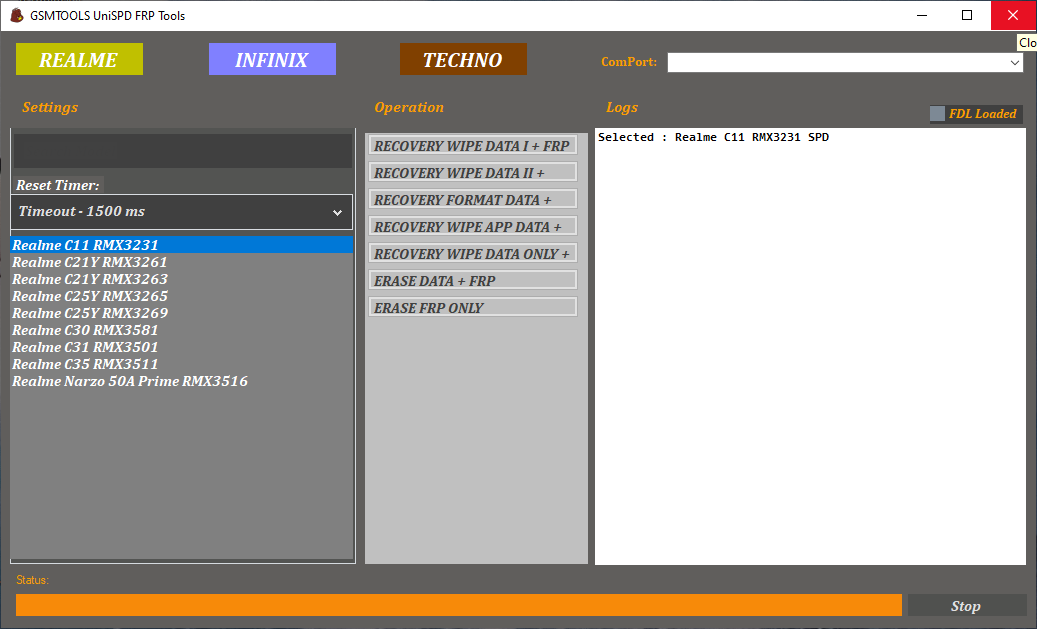
It is a comprehensive software solution designed to address Factory Reset Protection (FRP) issues on Android devices, with a particular focus on data management and recovery. To manage information effectively, the tool offers options such as “Recovery Wipe Data 1 + FRP” and “Recovery Wipe Data 11+.”
Users can leverage functions like “Recovery Format Data +” and “Recovery Wipe App Data +” to enhance their device usage experience. The tool also allows for more targeted actions based on specific user needs, such as “Recovery Wipe Data Only” or “Erase Data + FRP” (wiping data while simultaneously removing Factory Reset Protection).
The tool provides specialized data-wiping options, offering customizable solutions for data management while also helping to improve device performance.
Overview of the “GSMTools UniSPD FRP” tool:
The “GSMTools UniSPD FRP” tool features a wide array of device recovery functions, including options like “Recovery Wipe Data 1 + FRP” and “Recovery Wipe Data 11+,” which ensure efficient data management. Users can also utilize functions such as “Recovery Format Data” or “Wipe App Data” to further enhance device performance.
The “GSMTools UniSPD FRP” tool enables precise data operations through functions like “Recovery Wipe Data Only” and “Erase Data + FRP.” Additionally, the “Erase Only” option allows for the deletion of specific information without altering other settings, making it an indispensable tool for device maintenance.
Main Features of GSMTools UniSPD FRP Tool:
1. Recovery Wipe Functions
- Tool Published descriptions list multiple recovery-related wipe options for compatible devices. These functions are intended for device maintenance and troubleshooting when a normal reset is insufficient.
- Wipe operations can permanently erase personal data, so technicians should confirm customer authorization and backup availability before proceeding.
2. Data Formatting
- The utility is advertised with a recovery-format option for selected supported devices. Formatting changes the contents of device storage and may help address certain software-related issues.
- Incorrect or incompatible operations can cause boot problems or data loss. Use only functions documented for the exact phone being serviced.
3. App-Data Management
- Some release descriptions mention an option for clearing selected application data. Such a feature may be useful for troubleshooting supported software issues, although the actual effect depends on the device and implementation.
- Do not assume that an app-data operation will preserve all user information. Confirm the expected result before using it.
4. Data Erase and Reset Options
- The tool lists erase-data and reset-related functions for selected Unisoc and Spreadtrum devices. These options can be relevant to authorized repair work, particularly when a phone has software problems that require a reset.
- A reset may erase photos, documents, messages, and other stored information. Always explain this risk before carrying out a repair for a customer.
5. Selected Realme Device Support
- Third-party feature lists mention several Realme models, including selected C-series devices such as the Realme C21Y, C25Y, C30, C31, and C35. The exact model number and chipset must be checked because similarly named phones can have different hardware configurations.
- The published list should be treated as a compatibility reference rather than a guarantee that every operation will work on every firmware version.
6. Selected Infinix and Tecno Device Support
- The utility is also associated with selected Infinix Smart and Hot series phones and Tecno Pop, Spark, and Pova models. Actual support may vary with the chipset, firmware build, and tool release.
- Always confirm the exact model and software version before performing any maintenance operation.
7. Windows-Based Interface
- GSMTools UniSPD FRP Tool Download is distributed as Windows software. A desktop interface can help technicians organize supported servicing functions in one place.
- Successful device detection may require compatible USB drivers, a reliable data cable, and the correct connection mode. Use trusted drivers and follow the documentation for your device.
Supported Devices and Compatibility:
Published compatibility lists include selected models from:
- Realme, including certain C-series and Narzo devices.
- Infinix, including selected Smart and Hot series models.
- Tecno, including selected Pop, Spark, and Pova devices.
These lists do not establish compatibility with every phone from these manufacturers. Check the exact model number, chipset, Android version, and security patch before downloading or using the utility.
System Requirements:
The tool is distributed for Windows computers. Requirements may vary according to the package and release.
Before installation, prepare a compatible computer, a reliable USB data cable, appropriate device drivers, and enough storage to extract the installation files. Back up important data before performing operations that could modify the phone’s storage.
Some third-party packages are distributed as compressed archives and may include additional setup components. Verify the source and inspect the files before running them.
How to Download GSMTools UniSPD FRP Tool Safely?
Search for a release from a source that clearly identifies the tool and its publisher. Check the version, supported-device information, file details, and installation requirements before downloading.
The tool has been listed by third-party mobile servicing websites and community channels. These listings do not independently prove that every downloadable package is authentic or free from unwanted software.
Scan the installer with reputable security software. Avoid modified packages and never disable antivirus protection simply because a download page instructs you to do so. If the publisher cannot be verified, consider using manufacturer-supported recovery and repair options instead.
Important Safety and Security Notes:
GSMTools UniSPD FRP Tool Download is intended for authorized device servicing. FRP protects account ownership, and legitimate verification may still be required after a reset.
For a phone you own, use the previously synchronized Google account or Google’s official account recovery process. If the phone belongs to someone else, ask the owner to complete verification. For company-managed devices, contact the relevant administrator.
Incorrect reset or formatting operations may erase data or make a device unstable. Verify compatibility, maintain backups whenever possible, and avoid using any tool on a device without the owner’s permission.
Final Words:
GSMTools UniSPD FRP Tool Download by Rasheed KS is a Windows-based utility advertised for selected Unisoc and Spreadtrum Android devices. Its published features include recovery wipe options, data formatting, app-data management, and reset-related servicing for certain Realme, Infinix, and Tecno models.
Before downloading, verify the installer source and confirm that your device appears in the supported list. Careful preparation, data protection, and authorized repair practices are essential for reliable mobile servicing.
Official Download Link👇