Fastboot Firmware Flasher Tool V1.0.1.2 Free Download New Version 2026
Fastboot Firmware Flasher Tool V1.0.1.2 Free Download
Fastboot Firmware Flasher Tool V1.0.1.2 is a Windows-based Android utility designed to simplify firmware flashing, device maintenance, and Fastboot-related operations. The tool brings several functions into one interface, including device information, USB driver management, reboot controls, firmware unpacking, image flashing, and firmware flashing. Published feature information also lists support for Android 11 through Android 15 in the current release, with specific kernel options available through its KernelSU patching section.
What Is Fastboot Firmware Flasher Tool V1.0.1.2?
Fastboot Firmware Flasher Tool is designed for Android users and technicians who need a graphical interface for operations that are commonly performed through ADB and Fastboot commands. Instead of entering every command manually, users can access different device-management and firmware functions from dedicated sections within the application.
The tool is particularly useful when working with compatible Android devices that support Fastboot or FastbootD. It can assist with firmware preparation, image management, device rebooting, driver testing, and supported flashing procedures.
Main Features:
Device Information
- The Device Info section can retrieve important information from a connected Android device through ADB. Available information includes the device name, model, firmware, region, security patch, and kernel version. This information can help technicians identify the device before selecting firmware or performing a flashing operation.
Driver Management
- The integrated driver section provides options for managing Android USB drivers. Published feature lists mention deleting old drivers, installing new drivers, and testing the connection. Proper drivers are essential because the Windows computer needs to communicate correctly with the Android device during ADB and Fastboot operations.
Reboot Menu
- The Reboot Menu provides convenient options for switching between different Android service modes. The documented options include rebooting to Bootloader, FastbootD, Recovery, or performing a normal reboot through ADB and Fastboot commands.
KernelSU Patcher
- The KernelSU Patcher is another advanced feature included in the tool. Published information lists kernel options covering Android 12 through Android 15, including several kernel versions such as Android 12 5.10, Android 13 5.10, Android 13 5.15, Android 14 5.15, Android 14 6.1, and Android 15 6.6.
- This feature should only be used by experienced users who understand boot images, kernel versions, and the risks associated with modifying system software.
Image Flasher
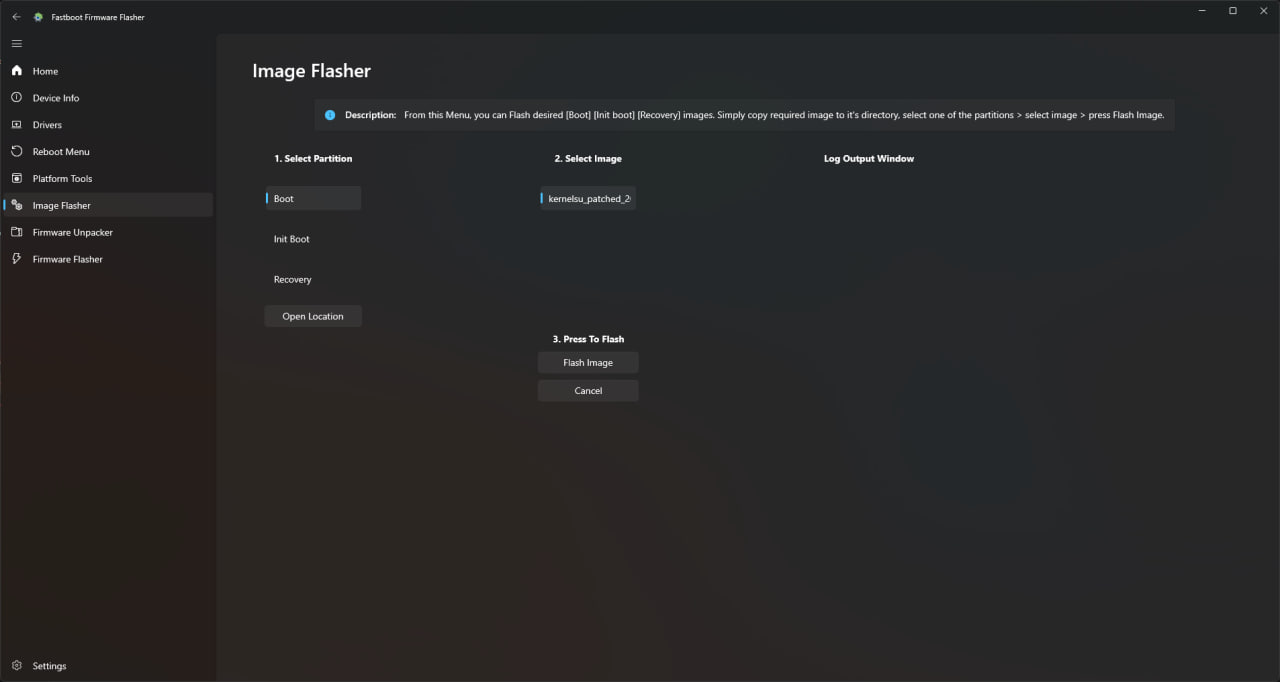
- The Image Flasher section allows users to select supported partitions and corresponding image files. Published descriptions list Boot, Init Boot, and Recovery as available partition options.
- Because partition flashing can affect the device’s ability to boot, users should make sure that the selected image belongs to the exact device and software version.
Firmware Unpacker
- The Firmware Unpacker is designed to prepare firmware files before flashing. The tool provides local unpacking options and also includes an online unpacking workflow where supported firmware information can be supplied.
- Firmware preparation can require considerable storage space. One published guide recommends around 20 GB of free space for the unpacking and flashing workflow.
Firmware Flasher
- The main Firmware Flasher section is intended for installing compatible firmware through Fastboot. Before starting, the published instructions recommend installing the required drivers, unpacking the firmware, connecting the phone to the PC, and then starting the flashing process.
Android Device Compatibility:
Fastboot Firmware Flasher Tool is designed around Android devices that support the Fastboot protocol. However, support is not identical across all Android smartphones. Manufacturer-specific implementations, bootloader status, firmware formats, security restrictions, and device models can affect whether a particular operation works.
Users should therefore verify the exact device model and firmware before flashing. A similar-looking model or different regional variant may require a completely different firmware package.
Why Use Fastboot Firmware Flasher Tool?
The main advantage of the tool is convenience. It combines several ADB and Fastboot functions in a graphical interface, making common operations easier to access than manually entering commands.
It can also be useful for technicians who frequently work with firmware files and need a single application for checking device information, managing drivers, unpacking firmware, rebooting devices, and flashing supported images.
Preparing Your Windows Computer:
Before using Fastboot Firmware Flasher Tool V1.0.1.2, make sure the Windows computer has enough free storage for the firmware package and extracted files. If the firmware workflow requires around 20 GB of temporary space, additional storage should be available rather than relying on a nearly full drive.
Install the appropriate Android USB drivers and test the connection before beginning an important flashing operation. A reliable USB cable and direct USB connection are also recommended.
Preparing the Android Phone:
Before flashing, identify the exact model, region, Android version, and firmware build. If the phone is accessible, create a backup of important data whenever possible.
The bootloader and device security configuration should also be checked. Fastboot-based flashing can require an unlocked bootloader, and unlocking a bootloader may erase user data depending on the manufacturer.
How to Use Fastboot Firmware Flasher Tool?
The general workflow starts by installing the tool and required drivers on the Windows computer. After connecting the Android device, use the Device Info section to verify the model and software information.
If required, use the Reboot Menu to enter Bootloader, FastbootD, or Recovery mode. Firmware can then be prepared through the Firmware Unpacker, followed by the appropriate flashing procedure.
For image-specific operations, select the correct partition and compatible image before beginning the flash. Users should carefully verify every selection because an incorrect image can cause boot or software problems.
Troubleshooting Connection Problems:
If the phone is not detected, first check the USB cable and USB port. Then open the driver section and test the installed drivers.
For ADB operations, USB debugging may need to be enabled and the computer authorized on the phone. For Fastboot operations, the phone must be in the appropriate bootloader or Fastboot mode.
If Windows still does not recognize the device, checking Device Manager can help identify missing or conflicting drivers.
Troubleshooting Flashing Errors:
Flashing errors can be caused by incorrect firmware, unsupported device models, missing drivers, locked bootloaders, insufficient storage, unstable USB connections, or incompatible partitions.
When an operation fails, users should read the displayed error and verify the firmware before trying again. Repeatedly flashing an incompatible image can create additional software problems.
Important Safety Precautions:
Firmware flashing is an advanced operation and should not be performed without understanding the consequences. Some procedures can erase user data or modify important system partitions.
Always use firmware intended for the exact device model. Keep the phone sufficiently charged and avoid disconnecting the USB cable while an active flashing process is running.
Users should also maintain backups whenever possible and only modify devices they own or are authorized to service.
Who Should Use This Tool?
Fastboot Firmware Flasher Tool V1.0.1.2 is most suitable for Android technicians, repair professionals, developers, and advanced users who understand Fastboot and firmware installation.
Beginners should first learn the basics of ADB, Fastboot, bootloader modes, partitions, and Android firmware before using advanced flashing functions.
Final Words:
Fastboot Firmware Flasher Tool V1.0.1.2 is a useful Windows utility for Android firmware management and Fastboot-based servicing. Its documented features include device information, driver management, reboot controls, KernelSU patching, image flashing, firmware unpacking, and firmware flashing.
For technicians, its all-in-one interface can make Android firmware workflows more convenient. However, compatibility should always be checked before flashing, and users should take proper precautions with drivers, firmware files, backups, USB connections, and device security settings.