CixxiTool Android Suite V1.3.10.11.24b Latest Updates 2026
CixxiTool Android Suite V1.3.10.11.24b Latest Updates
Introduction
CixxiTool Android Suite V1.3.10.11.24b is a Windows-based mobile servicing utility designed for selected Android devices from brands such as Samsung, Xiaomi, and Huawei. It brings together several diagnostic, information-reading, backup, and repair-related functions in one desktop application. The suite is intended mainly for mobile repair technicians and experienced users who need tools for supported device maintenance.
The V1.3.10.11.24b release is associated with features for reading device information, working with diagnostic ports, editing QCN files, managing selected device data, and handling certain partition-related tasks. Its available functions depend on the phone model, chipset, firmware, connection mode, and whether root access or a premium license is required.
What Is CixxiTool Android Suite?
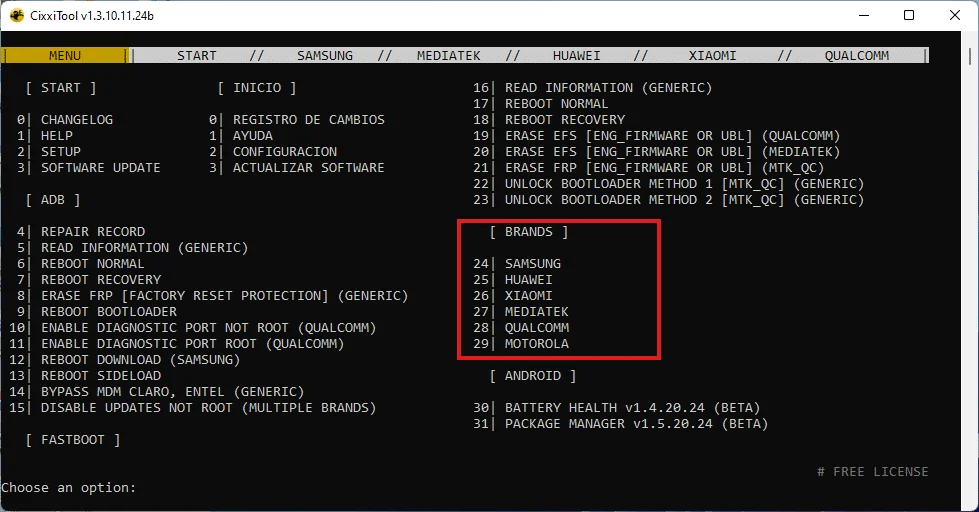
CixxiTool Android Suite is a multi-function Android servicing program that combines several operations commonly used during mobile software maintenance. Instead of relying on separate utilities for every supported task, technicians can access a range of functions through a single interface.
The suite includes options related to ADB and Fastboot information, Xiaomi Sideload mode, selected Qualcomm diagnostic functions, Samsung device maintenance, and supported backup operations. These capabilities can be useful when diagnosing software problems, preparing device information for repair, or working with compatible firmware configurations.
Not every feature is available on every device. Users should check the release documentation and confirm compatibility before performing operations that affect system partitions or device data.
Key Features of CixxiTool Android Suite V1.3.10.11.24b:
1. Device Information Reading
- The suite advertises device-information reading through ADB and Fastboot, along with selected manufacturer-specific modes. Reading device information can help technicians identify a connected phone and check whether the required communication interface is working correctly.
2. Xiaomi Sideload Support
- The published feature list includes information-reading and data-formatting options for supported Xiaomi Sideload configurations. Availability varies by device and software version, and formatting may erase personal data. Always confirm the exact model and back up important files before proceeding.
3. Qualcomm Diagnostic Port Functions
- CixxiTool Android Suite includes advertised options for enabling diagnostic ports on certain Qualcomm-based devices, including methods that may require root access and other supported configurations. Diagnostic access is intended for authorized repair and testing, and the appropriate method depends on the device.
4. QCN Editing
- QCN files contain device configuration information associated with certain Qualcomm devices. The suite advertises QCN editing features for supported servicing scenarios. These files should be handled carefully because incorrect modifications can affect network connectivity or other device functions. Preserve an original backup and use only data intended for the specific device.
5. NV Data Backup and Write Options
- The tool’s feature list includes NV data backup and selected write operations for supported Samsung devices and chipsets. Root access may be required, and availability differs across Qualcomm, Exynos, MediaTek, and Unisoc configurations.
- These operations can affect important device configuration data. They should only be performed by users who understand the procedure and have a verified backup.
6. Partition Management
- The suite advertises partition-writing functions for selected Samsung configurations. Partition operations can change how a device boots or operates, so an incorrect image or incompatible partition can cause serious software problems. Confirm the firmware, model number, and instructions before attempting such work.
7. Bootloader Logo Repair
- Another advertised feature is bootloader-logo repair for selected Samsung devices using MediaTek or Exynos platforms. This is a specialized maintenance function, and its availability should be confirmed for the exact device and software release.
8. Samsung and Motorola Updates
- The release information also mentions several additional features, including options related to Samsung bootloader warning screens and country-specific codes, along with certain premium Motorola servicing functions. These options may have specific model, access, or licensing requirements, so they should not be assumed to be available in the free version.
Supported Devices and Compatibility:
CixxiTool Android Suite is associated with selected devices from the following manufacturers:
- Samsung: Selected Galaxy models with supported chipset and firmware configurations.
- Xiaomi and Redmi: Selected Redmi Note, Redmi, POCO, and Xiaomi models using supported interfaces.
- Huawei: Selected devices with supported Fastboot information-reading functions.
- Motorola: Certain servicing features listed for specific ADB-mode operations, with some functions requiring premium access.
This is not a complete compatibility list. Support depends on the precise model identifier, chipset, Android version, firmware build, and the feature being used. Confirm the requirements for your device before starting a repair.
How to Prepare CixxiTool on Windows?
Before using the suite, follow these general preparation steps:
- Verify that the downloaded package matches the intended release.
- Scan the installation files with reputable security software.
- Review the available documentation and system requirements.
- Install appropriate USB drivers if required for your phone.
- Use a reliable USB cable and confirm that Windows recognizes the device.
- Back up important data and configuration files before performing repair operations.
- Check whether the required function needs root access, a specific connection mode, or a premium license.
Avoid disabling security software simply because an installer requests it. Investigate any warning and verify the software’s source before deciding whether a file is safe to run.
Benefits for Mobile Repair Technicians:
CixxiTool Android Suite can be convenient for technicians who regularly work with supported Android devices. Its combination of information reading, diagnostic options, backup functions, and selected repair features can reduce the need to switch between multiple programs.
The suite may also help organize diagnostic work by providing access to several supported interfaces through one application. However, it is not a universal repair solution, and some operations require specialist knowledge. The safest workflow is to identify the problem first, use the least destructive appropriate method, and preserve original configuration data whenever possible.
Important Safety Considerations:
Some mobile servicing operations can erase personal information, affect cellular connectivity, or prevent a device from starting correctly if incompatible data is used. Always verify the device model and firmware before changing partitions or configuration files.
Account locks and enterprise-management protections should be handled through authorized recovery procedures. For example, Google account verification should be resolved through the account owner’s official recovery process, while organization-managed devices should be handled by the authorized administrator.
Final Words:
CixxiTool Android Suite V1.3.10.11.24b is a multi-function Android servicing utility with advertised features for device information reading, diagnostic access, QCN editing, NV data management, and selected repair tasks. Its usefulness depends on device compatibility, available permissions, and the specific release features.
Before installing or using the suite, verify the package, review the supported-device information, and back up important data. Careful preparation can help technicians perform supported maintenance tasks while reducing the risk of unnecessary software or data problems.