Black Box Tool V1.0 MDM Bypass Account AndroidADB Latest Version 2026
Black Box Tool V1.0 – Android ADB, MDM Servicing and Device Management Tool
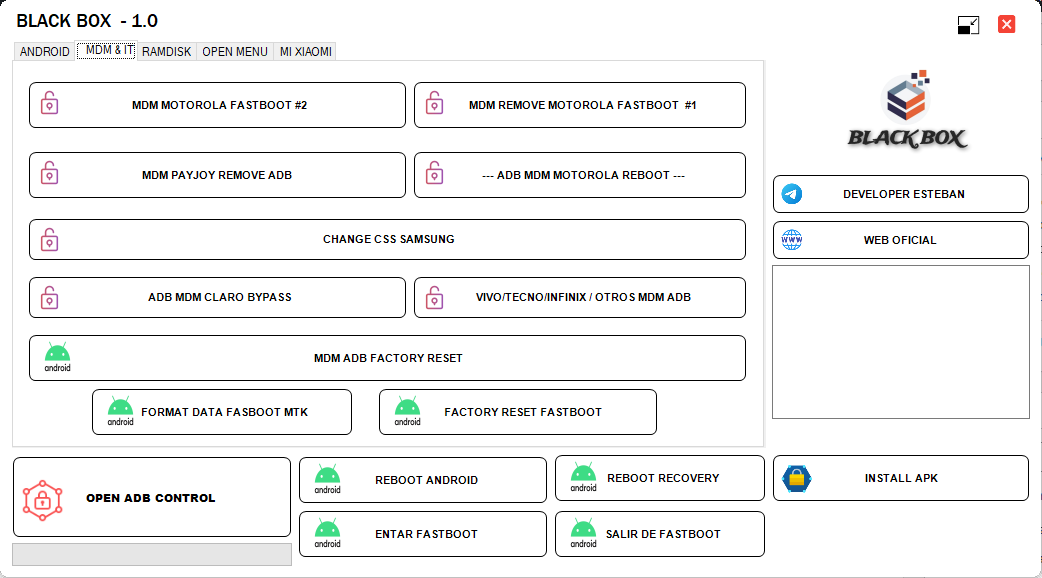
Black Box Tool V1.0 is an Android servicing utility designed for technicians who work with supported Android smartphones and Windows computers. The tool is associated with Android Debug Bridge (ADB) functions, device reboot options, fastboot operations, application installation, factory-reset features, and selected mobile device management (MDM) servicing tasks. It has been promoted in third-party mobile repair videos for use with selected Motorola, Samsung, Xiaomi, Vivo, Tecno, and Infinix devices. However, the availability of each function depends on the device model, Android version, security patch, connection mode, and authorization status.
What Is Black Box Tool V1.0?
Black Box Tool V1.0 is a multi-function Android utility intended to bring several common servicing options into a single interface. It is particularly associated with ADB and fastboot workflows, which technicians use to communicate with compatible Android devices, inspect device status, install applications, and perform supported maintenance operations.
The tool has also been advertised for selected MDM-related tasks. MDM stands for Mobile Device Management, a system used by businesses, schools, and other organizations to configure and manage their devices. Such restrictions may be controlled by an organization’s management platform, so their removal should only be performed with appropriate authorization.
Key Features of Black Box Tool V1.0:
Android ADB Functions
- The Tool is advertised with built-in ADB controls for supported devices. ADB is an official Android development utility that allows an authorized computer to communicate with a phone for debugging and maintenance. Depending on the connection and device permissions, ADB can support application installation, device information retrieval, and other troubleshooting tasks.
- ADB is not a universal unlocking solution. USB debugging generally needs to be enabled, and the computer may need to have been authorized on the device beforehand.
Reboot and Fastboot Options
- Black Box Tool V1.0 is associated with common device-control options, including rebooting Android, entering recovery mode, and switching to fastboot mode on compatible devices. These options can help technicians diagnose certain startup problems and access supported maintenance environments.
- Available commands and results vary by manufacturer. Some devices restrict fastboot operations or require additional authorization.
Application Installation
- The tool’s advertised functions include APK installation for supported Android devices. This can be useful when installing legitimate applications during device setup, testing, or authorized repair. Applications should be obtained from trusted sources and checked for compatibility before installation.
Factory Reset and Data Formatting
- Third-party descriptions list factory-reset and formatting functions for selected devices and connection modes. These operations may erase local user data, so a backup should be made first whenever possible. A factory reset does not automatically remove every account lock or organizational management restriction.
Selected MDM Servicing Functions
- Black Box Tool V1.0 has been promoted for selected MDM-related operations involving certain Motorola devices and other Android brands. Compatibility is not universal, and an advertised feature may no longer work after a manufacturer update.
- For company-owned or school-managed phones, the organization’s IT administrator should authorize and carry out management changes. For personally owned devices, contact the seller, carrier, or relevant management provider if an enrollment restriction remains after purchase.
Brand-Specific Android Functions
- Third-party feature descriptions mention selected functions for Motorola, Samsung, Xiaomi, Vivo, Tecno, and Infinix devices. These may include supported diagnostic, reboot, or account-related servicing operations. The precise support list should be checked before relying on a particular feature because different models from the same brand may use different chipsets and security implementations.
System Requirements and Preparation:
Black Box Tool V1.0 is presented as a Windows-based utility in third-party publications. Exact Windows requirements and installation details should be confirmed from the package documentation for the version being used.
Before starting, prepare the following where applicable:
- A compatible Windows computer.
- A reliable USB data cable.
- Appropriate Android USB drivers.
- A supported phone with sufficient battery charge.
- ADB authorization or the appropriate connection mode, when required.
- A backup of important data before reset or formatting operations.
Download software only from sources you can verify. Scan installers with reputable security software and avoid disabling antivirus protection to run an unknown package.
Benefits for Mobile Repair Technicians:
A combined Android servicing utility can simplify routine maintenance by grouping device-control and diagnostic options in one interface. Technicians may find the reboot functions, application installation, ADB connectivity, and selected fastboot operations useful when handling supported devices.
The main benefit depends on the tool’s reliability and actual compatibility with the target phone. A feature list alone does not confirm that every advertised operation works on every model or Android release.
Important Limitations and Security Considerations:
Black Box Tool V1.0 should not be treated as a universal MDM removal or Android unlocking solution. Modern devices use different security controls, and operations may be blocked by device policies, bootloader restrictions, authorization requirements, or updated firmware.
MDM restrictions exist to protect organizational data and enforce device policies. Do not attempt to remove management from a device without permission from the organization responsible for it. Similarly, account recovery should use the relevant official process rather than an unverified bypass method.
Be cautious of unofficial downloads that promise one-click support for every phone. Incorrect servicing operations may erase data, disrupt device management, or cause software problems.
Final Words:
Black Box Tool V1.0 is a multi-function Android servicing utility associated with ADB controls, reboot and fastboot options, APK installation, factory-reset operations, and selected MDM-related functions. It may be useful to technicians working with compatible devices, but its actual capabilities depend on the phone model, software version, connection mode, and authorization.
Before using the tool, verify its source and compatibility, back up important information, and ensure that any account or management-related servicing is authorized. Careful preparation helps reduce the risk of data loss and unnecessary device problems.