 Posted by
Android Utility Tool V200 Rev (2) Offline Latest Version Free Download
Android Utility Tool V200 Rev (2) Download Offline is a Windows-based mobile servicing utility designed for technicians who work with different Android smartphone brands and chipset platforms. Also known as Android Utility PRO, the tool brings together a range of device maintenance functions, including firmware servicing, device information reading, reset options, boot repair, and selected diagnostic operations. The offline release is particularly useful for repair environments where an internet connection is not always available. Android Utility supports selected MediaTek, Qualcomm, Samsung, and UniSoC-related workflows, although the availability of individual functions depends on the device model, firmware version, drivers, and hardware configuration. Before installing V200 Rev (2), users should verify the package version and obtain the software from a trustworthy source.
What Is Android Utility Tool V200 Rev (2)?
Android Utility Tool V200 Rev (2) Download is an all-in-one Android servicing application developed by Mofadal Mohammed. It is designed to help mobile repair technicians manage selected software-related problems from a Windows computer instead of relying on separate utilities for every supported task.
The V200 Rev (2) Offline edition is associated with version V200.01.0001. Third-party release listings describe it as an offline build that does not require mandatory online update checks for normal operation. However, some advanced functions may still require particular hardware, activation, or external services.
The tool is intended for users familiar with Android servicing procedures. Incorrect operations can erase data or make a device unable to boot, so users should confirm compatibility before attempting repairs. <Cite refs={[“turn709787search0″,”turn709787search2″,”turn709787search4”]}/>
Key Features of Android Utility Tool V200 Rev (2) Download:
1. Offline Operation
- One of the main attractions of this edition is its offline functionality. According to third-party release information, the package can run without mandatory internet checks or forced updates.
- This can be convenient for technicians who work in repair shops with limited connectivity. Nevertheless, internet access may still be needed for downloading the package, obtaining drivers, or accessing certain external services.
2. Multi-Brand Android Servicing
- Android Utility Tool V200 Rev (2) Download is associated with servicing workflows for selected devices from brands such as Samsung, Xiaomi, Motorola, Vivo, OPPO, Realme, Huawei, and others.
- Support is not identical across all brands. The available functions depend on the particular device, chipset, firmware, and release of the software.
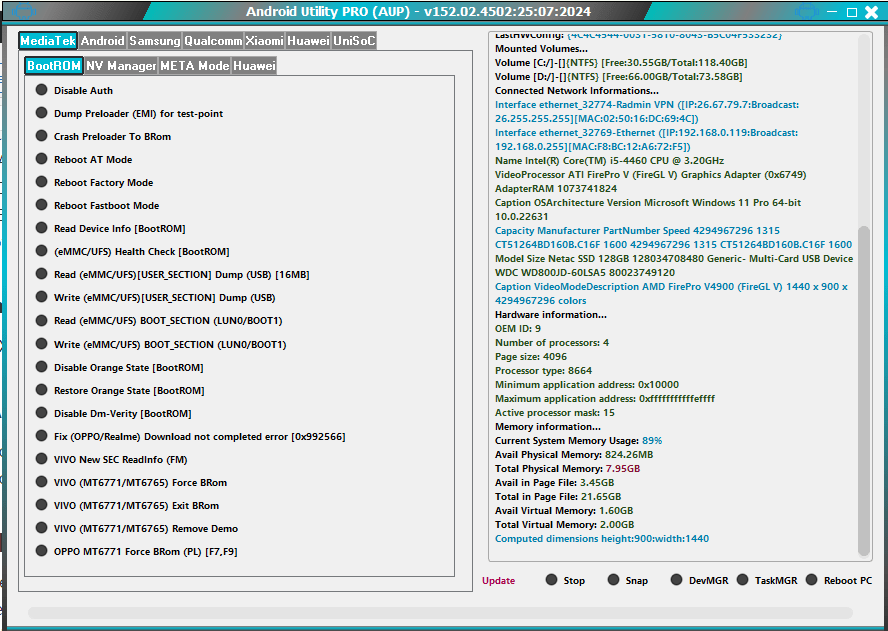
3. MediaTek Support
- The MediaTek section is designed for supported devices using MediaTek chipsets. Advertised functions include device communication, firmware-related operations, and selected diagnostic or maintenance tasks.
- Technicians should identify the exact model and chipset before choosing an operation. Incorrect low-level commands or incompatible firmware may cause software failure or data loss.
4. Qualcomm Device Support
- The tool is also associated with selected Qualcomm servicing functions. Depending on the device and connection mode, these may include diagnostic access, device information, and supported firmware or maintenance workflows.
- Qualcomm devices can require specific drivers and authorized service procedures. Not every model supports every feature listed in third-party descriptions.
5. Samsung Servicing Functions
- The Samsung-related section is advertised with selected maintenance and diagnostic features for compatible Galaxy devices. Certain V200 releases have also been associated with Samsung Android 16 FRP-related support, but compatibility can depend on the model and security patch.
- Users should check the exact supported-device information rather than assuming that all Samsung phones running Android 16 are supported.
6. UniSoC and Spreadtrum Support
- Android Utility Tool V200 Rev (2) Download includes selected functions for devices using UniSoC, also known historically as Spreadtrum in some servicing contexts. The V200.01.0001 release notes specifically mention a fix for Motorola UniSoC boot repair.
- This improvement may be useful for supported devices experiencing particular boot-related software issues, but it is not a universal solution for every Motorola phone or boot failure. <Cite refs={[“turn709787search0″,”turn709787search2″,”turn709787search8”]}/>
7. Firmware Flashing and Maintenance
- Firmware servicing is an important part of Android repair. The tool is advertised with selected flashing and maintenance operations for compatible devices.
- Before using firmware features, verify the model number, regional variant, chipset, and firmware package. Installing an incompatible image may prevent the phone from starting normally.
8. Device Information and Diagnostics
- Device information functions can help technicians identify a connected phone and determine whether the computer is communicating with it correctly. This is useful when troubleshooting driver problems or checking a device before an authorized repair.
9. Reset and Data Maintenance
- The tool is associated with selected factory-reset and data-maintenance options. These functions can be useful during authorized repairs, but reset operations may permanently erase personal files and settings.
- Back up important data whenever possible and confirm that the device owner understands the consequences before proceeding.
System Requirements:
Before using Android Utility Tool V200 Rev (2) Download, prepare the following:
- A Windows computer compatible with the software package.
- A reliable USB data cable.
- Correct USB drivers for the target device and chipset.
- Adequate storage for the application and supporting files.
- A compatible Android phone or tablet.
- Administrator permissions where required.
- Any required hardware, activation, or licence for restricted functions.
Third-party installation guides commonly recommend Windows 10 or Windows 11. Check the documentation packaged with the specific release to confirm its exact requirements.
How to Prepare Android Utility Tool for Installation?
Follow these general preparation steps before starting a servicing session:
- Obtain the installation package from a source you can verify.
- Check that the version is V200.01.0001 Rev (2) if that is the release you need.
- Scan the downloaded archive with reputable security software.
- Extract the package using a trusted archive utility.
- Install the appropriate USB drivers for the target phone.
- Identify the exact phone model, chipset, and current firmware.
- Review the documentation for the operation you intend to perform.
- Back up accessible personal data before any reset or firmware-related work.
Avoid using modified packages from unknown sources. An installer described as offline should not be assumed to be safe simply because it does not require a network connection.
Common Problems and Troubleshooting:
The Tool Does Not Detect the Phone
Check the USB cable, USB port, device drivers, and connection mode. Some operations require a particular device state, and certain phones may need additional manufacturer-specific drivers.
The Selected Operation Is Not Supported
A feature may be unavailable for a particular chipset, firmware version, or security patch. Confirm the exact model and consult the documentation for the installed release.
Firmware Flashing Fails
Check the firmware package and confirm that it matches the phone’s exact model and regional variant. Do not repeatedly try random firmware files, as this can make the problem worse.
Motorola UniSoC Boot Repair Does Not Work
Although the V200.01.0001 release notes mention a Motorola UniSoC boot-repair fix, success depends on the supported model and the underlying fault. Hardware damage or incompatible firmware may require professional diagnosis.
Activation or Smart Card Errors Appear
Some functions may depend on a compatible smart card, licence, or activation. Check the requirements for the specific module rather than assuming all features are available in every installation.
Important Safety Considerations:
Mobile servicing operations can affect personal data, firmware integrity, and device security. Before using the tool:
- Back up important data whenever possible.
- Use only firmware intended for the exact device.
- Perform repairs only on devices you own or are authorized to service.
- Use official account-recovery procedures when a phone requests Google account verification.
- Avoid unauthorized changes to device identifiers such as IMEI.
- Stop if the software reports an unexpected error during a low-level operation.
FRP and other security protections are intended to protect device owners. If a device is locked after a reset, use the original account or the manufacturer’s authorized recovery process.
Is Android Utility Tool V200 Rev (2) Worth Using?
Android Utility Tool V200 Rev 2 Download may be useful for technicians who need a collection of Android servicing functions in one Windows application. Its offline operation and multi-chipset focus are attractive for workshops that regularly handle compatible devices.
However, no single utility supports every phone or every security update. Verify the exact version, supported-device list, and required drivers before relying on it for a repair. If you need only a specific firmware or recovery function, the manufacturer’s official tool may be the safer choice.
Final Words:
Android Utility Tool V200 Rev 2 Download Offline is a multi-purpose Android servicing application associated with firmware maintenance, device diagnostics, reset functions, and selected brand- and chipset-specific workflows. Its V200.01.0001 release is described in third-party listings as an offline build, with a reported Motorola UniSoC boot-repair improvement. Actual capabilities vary by device, firmware, and activation requirements. Download the package carefully, verify compatibility, and protect user data before performing any servicing operation.