ACT Unlock Tool V6.0 Free Download Latest Version For Repair & Unlock 2026
ACT Unlock Tool V6.0 Free Download Latest Version for Android Repair and Unlocking
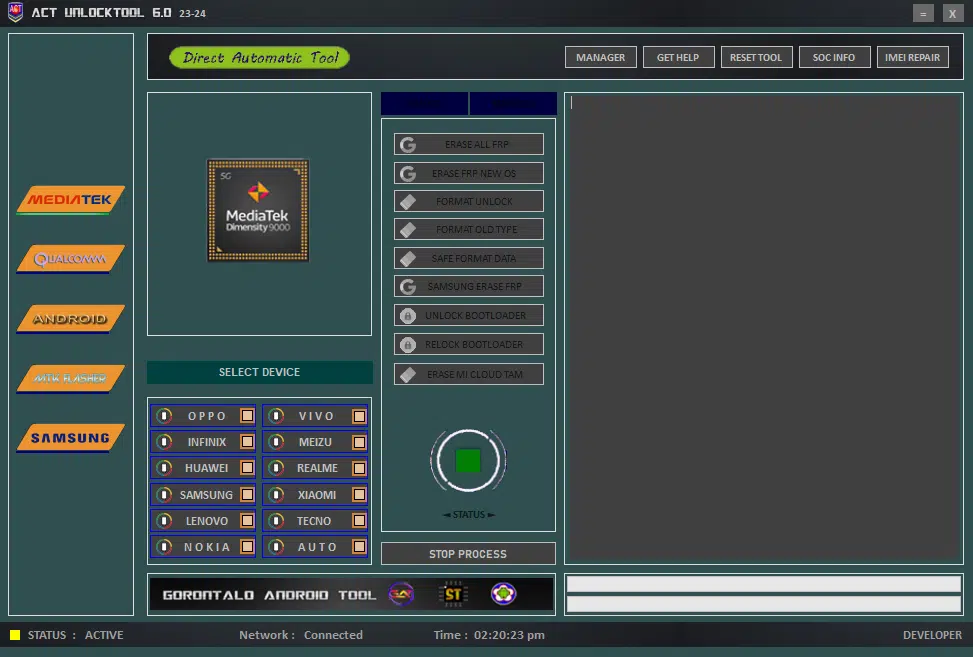
ACT Unlock Tool V6.0 is a Windows-based Android servicing utility designed for mobile technicians and experienced users who need to perform device maintenance, software troubleshooting, and selected firmware operations. The tool is advertised for supported MediaTek (MTK), Qualcomm, and other Android devices, with functions related to device information, ADB commands, factory resets, firmware flashing, and bootloader management. Its interface brings multiple servicing options together, helping technicians work with compatible smartphones from brands such as Samsung, Xiaomi, Huawei, Oppo, Vivo, Realme, and Infinix. Available features depend on the device model, chipset, firmware version, security patch, and required authorization.
What Is ACT Unlock Tool V6.0?
ACT Unlock Tool V6.0 is a multi-purpose mobile servicing program intended to simplify selected Android repair tasks through a Windows interface. It is commonly associated with chipset-specific operations, device diagnostics, firmware maintenance, and troubleshooting functions.
The tool’s published descriptions mention utilities for reading system information, performing supported resets, managing bootloader settings, and flashing compatible firmware. Some releases also advertise IMEI-related repair functions and account-lock servicing features. These operations require particular care because an incorrect procedure can damage device software, erase personal data, or affect network functionality.
Main Features of ACT Unlock Tool V6.0:
1. Device Information and SOC Details
- ACT Unlock Tool includes device-information functions intended to display available hardware and software details. Its SOC information feature can help technicians identify the chipset before selecting a compatible servicing operation.
- Knowing the device model and chipset is important because procedures for MediaTek and Qualcomm devices are not interchangeable. Always confirm the exact model and firmware before proceeding.
2. ADB and Fastboot Utilities
- The tool is associated with ADB and Fastboot functions for supported Android devices. Android Debug Bridge allows authorized communication between a computer and an Android phone, while Fastboot supports selected bootloader-level operations.
- These utilities can help with device detection, rebooting, diagnostics, and supported maintenance tasks. ADB operations may require USB debugging and computer authorization, while Fastboot commands depend on device support and bootloader configuration.
3. MediaTek Device Support
- ACT Unlock Tool V6.0 is widely advertised for MediaTek-based smartphones. Its published feature descriptions include selected flashing, factory-reset, formatting, and device-maintenance functions.
- Compatibility varies by chipset, model, firmware, and security level. Before performing any operation, confirm that the selected function is supported for the specific device rather than assuming that all MTK phones work in the same way.
4. Qualcomm Device Support
- The utility is also advertised for supported Qualcomm-based devices. Depending on the release and handset, its functions may include reading device information and performing selected servicing or firmware-related operations.
- Qualcomm devices can require specific drivers, connection modes, or authorized service access. Use the correct procedure for the exact model and avoid interrupting firmware operations.
5. Factory Reset and Software Maintenance
- The tool’s published feature list includes factory-reset and selected data-formatting options. These functions may be useful when a device has software problems or needs to be prepared for an authorized repair.
- A factory reset normally erases user data. Back up accessible files first, and make sure you understand the difference between a standard reset and operations that modify partitions or firmware.
6. Firmware Flashing
- ACT Unlock Tool advertises firmware-flashing capabilities for supported devices. Flashing can help technicians restore compatible software when a phone experiences certain operating-system problems.
- Firmware must match the device model and relevant hardware configuration. Using an incorrect image or interrupting the process can cause boot failures or leave the device requiring advanced recovery.
7. Bootloader Management
- The tool is associated with bootloader unlock and relock functions on compatible devices. These operations are relevant to certain development, repair, and firmware-maintenance workflows.
- Bootloader unlocking may erase data and reduce some security protections. Relocking a device with incompatible or modified firmware can prevent it from starting. Follow the manufacturer’s requirements and use these features only when appropriate.
8. Device Diagnostics and Troubleshooting
- The utility provides a collection of servicing options intended to help technicians investigate device issues. Diagnostic information can help narrow down whether a problem relates to device detection, software configuration, firmware compatibility, or missing drivers.
- Not every problem can be resolved through a servicing utility. Hardware failures and manufacturer-specific restrictions may require professional diagnosis or authorized service.
9. IMEI-Related Functions
- Some published descriptions of ACT Unlock Tool mention IMEI-related repair features for supported chipsets. IMEI information is a regulated device identifier used by mobile networks, so any repair must comply with local law and applicable manufacturer procedures.
- Only perform lawful repairs to restore a device’s original, legitimate identifier where authorized. Do not use such functions to alter identifiers, duplicate them, or evade network restrictions.
How to Install ACT Unlock Tool V6.0 on Windows?
Before installing the utility, prepare a Windows computer, a reliable USB cable, and the appropriate USB drivers for your Android device.
- Obtain the software package from a source you trust.
- Scan the downloaded archive and executable files with reputable security software.
- Extract the archive into a dedicated folder if necessary.
- Read the included instructions and check for additional dependencies.
- Install the required device drivers from trusted sources.
- Launch the program using the permissions needed for the intended task.
- Connect the Android device in the appropriate mode and confirm that the computer recognizes it.
- Review the selected operation and any warnings before proceeding.
Installation steps may differ between packages. Avoid unknown repackaged installers and do not disable security protection merely because a download page requests it.
How to Use ACT Unlock Tool V6.0?
After launching the program, identify the device’s manufacturer, exact model, and chipset. Select the relevant section and confirm that the tool detects the connected phone.
Start with basic information or diagnostic functions where possible. Before running a reset, flashing, or bootloader operation, verify firmware compatibility and back up important data. Wait for operations to complete, and review the program’s output for errors before disconnecting the device.
For account verification and Factory Reset Protection issues, use official account recovery or authorized service procedures. Do not attempt to access a device without the owner’s permission.
System Requirements and Compatibility:
ACT Unlock Tool V6.0 is distributed as a Windows utility. The exact supported Windows versions and additional software requirements should be checked against the particular release.
Compatibility depends on:
- The phone’s exact model and chipset
- Android version and security patch
- Correct USB drivers
- ADB, Fastboot, or other supported connection modes
- Bootloader status and required service authorization
- Firmware compatibility and tool version
A manufacturer or chipset appearing in the advertised feature list does not guarantee that every device or operation is supported.
Advantages of ACT Unlock Tool V6.0:
The main advantage of ACT Unlock Tool V6.0 is its collection of different Android servicing functions in one interface. Device-information tools, selected reset options, firmware utilities, and chipset-specific functions can help technicians organize routine maintenance tasks.
Its advertised support for multiple device platforms may also be useful in repair environments that handle phones from different manufacturers. However, successful operation depends on compatibility, and advanced functions require appropriate technical knowledge.
Important Safety Recommendations:
Always download the tool from a trusted source and scan its files before running them. Back up important information before resetting a device or modifying firmware. Use only compatible firmware, and avoid disconnecting a phone while a critical operation is in progress.
For FRP, account locks, or organization-managed devices, use official account recovery, the previous owner’s authorized removal process, or the responsible administrator. Only service devices you own or are authorized to repair.
Final Words:
ACT Unlock Tool V6.0 is a Windows-based Android servicing utility advertised for device diagnostics, ADB and Fastboot operations, selected MediaTek and Qualcomm functions, factory resets, firmware flashing, and bootloader management. It may be useful for mobile technicians who work with compatible devices and understand the risks of advanced maintenance operations. Before using the tool, verify the software source, confirm exact device compatibility, and follow safe servicing practices to reduce the risk of data loss or software damage.