Kg Killer Tool Mdm Solutions On Android Unlock For Devices New Setup 2026
KG Killer Tool MDM Solutions on Android Devices
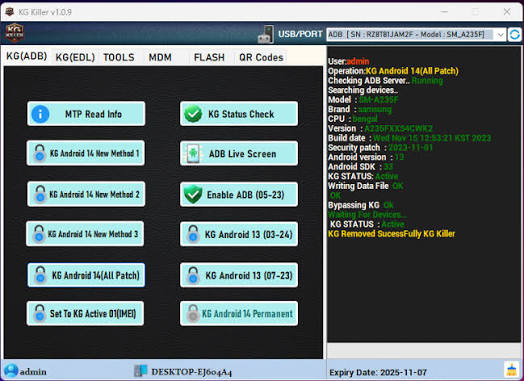
KG Killer Tool is a name used for Android servicing utilities that are promoted for handling certain KG, Knox Guard, and MDM-related device states. Such tools are generally aimed at mobile technicians working with Samsung and other supported Android devices. Because KG and MDM protections are security and device-management mechanisms, any related servicing should only be performed on devices that are legitimately owned or explicitly authorized for repair.
What Is KG Killer Tool?
KG Killer Tool is associated with Android device servicing and troubleshooting where a device may be subject to management or security restrictions. Depending on the particular release, tools marketed under this name may provide diagnostic functions, device information, ADB communication, and other maintenance capabilities.
KG commonly refers to Samsung Knox Guard, while MDM stands for Mobile Device Management. Both technologies can be used by organizations, carriers, retailers, and other authorized parties to manage Android devices.
KG and MDM on Android Devices:
KG and MDM restrictions can appear for different legitimate reasons. For example, a company may manage phones issued to employees, while a retailer or financing provider may manage devices under a specific agreement.
When a device displays a management or security restriction, the correct solution depends on the reason behind the restriction. Removing management without authorization can violate ownership or organizational policies.
Key Features Associated With KG Service Tools:
Device Information
- A KG Tool servicing utility can help technicians identify the connected Android device and review available software information before troubleshooting.
- Important details can include the device model, Android version, firmware build, security patch, and connection status.
ADB Communication
- ADB can provide authorized communication between Windows and an Android device. It can be useful for diagnostics, application management, device information, and supported maintenance operations.
- ADB access depends on the device configuration and required authorization.
Service and Diagnostic Functions
- KG- and MDM-related service utilities may provide diagnostic features that help technicians determine the current device state. These functions can be useful when investigating whether a problem is caused by software configuration, management policies, or another issue.
Samsung Device Support
- KG and Knox Guard are strongly associated with Samsung’s enterprise and device-management ecosystem. As a result, many KG-focused servicing utilities are marketed toward Samsung smartphones.
- Compatibility varies by model, Android version, firmware, and security patch.
Understanding Knox Guard:
Knox Guard is a Samsung security and device-management solution that can be used to protect devices under various ownership or management arrangements.
A device with an active KG state may require an authorized action from the organization, carrier, retailer, or other legitimate administrator responsible for the device.
For this reason, KG should not simply be treated as an ordinary software error.
Understanding MDM:
Mobile Device Management allows organizations to control and manage smartphones remotely. MDM can enforce security policies, configure applications, restrict settings, and manage corporate devices.
If a phone is enrolled in MDM, the appropriate solution is normally to have the authorized administrator remove or release the device from management.
Why Technicians Use Android Service Tools?
Professional technicians often need diagnostic utilities to determine why a phone cannot be configured normally. Service tools can help identify device states, collect information, communicate through supported interfaces, and troubleshoot software problems.
A dedicated utility can also reduce the need to switch between multiple diagnostic applications.
Compatibility:
KG and MDM-related functionality can vary significantly between Android devices. Before using any servicing software, technicians should verify:
- Exact device model
- Android version
- Security patch level
- Firmware/build number
- KG state
- MDM enrollment status
- USB driver compatibility
- Device ownership or service authorization
Newer security updates may also change how device-management features operate.
Windows Setup:
Most Android service utilities are used from a Windows computer. A stable USB connection and the appropriate Android or manufacturer drivers are important for reliable communication.
Before connecting a device, close unnecessary Android management applications and make sure the phone has enough battery power for normal diagnostic operations.
Common Troubleshooting:
Device Is Not Detected
Check the USB cable, Windows drivers, USB port, and device connection mode. For ADB-based functions, required debugging authorization must also be available.
KG State Remains Active
An active KG state may be controlled by Samsung or an authorized organization, carrier, or financing provider. A legitimate resolution may require the responsible administrator or service provider to release the device.
MDM Restrictions Remain
If the phone is still enrolled in an organization’s MDM system, the administrator normally needs to remove the device from the management platform.
Tool Does Not Support the Device
Compatibility can vary based on Android version, firmware, security patch, chipset, and device model. A feature working on an older device does not guarantee support on a newer security build.
Safety and Responsible Use:
KG Killer Tool and similar utilities should only be used for authorized device servicing. KG, Knox Guard, MDM, and related protections exist to prevent unauthorized use and protect devices and organizational data.
Users should not attempt to defeat management or security controls on devices they do not own or have permission to service. For corporate, financed, or carrier-managed devices, the appropriate administrator or provider should be contacted.
Final Words:
KG Killer Tool is associated with Android servicing workflows involving KG, Knox Guard, and MDM-related device states. Such utilities may help technicians diagnose supported Android devices and perform legitimate maintenance tasks through interfaces such as ADB.
Because KG and MDM are security and management systems, the correct approach for a locked or managed device is to verify ownership and resolve the restriction through the responsible administrator, carrier, retailer, or manufacturer. Compatibility also depends on the device model, firmware, Android version, and security level.