Alriqi Soft Tools V2 Download Unlocking and Frp Tool For Smart Phones 2026 Updated
Alriqi Soft Tools V2 – Unlocking and FRP Tool for Smartphones
Introduction to Alriqi Soft Tools V2 Download
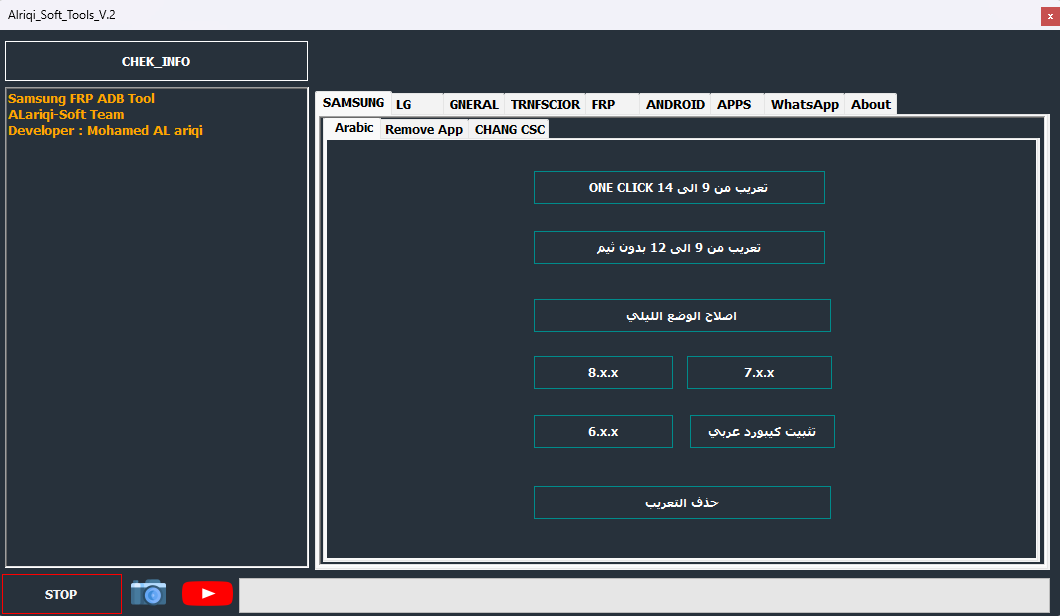
Alriqi Soft Tools V2 Download is a Windows-based Android servicing utility designed for technicians who work with supported Samsung, LG, and selected Android smartphones. It combines several device management and troubleshooting functions in a single interface, making it useful for routine software maintenance and authorized mobile repair.
The tool is known in mobile servicing communities for its advertised Samsung FRP-related functions, ADB operations, Arabic language options, application management, and network configuration utilities. The features available depend on the software release, device model, Android version, firmware, and security patch level.
What Is Alriqi Soft Tools V2 ?
Alriqi Soft Tools V2 is intended to help users manage supported smartphone servicing tasks through a Windows computer. Instead of relying on separate applications for every maintenance operation, technicians can access several advertised functions from one desktop interface.
Third-party descriptions identify Samsung and LG devices as its main focus. However, compatibility is not universal, and the presence of a particular brand in a feature list does not guarantee that every model will work.
Main Features of Alriqi Soft Tools V2:
1. Samsung FRP Servicing
- Factory Reset Protection is an Android security feature that helps protect a phone after an unauthorized or incomplete factory reset. Alriqi Soft Tools V2 Download is advertised as providing FRP-related servicing options for selected Samsung devices.
- Support depends on the model, Android release, firmware, and security patch. For legitimate account-verification problems, users should begin with Google’s official account recovery process or contact an authorized repair provider.
2. ADB Device Management
- Android Debug Bridge is a communication interface used for authorized diagnostics and software maintenance. The tool’s published feature descriptions include ADB-related operations for compatible devices.
- ADB functions can help technicians access supported device information and perform certain maintenance tasks when the required permissions and connection settings are available.
3. Arabic Language and Keyboard Support
- One of the advertised features of Alriqi Soft Tools V2 Download is support for Arabic language configuration and keyboard installation on selected Samsung devices. These options can be helpful when configuring a phone for Arabic-language use.
- The available localization functions may vary according to the phone’s firmware and software configuration.
4. Samsung CSC and Network Settings
- The tool’s published descriptions mention selected CSC and network-related functions. CSC refers to Country Specific Code, a Samsung firmware configuration associated with regional and carrier-specific settings.
- Changing these settings can affect network configuration, available features, and carrier customization. Always verify compatibility and use settings appropriate for the device’s intended region and network.
5. LG ADB Functions
- Alriqi Soft Tools V2 also advertises ADB-based utilities for selected LG Android devices. Depending on the supported model, these may assist with device information and certain software maintenance tasks.
- Because LG device support can differ by generation and firmware, verify the exact model before using any function.
6. Application Management
- The application management section is described as providing options to view, manage, disable, or remove selected applications on compatible devices.
- Removing system or carrier applications can affect important device functions. Before making changes, identify the application and confirm that it is safe to disable or remove.
7. Network and VoLTE-Related Utilities
- Some published feature lists include network configuration, IMS, and VoLTE-related options for supported Samsung devices. These technologies help provide voice services over compatible mobile networks.
- Availability depends on the phone hardware, firmware, carrier configuration, and network support. A software setting alone cannot guarantee that VoLTE or another network feature will work.
8. Additional Device Maintenance
- Third-party descriptions also mention reboot controls, selected reset functions, and other device management options. The availability and behavior of these functions depend on the particular release.
- Reset and erase operations can remove personal data. Back up important files whenever possible and review the consequences before proceeding.
Supported Devices and Compatibility:
Alriqi Soft Tools V2 Download is primarily associated with selected Samsung and LG smartphones. Some third-party descriptions also refer to additional Android devices and carrier-specific configurations.
Before using the tool, verify the following details:
- Exact phone model and regional variant
- Android version and firmware build
- Current security patch level
- Required USB drivers and connection mode
- Compatibility of the selected feature with the device
- Release-specific installation and licensing requirements
A tool that works with an older Samsung device may not support a newer model with updated security protections.
System Requirements:
Alriqi Soft Tools V2 is distributed as Windows software. Third-party listings mention support for several Windows versions, but users should confirm compatibility with the particular release before installation.
A typical setup may require a compatible Windows computer, sufficient storage, a reliable USB data cable, and the appropriate Samsung, LG, or ADB drivers.
Download and Installation Safety:
Download the software only from a source you can reasonably verify. Check the version information, package details, and any installation requirements before running the setup file.
Scan downloaded archives and installers with a trusted security application. Avoid disabling Windows Defender or another antivirus program just to run an unverified package. If the software triggers a suspicious warning, verify the file’s authenticity rather than ignoring the alert.
Also check whether the release is genuinely free and whether registration or activation is required. Third-party download pages may describe different packages or outdated versions.
Advantages of Alriqi Soft Tools V2:
The main advantage of Alriqi Soft Tools V2 is its collection of several device management and servicing options in one Windows interface. Its advertised features include Samsung FRP-related servicing, ADB utilities, Arabic language support, application management, and selected network settings.
This combination may be convenient for mobile repair technicians who regularly work with supported devices and understand the relevant servicing requirements.
Limitations and Important Precautions:
The tool is not a universal solution for every Android phone. Certain functions may be unavailable on newer firmware or may require a specific connection mode. Incorrect operations can cause data loss or software problems.
FRP and organizational device-management restrictions are security protections. Only service devices you own or have explicit permission to repair. For a second-hand phone, ask the previous owner to complete the official account-removal process. For company-managed devices, contact the authorized administrator.
Final Words:
Alriqi Soft Tools V2 Download is a Windows-based Android servicing utility associated primarily with Samsung and LG smartphones. Its advertised functions include FRP-related servicing, ADB operations, Arabic localization, application management, and selected CSC and network utilities.
Before using the tool, verify the download source, release details, and compatibility with your exact device. Responsible servicing, reliable backups, and official account recovery procedures help protect both the device and its data.