VG Open Menu Tool Download Unlimited Bypass for All Devices Latest Version 2026
VG Open Menu Tool Download – iPhone FMI Servicing and iOS Device Management Utility
Introduction to VG Open Menu Tool
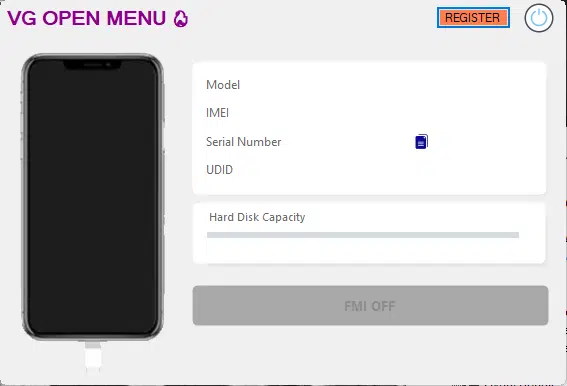
VG Open Menu Tool Download is a third-party iOS servicing utility associated with iPhone and iPad maintenance, Find My iPhone (FMI)-related services, and selected activation or device-management functions. The tool has been discussed in mobile repair communities as a computer-based utility for compatible Apple devices.
Third-party descriptions advertise features for selected iPhone models and iOS versions, including backup-related operations and FMI servicing. However, compatibility depends on the device model, iOS version, device state, and the specific release. The phrase “unlimited bypass for all devices” should not be treated as a guarantee that every iPhone or iPad is supported.
VG Open Menu Tool is not an official Apple application. Before downloading it, users should verify the release details, software requirements, and source of the installer.
What Is VG Open Menu Tool?
VG Open Menu Tool Download is promoted as a Windows-based utility for selected iOS servicing tasks. Its published descriptions focus on FMI-related operations and device-management features, with some releases claiming compatibility with multiple generations of iPhones.
Find My iPhone is part of Apple’s security and device-location system. Activation Lock can prevent another person from activating a device without the owner’s Apple Account credentials. These protections are designed to safeguard personal data and help discourage unauthorized use of lost or stolen devices.
Because VG Open Menu Tool is distributed by third parties, its actual capabilities and supported devices should be confirmed against reliable release information rather than assumed from marketing claims.
Main Features Associated with VG Open Menu Tool:
1. FMI-Related Servicing
- FMI stands for Find My iPhone. Third-party descriptions of VG Open Menu Tool advertise FMI-related servicing for selected compatible devices.
- Availability may depend on the device’s hardware, iOS version, and current software support. A feature listed for an older release may not work on newer devices or updated operating systems.
2. iPhone and iPad Compatibility
- Published third-party listings mention various iPhone generations, including selected models from the iPhone 6 through iPhone 15 families. These listings do not establish universal compatibility or confirm support for every device in those ranges.
- Before using any servicing utility, check the exact model number and iOS version against the documentation for the specific release.
3. Backup-Related Functions
- Some descriptions of VG Open Menu Tool mention backup operations and improvements to their speed. Backup functions can be useful when preparing a device for legitimate maintenance.
- Always maintain a separate, verified backup of important data before attempting software repairs. Do not assume that a third-party tool will preserve every file or setting.
4. Device Connection and Detection
- Computer-based iOS utilities generally rely on a suitable USB data cable and compatible Apple device support components. Correct detection helps users determine whether the device is communicating properly with the computer.
- If a phone is not recognized, check the cable, USB port, operating-system compatibility, and trusted driver or device-support installation before attempting further maintenance.
5. Version-Specific Updates
- Third-party listings describe interface updates, stability improvements, and changes to backup-related functions in certain VG Open Menu releases. However, those notes may refer to an older release and should not be applied automatically to every version.
- Confirm the changelog and supported iOS range for the exact package you intend to use.
System Requirements and Preparation:
VG Open Menu Tool Download has been distributed as Windows software. Requirements can vary by release, so check the publisher’s documentation before installation.
For general preparation, use a compatible Windows computer, a reliable USB data cable, sufficient storage, and any required Apple device support components. Back up important data before carrying out maintenance that could affect device information.
If a feature requires an account, paid credits, or an online service, review the conditions and costs before purchasing access.
How to Download VG Open Menu Tool Safely?
Choose a source that clearly identifies the publisher and software version. Check the installer name, file details, supported devices, and release notes before running the program.
The VG Open Menu Tool V3.0 release is mentioned in third-party listings, but that does not independently establish that it is the latest, safest, or most compatible version available. Verify current version information before downloading.
Scan downloaded files with reputable security software. Avoid modified installers, unknown archives, and instructions that tell you to disable antivirus protection. If a security warning appears, verify the file with the publisher before proceeding.
Important Security and Compatibility Notes:
VG Open Menu Tool Download advertised functions may be limited by the iOS version, device configuration, and the particular release. Claims of universal or permanent unlocking should be treated cautiously, and no result should be assumed before compatibility is established.
Use servicing software only on devices you own or are authorized to repair. If an iPhone or iPad is linked to another person’s Apple Account, ask the previous owner to remove it from their account through the proper process. If you have proof of purchase but cannot resolve Activation Lock, contact Apple Support.
Final Words:
VG Open Menu Tool Download is a third-party iOS servicing utility associated with FMI-related operations, backup functions, and selected iPhone and iPad maintenance tasks. Its actual capabilities depend on the release, device model, and iOS version.
Before downloading, verify the software source and version, review compatibility requirements, and protect your data with a backup. For genuine Find My or Activation Lock problems, Apple’s official account recovery and support options remain the safest approach.