Chigo Unlocker Tool V3.5 With Unlock Your Android Devices Download For Windows
Chigo Unlocker Tool V3.5 – Android Unlocking, Flashing and Repair Tool
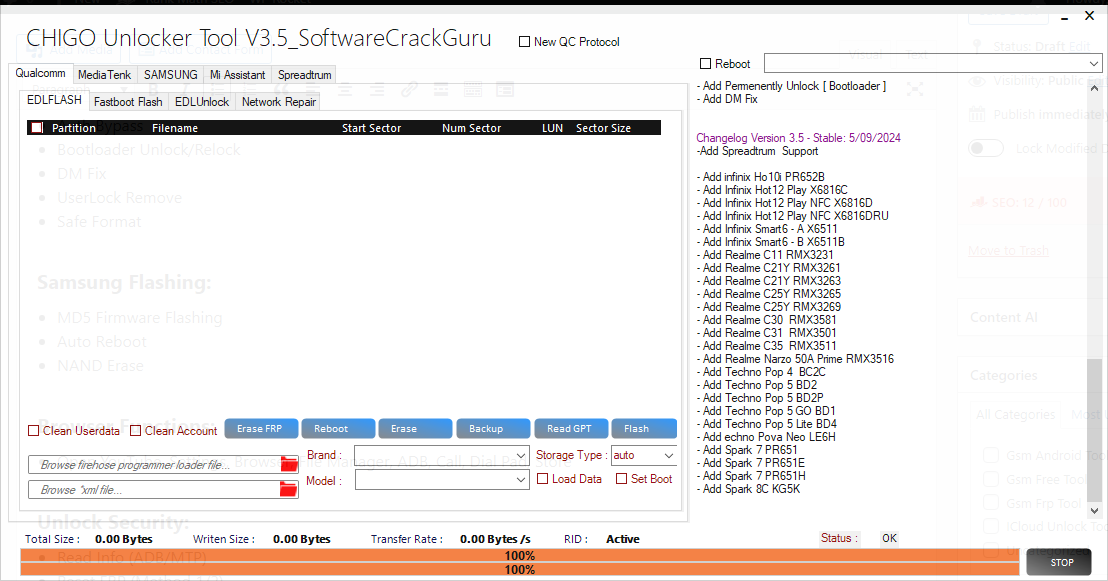
Chigo Unlocker Tool V3.5 is a Windows-based mobile servicing utility designed for technicians who work with supported Android smartphones. It brings together several firmware flashing, device maintenance, diagnostic, and repair functions for selected Qualcomm, MediaTek, and Spreadtrum/UNISOC devices. Third-party descriptions list support for brands such as Xiaomi, Oppo, Realme, Samsung, Vivo, Tecno, and Infinix. Actual compatibility depends on the exact device model, chipset, firmware version, security patch, and connection mode.
What Is Chigo Unlocker Tool V3.5?
Chigo Unlocker Tool is a multi-platform Android servicing program intended to simplify common mobile repair workflows. Instead of switching between multiple applications for different chipsets, technicians can use its available modules to perform supported flashing, backup, partition inspection, reset, and diagnostic tasks.
Version 3.5 is associated with additional Spreadtrum/UNISOC support and improvements to selected Qualcomm and MediaTek workflows. Although third-party sources advertise broad device compatibility, not every feature works on every phone. Users should verify the supported model list before attempting any operation.
Key Features of Chigo Unlocker Tool:
1. Qualcomm EDL Flashing
- The Qualcomm module is advertised with Emergency Download Mode (EDL) support for compatible devices. EDL is a low-level recovery mode used for certain firmware and servicing operations. Listed functions include firmware flashing, device information access, backup options, partition-table reading, and selected reset operations.
- These functions may require compatible programmer files, correct firmware, and appropriate authorization. Using an incorrect firmware package or programmer can cause serious software problems.
2. Fastboot Flashing
- The Fastboot module provides options for supported Android devices to communicate with the bootloader. Depending on the model and security configuration, it may support firmware installation, system reboot, and transitions into supported recovery modes.
- Always use firmware that matches the exact model and regional variant. Some devices require an officially unlocked bootloader or additional manufacturer authorization before flashing is permitted.
3. MediaTek Device Support
- Chigo Unlocker Tool V3.5 includes a MediaTek module for selected MTK-based smartphones. Third-party feature lists mention firmware flashing, backup operations, partition management, and selected preloader-related functions.
- MediaTek devices differ considerably in their security implementations. Some operations require compatible Download Agent files or other device-specific resources, so chipset support alone does not guarantee successful servicing.
4. Spreadtrum and UNISOC Support
- Version 3.5 is also associated with expanded Spreadtrum/UNISOC support. Published lists mention selected Tecno, Infinix, and Realme models, including certain entry-level smartphones.
- The available functions vary by model and may depend on the device’s firmware and security configuration. Check the exact model number rather than relying only on the manufacturer’s brand name.
5. Samsung Firmware Flashing
- The Samsung module is advertised with support for compatible firmware packages in MD5 format. Depending on the device and available options, it may provide flashing controls such as automatic reboot and storage-erasure settings.
- Incorrect firmware or unsuitable flashing settings can cause boot failures or data loss. Use trusted firmware for the exact device model and follow manufacturer-recommended recovery procedures whenever possible.
6. Xiaomi Servicing Functions
- Third-party descriptions list Xiaomi-related operations through EDL and recovery-oriented modules. Available functions may include device information reading, factory reset, and selected recovery tasks for supported models.
- Account-based protections are separate from ordinary firmware maintenance. If a Xiaomi device requests the previous owner’s account, use the official account-recovery or owner-removal process rather than assuming a flashing utility can resolve the restriction.
7. Oppo and Realme Support
- The tool advertises selected servicing functions for compatible Oppo and Realme devices. Depending on the model, the available options may include factory reset and other software maintenance operations.
- Because security measures differ between models and software releases, verify compatibility before starting. A function listed for one Oppo or Realme phone may not be available on another.
8. Vivo and Other Supported Brands
- Third-party feature descriptions also mention selected Vivo servicing functions, along with support for certain other Android manufacturers. Available options can vary according to chipset, device state, and supported connection method.
- A complete compatibility check should include the model number, firmware version, chipset, and the precise repair task required.
9. Network Diagnostics
- Chigo Unlocker Tool is advertised with diagnostic features involving Qualcomm network data, including QCN and NV-related operations on supported devices. Such functions may be relevant when investigating certain network or modem issues.
- Network calibration data is device-specific and can affect connectivity. Back up relevant information before authorized repairs, and never use these functions to alter device identifiers or interfere with cellular networks.
10. Device Information and Utility Functions
- Some published descriptions list shortcuts for ADB, device information, file management, and other utility functions. These can help technicians organize basic maintenance and diagnostic tasks from a single interface.
- ADB functions require the appropriate device connection and permissions. They cannot automatically access every phone or override all security restrictions.
System Requirements:
Chigo Unlocker Tool V3.5 is distributed as a Windows utility in third-party listings. Exact requirements may vary depending on the package.
Before installation, prepare:
- A compatible Windows computer.
- A reliable USB data cable.
- Appropriate USB drivers for the target device and chipset.
- Correct firmware files for any planned flashing operation.
- Sufficient free disk space and a stable power supply.
- A backup of important user data, where possible.
Only download software from sources you can verify. Scan installers with reputable security software, and do not disable antivirus protection simply because an unofficial download page instructs you to do so.
Benefits of Chigo Unlocker Tool V3.5:
One of the main advertised advantages is the combination of Qualcomm, MediaTek, and Spreadtrum/UNISOC servicing options in a single application. This may help technicians who regularly work with phones from different manufacturers.
Other potential benefits include a unified interface for selected firmware operations, device diagnostics, backup tasks, and partition inspection. The usefulness of these features depends on whether the exact phone and required operation are supported.
Important Limitations and Safety Tips:
Chigo Unlocker Tool V3.5 is not a universal repair solution. Newer Android security updates, manufacturer restrictions, authentication requirements, and changes to bootloader protocols can prevent some operations from working.
Before performing any repair, verify the tool’s source, confirm the supported model, and back up important data. Avoid unverified packages that promise guaranteed one-click unlocking across every Android device.
Factory Reset Protection (FRP), account locks, and organizational device management are ownership safeguards. For a phone you own, use the relevant official account-recovery process. For a second-hand device, ask the previous owner to remove the account. Organization-managed phones should be handled by the responsible administrator.
Final Words:
Chigo Unlocker Tool V3.5 is a multi-chipset Android servicing utility associated with firmware flashing, device diagnostics, partition management, and selected repair functions. Its advertised support for Qualcomm, MediaTek, and Spreadtrum/UNISOC platforms may make it useful for technicians handling compatible Android phones.
Before using the tool, verify device compatibility, obtain trustworthy firmware, protect user data, and follow authorized servicing practices. Since features vary by model and security version, treat third-party feature lists as guidance rather than a guarantee of successful operation.