Halabtech Tool V1.1.6 Samsung Qualcomm Xiaomi Download For Windows 2026
Halabtech Tool V1.1.6 Samsung Qualcomm Xiaomi
Halabtech Tool is a Windows-based mobile servicing utility designed for technicians who work with compatible Android smartphones from Samsung, Xiaomi, Qualcomm-powered devices, and other supported manufacturers. The software brings together several servicing functions in one interface, including device-information reading, firmware-related operations, selected reset functions, language support, and diagnostic tools. It is intended to simplify common mobile repair workflows and reduce the need to switch between multiple utilities. The exact features available depend on the software edition, connected device, chipset, firmware version, and security patch level.
What Is Halabtech Tool?
Halabtech Tool is a third-party mobile repair application associated with the HalabTech support platform. Its published documentation describes support for multiple device platforms, including MediaTek, Qualcomm, Kirin, Samsung, Huawei, Oppo, and Tecno. Different releases introduce different features, so users should distinguish the version number shown in a download title from the release information published by the developer.
The official product pages identify the main application as Halabtech Tool V1.1. However, the exact release history for a version specifically labeled V1.1.6 could not be independently confirmed from the available official information. Verify the package details before installing a file advertised under that version number.
Key Features of Halabtech Tool:
1. Samsung Device Servicing
- Halabtech Tool includes selected Samsung servicing functions. Published release notes describe language-related features for Arabic, Turkish, and Persian on supported Android versions, along with device-information and other maintenance options. Availability varies by Samsung model, firmware, and the specific edition being used.
2. Qualcomm Device Support
- The tool advertises functions for selected Qualcomm-powered devices, including certain diagnostic, firmware, and maintenance operations. Some procedures require specialized connection modes, appropriate drivers, or additional authorization. Compatibility should always be checked before attempting a repair.
3. Xiaomi and Redmi Support
- Halabtech Tool includes Xiaomi-related functions in its published feature history. These include selected device-identification, diagnostic, and bootloader-related operations for supported models. The availability of each function depends on the phone’s model, chipset, and software configuration.
4. MediaTek Servicing
- The software also advertises support for selected MediaTek chipsets. Depending on the version and device, features may include device communication, firmware-related work, and certain reset or maintenance functions. Not all MediaTek devices are supported, and newer security protections can limit available operations.
5. Huawei and Kirin Devices
- Published descriptions list selected Huawei and Kirin-related servicing capabilities. These functions may require specific drivers, firmware files, or supported hardware modes. Confirm the supported model and exact operation in the relevant documentation.
6. Language and Software Maintenance
- Some Halabtech releases provide language-related features for supported Samsung devices. These can be useful in servicing situations where language availability is limited. Compatibility depends on the Android version and device configuration.
7. Device Information and Diagnostics
- Device-information functions can help technicians identify a connected phone and inspect available details before selecting a repair operation. Accurate identification is important when choosing firmware or determining whether a particular function is supported.
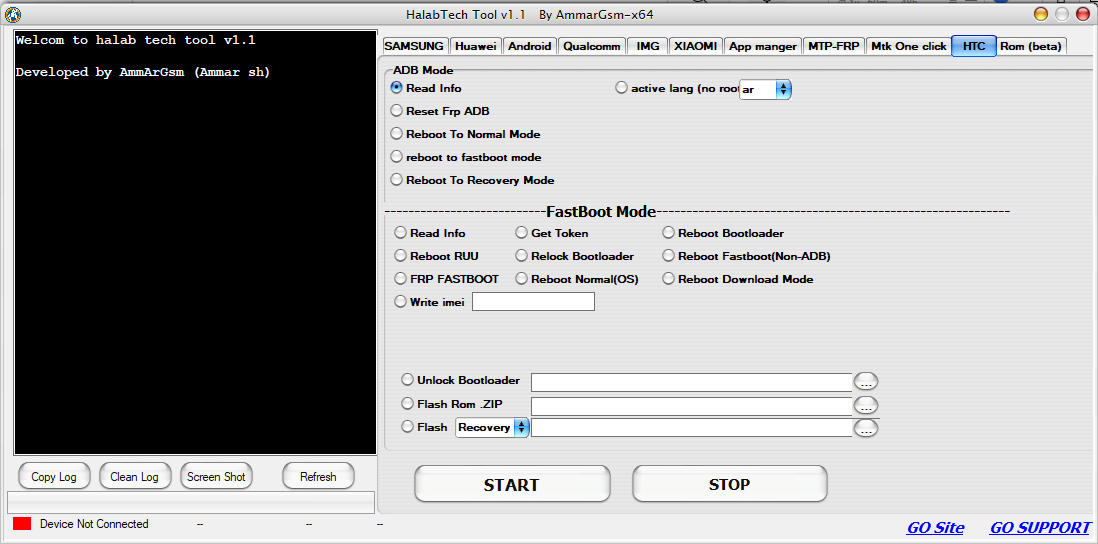
Halabtech Tool V1.1.6 Latest Version:
Halabtech publishes product information and update notes through its support platform. The official pages currently describe the main product as version 1.1 and document several features added in that release. Because the exact V1.1.6 label could not be verified independently, users should confirm the version displayed by the developer before downloading.
Avoid assuming that a third-party package is official or current simply because its filename includes a newer version number. Check the release notes, file details, licensing requirements, and supported-device information before installing it.
System Requirements:
Before using Halabtech Tool, prepare the following:
- Operating system: A compatible Windows computer.
- USB cable: A reliable data cable for connecting the smartphone.
- USB drivers: Drivers appropriate for the device manufacturer and chipset.
- Firmware files: Correct files for the exact device model, when required.
- Storage: Enough free space to extract and run the software.
- Authorization: Permission to service the connected device.
Specific requirements may vary by edition and operation. Consult the included documentation before starting.
How to Prepare Halabtech Tool on Windows?
First, identify the exact model number and chipset of the phone you intend to service. Obtain the software from the official HalabTech platform or another source you trust, and scan the downloaded files before running them.
Install the appropriate USB drivers and connect the device using a suitable data cable. Confirm that Windows recognizes the phone and review the supported functions for that model. Before performing a reset, flashing operation, or other major change, back up important information whenever possible and verify that the selected files match the device.
Benefits of Halabtech Tool:
Halabtech Tool combines multiple advertised servicing functions in a single Windows interface. Its multi-platform focus can be useful for technicians who work with different manufacturers, while device-information and diagnostic options can help organize repair procedures.
However, results are not guaranteed for every phone. Some operations may require paid access, service credits, or additional authorization. Users should check the licensing terms and current compatibility list rather than assuming all functions are freely available.
Safety and Compatibility Tips:
Download the tool from a trusted source and avoid modified packages that ask you to disable security software. Firmware flashing, formatting, and factory-reset operations can erase personal data or prevent a phone from booting if performed incorrectly.
Only service devices you own or have authorization to repair. Account verification, anti-theft protections, and organization-managed restrictions should be resolved through the appropriate account owner, manufacturer, or administrator.
Final Words:
Halabtech Tool is a multi-brand Windows servicing utility advertised for selected Samsung, Qualcomm, Xiaomi, MediaTek, and other compatible devices. Its published features cover several diagnostic, maintenance, and firmware-related workflows. Before downloading a package labeled V1.1.6, verify the version and source because that exact release label was not confirmed by the available official documentation. Choosing the correct edition and checking device compatibility can help reduce unnecessary risks during mobile servicing.