 Posted by
PL SPD FRP Free Tool – Infinix, Realme and Tecno Device Utility
Introducing the “PL SPD FRP Free Tool.” This multifunctional tool serves as a solution for data recovery and bypassing Factory Reset Protection (FRP) locks, allowing you to regain access to your devices. You can download it now to take advantage of various features—such as wiping data and removing FRP locks—available for compatible models, including devices from Infinix, Realme, and Tecno.
What is the “PL SPD FRP Free Tool”?
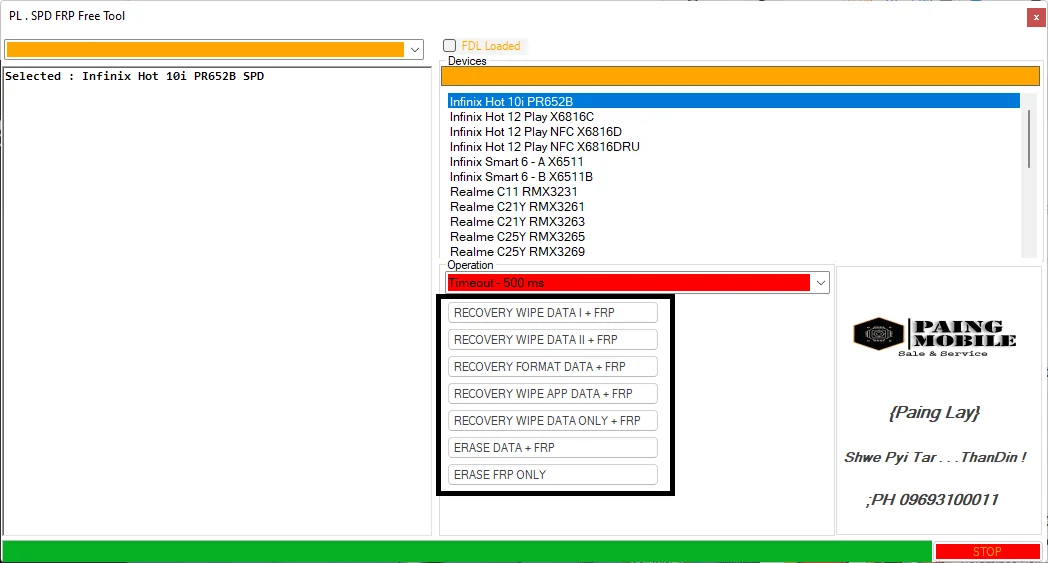
The “PL SPD FRP Free Tool” is an excellent solution for addressing issues related to Factory Reset Protection (FRP) locks on Android devices. The tool offers options such as “Recovery Wipe Data + FRP,” as well as a dedicated function for removing only the FRP lock, simplifying the device recovery process.
Additionally, the tool provides functions like “Recovery Format Data + FRP,” “Wipe App Data + FRP,” and “Erase Data + FRP,” making it a comprehensive solution for data management. It is compatible with devices from brands such as Infinix, Realme, and Tecno.
Overview of the “PL SPD FRP Free Tool”:
The 2024 version of the “PL SPD FRP Free Tool” includes various features for managing FRP locks—such as “Recovery Wipe Data + FRP” and “Recovery Format Data + FRP”—ensuring an effective recovery process for your device.
The tool enables operations including “Recovery Wipe App Data + FRP,” “Recovery Wipe Data + FRP,” and “Erase Data + FRP,” alongside the ability to remove the FRP lock independently. Thanks to its compatibility with popular models such as Infinix, Realme, and Tecno, this versatile tool provides users with an effective way to manage their devices.
Key Features of PL SPD FRP Free Tool:
1. Recovery Data Wipe Options
- The published feature list includes multiple recovery wipe options. These functions are intended for supported recovery and servicing scenarios, but wiping data can permanently remove photos, applications, messages, and other information stored on the device. Always back up accessible data before performing a reset.
2. Data Formatting Functions
- The Tool advertises formatting-related operations for selected devices. Formatting is a significant system-level action and may leave a phone requiring setup or firmware recovery. Users should only use such functions when they understand the consequences and have confirmed device compatibility.
3. FRP-Related Servicing
- Factory Reset Protection is an Android security feature that helps prevent unauthorized use of a device after a reset. PL SPD FRP Free Tool advertises FRP-related servicing options for certain supported models. These functions should only be used by the rightful owner or an authorized technician, following legitimate ownership verification and applicable manufacturer procedures.
4. Support for Selected Infinix Devices
- The published model list includes selected devices such as the Infinix Hot 10i, Hot 12 Play, and Smart 6 series. This does not guarantee support for every regional variant or firmware version. Verify the exact model identifier before relying on any advertised function.
5. Support for Selected Realme Devices
- The tool’s listed Realme models include selected C-series phones and the Realme Narzo 50A Prime. Since model variants can differ in hardware and software, users should check the exact model number rather than relying on the product name alone.
6. Support for Selected Tecno Devices
- Some Tecno Pop, Spark, and Pova Neo models also appear in the published compatibility list. Actual results may vary according to the device’s chipset, Android version, and security updates.
7. Windows-Based Servicing Interface
- The utility is intended to run on a Windows computer, providing access to its advertised options through a desktop interface. Correct USB drivers, a stable cable, and a properly detected device may be required for compatible servicing operations.
Supported Devices and Compatibility:
PL SPD FRP Free Tool is associated with selected Infinix, Realme, and Tecno phones, particularly models listed in its published documentation. However, a chipset family or brand name alone does not establish compatibility.
Before proceeding, check the following:
- Exact model number and regional variant.
- Chipset and Android version.
- Firmware build and security patch level.
- Required USB drivers and connection mode.
- Whether the selected operation is documented for that model.
If a device is not explicitly supported, avoid experimenting with destructive options. An incompatible operation can cause data loss or additional software problems.
How to Prepare Before Using the Tool?
- Confirm that you own the device or have permission to service it.
- Back up important data whenever possible.
- Obtain the utility from a trusted source and scan the downloaded files for security risks.
- Install the appropriate USB drivers if needed.
- Use a reliable USB cable and ensure the computer can detect the device.
- Read the available documentation before choosing a recovery or reset function.
- Keep the device connected during any operation that is in progress, unless the software instructs otherwise.
These precautions help reduce avoidable errors during mobile servicing.
Important Security and Data-Loss Considerations:
FRP is an ownership protection mechanism, not simply an ordinary screen lock. If a phone requests the Google account previously associated with it, use Google’s official account recovery process or ask the previous owner to remove the device from their account through an authorized method. For managed devices, contact the organization’s administrator.
Do not assume that a tool will work on newer security patches just because it supports an older model from the same brand. Unofficial servicing utilities can also contain modified or unsafe files, so source verification and malware scanning are important.
Benefits for Mobile Repair Technicians:
A dedicated SPD servicing utility can help technicians organize selected recovery tasks for compatible devices. Its listed options may be useful when diagnosing supported software issues, but the value of the tool depends on accurate compatibility information, reliable documentation, and safe handling of user data.
For routine maintenance, start with the least destructive troubleshooting option available. If a device has important data or an unresolved ownership lock, consider official support or a qualified repair provider before attempting a reset or other system-level modification.
Final Words:
PL SPD FRP Free Tool is advertised as a free mobile servicing utility for selected Infinix, Realme, and Tecno devices, with recovery, data-wipe, and FRP-related options. It may be relevant to technicians working with supported SPD/Unisoc models, but it should not be treated as a universal Android solution. Verify the exact model and firmware, protect personal data, and follow legitimate account-recovery and authorized servicing procedures.
Official Download Link👇