Typhon Tool Download Qualcomm MediaTek And Fastboot to EDL Latest Version 2026
Typhon Tool Qualcomm MediaTek and Fastboot to EDL
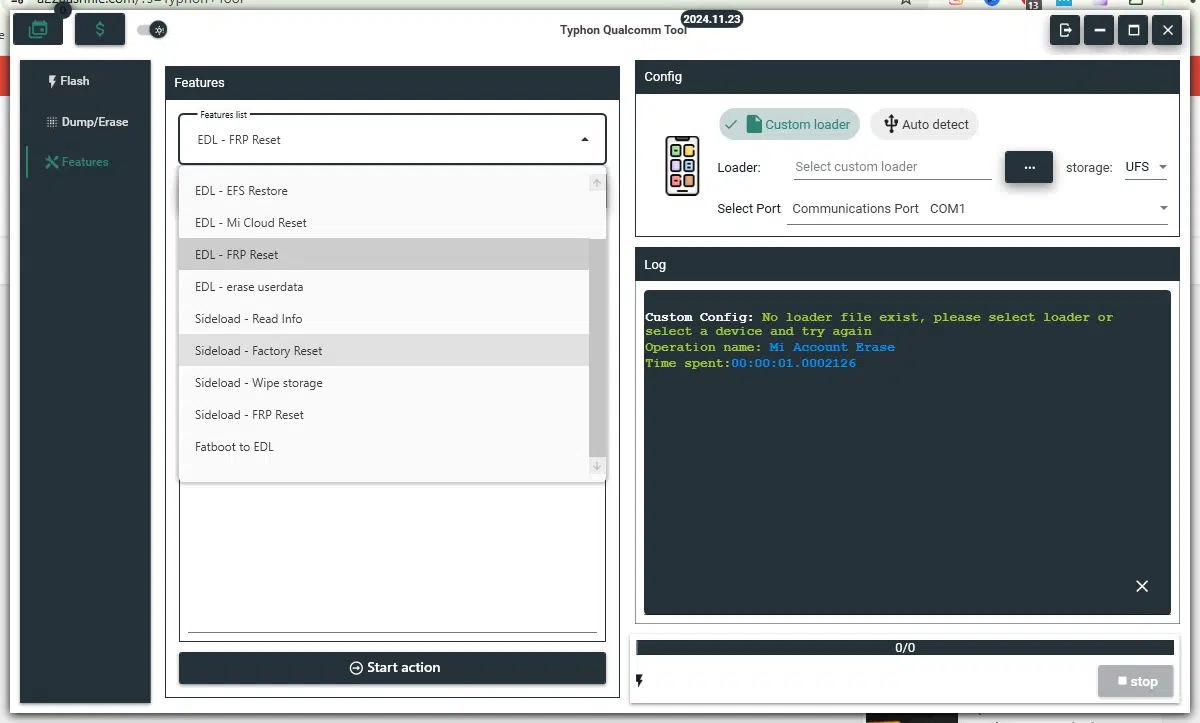
Typhon Tool Download is a professional mobile servicing utility designed primarily for Xiaomi, Redmi, and POCO smartphones. It provides a range of firmware maintenance and device troubleshooting features for supported Qualcomm and MediaTek platforms. The tool also advertises Fastboot-to-EDL conversion, MediaTek V5 and V6 flashing, Qualcomm EDL flashing, Unisoc FDL operations, and selected Samsung Exynos servicing functions. Its centralized interface is intended to help mobile technicians manage compatible devices from a Windows computer. Actual functionality depends on the device model, chipset, firmware version, authorization requirements, and availability of the relevant service.
What Is Typhon Tool?
Typhon Tool Download is a Windows-based smartphone servicing solution developed for technicians and repair centers that work with supported Android devices. It brings several low-level device maintenance functions into one interface, helping users identify connected phones, check device information, manage firmware packages, and perform supported servicing operations.
The tool focuses particularly on Xiaomi-family devices, including selected Xiaomi, Redmi, and POCO models. Its published documentation describes support for Qualcomm and MediaTek platforms, with additional functions for Unisoc and Samsung Exynos devices. Not every feature works on every model, so checking the compatibility information before using the software is essential.
Main Features of Typhon Tool:
1. Qualcomm EDL Flashing
- Typhon Tool Download advertises firmware flashing for supported Qualcomm-based devices through Emergency Download Mode, commonly known as EDL or 9008 mode. This mode is used for certain advanced recovery and firmware maintenance operations when the normal Android interface or standard Fastboot process is unavailable.
- The software describes support for Qualcomm’s Sahara and Firehose communication protocols. Successful flashing depends on compatible firmware, device authorization, and support for the specific model. Some devices require authorized service credentials, and not all regional variants are supported.
2. MediaTek V5 and V6 Support
- The tool includes separate MediaTek V5 and V6 servicing options for compatible devices. These protocols support different generations of MediaTek platforms and may have different authentication and firmware requirements.
- The advertised features include firmware operations through supported BROM and Download Agent (DA) communication methods. The exact functions available depend on the chipset, security configuration, device model, and required authorization files.
3. Fastboot-to-EDL Conversion
- One of Typhon Tool Download key advertised functions is converting supported Qualcomm devices from Fastboot mode to EDL mode. This capability can be relevant when a compatible device requires a supported low-level firmware recovery process.
- EDL is a specialized servicing mode, and conversion support is device-specific. Entering EDL does not automatically repair a phone or guarantee that flashing will be possible. Use this function only on devices you own or are authorized to service, and verify compatibility before proceeding.
4. Device Detection and Information
- Typhon Tool’s documentation describes automatic device detection and the display of available information, such as the connected device’s model, chipset, and current operating state.
- This information can help technicians select the appropriate servicing section and avoid using firmware intended for a different model. Detection results depend on the USB connection, installed drivers, and the mode in which the phone is connected.
5. Firmware Management
- The tool advertises firmware management features for supported devices, including loading compatible packages and performing selected flashing operations. Using the correct firmware is essential when recovering a phone from certain software problems or reinstalling its operating system.
- A firmware package must match the device’s exact model and hardware variant. An incompatible package or interrupted flashing process can cause serious software problems or leave the phone unable to boot.
6. Unisoc FDL Flashing
- The published feature list includes Unisoc FDL-based servicing. FDL refers to the Download Loader components used by supported devices during certain low-level operations.
- These functions may help technicians work with compatible Unisoc devices, but availability depends on the hardware, firmware, and authentication requirements. Confirm that the selected operation is supported before making any changes.
7. Samsung Exynos Servicing
- Typhon Tool Download also advertises selected Samsung Exynos servicing functions. This indicates additional platform coverage beyond its primary Xiaomi focus, although the exact operations and supported models may vary.
- Do not assume that every Samsung phone or Exynos chipset is supported. Check the current device list and release documentation before using any servicing feature.
8. Backup and Restore Functions
- The tool’s documentation mentions backup and restore options for supported device data and partitions. Backups can be valuable before performing major maintenance because some operations may erase information or alter device configuration.
- Backup availability depends on device permissions and the selected connection mode. Keep important personal files in a separate, secure location rather than relying on a single backup stored on the servicing computer.
9. Diagnostic Logs and Error Information
- Typhon Tool Download includes logging and diagnostic features intended to help users investigate connection problems, authentication errors, and unsuccessful operations.
- Reviewing logs can help distinguish a driver issue from an unsupported device or incompatible firmware package. Error messages should be checked against the software’s official documentation rather than resolved by trying random commands or files.
10. Interface and Software Updates
- The tool advertises a graphical interface with light and dark appearance options, multiple language choices, license management, and update support. These features can make the software more convenient for technicians who regularly service different compatible devices.
- Some functions may require an active license, credits, an internet connection, or access to an online service. Verify the current terms and availability before relying on a particular operation.
How to Install Typhon Tool on Windows?
Before installing the utility, prepare a compatible Windows computer, a reliable USB cable, and the correct drivers for the Android device.
- Obtain the installer from a source you trust.
- Scan the downloaded files with reputable security software.
- Review the included installation instructions and system requirements.
- Install the required Windows components and device drivers.
- Launch the program and complete any required registration or license activation.
- Connect your phone and confirm that the software detects it correctly.
- Check the supported device list before selecting any firmware or servicing operation.
Typhon Tool’s official documentation specifies particular installation-path requirements. Follow the instructions for your release, and avoid unofficial repackaged installers that request unnecessary permissions.
System Requirements and Compatibility:
Typhon Tool is designed for Windows computers. Its published requirements list Windows 7 SP1 64-bit or newer, with Windows 10 and Windows 11 recommended. The documentation also lists Microsoft .NET Framework 4.8 or later, Microsoft Visual C++ Redistributable 2015–2022, appropriate USB drivers, and an internet connection for activation and updates.
The recommended hardware and storage requirements should be checked against the current release. Device compatibility depends on the chipset, exact model, firmware version, security configuration, and authorization requirements.
Benefits of Typhon Tool:
Typhon Tool Download combines multiple mobile servicing functions in one interface, which can help technicians organize firmware maintenance and device troubleshooting. Its advertised Qualcomm, MediaTek, Unisoc, and Exynos support offers options for working with different platforms, while its logging and device-detection features can assist with diagnosing connection problems.
However, advanced servicing operations can be risky. The presence of a feature in the interface does not guarantee compatibility or successful results on every phone.
Important Safety Precautions:
Always back up important information before flashing firmware or modifying device partitions. Use firmware that matches the exact device model, maintain a stable USB connection, and never interrupt an active flashing process.
Low-level operations such as EDL flashing and partition modification should only be performed by authorized users who understand the risks. Avoid wiping EFS or modifying device identifiers, as doing so can cause permanent loss of cellular connectivity. For account verification or Factory Reset Protection issues, use official recovery methods or authorized service procedures.
Final Words:
Typhon Tool Download is a multi-platform mobile servicing utility focused primarily on Xiaomi, Redmi, and POCO devices, with advertised Qualcomm EDL, MediaTek V5/V6, Fastboot-to-EDL, Unisoc FDL, and selected Exynos functions. It may be useful for experienced technicians who need firmware maintenance and diagnostic capabilities in one Windows application. Before using it, verify the supported device list, installation requirements, license conditions, and firmware compatibility to reduce the risk of data loss or device damage.