 Posted by
ADB MDM KG Tool Download – Samsung KG Lock and FRP Troubleshooting
ADB MDM KG Tool Download is a mobile servicing utility advertised for technicians working with Samsung device management restrictions, KG lock issues, FRP-related troubleshooting, and selected Android servicing tasks. Its name refers to Android Debug Bridge (ADB), Mobile Device Management (MDM), and Knox Guard (KG), which are associated with different device-management and security functions. The availability of any particular operation depends on the tool version, device model, firmware, security patch, and required service authorization.
What Is ADB MDM KG Tool?
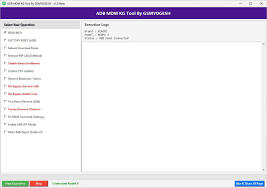
ADB MDM KG Tool Download is presented as a Windows-based utility for diagnosing and servicing supported Android devices. Tools in this category may provide a central interface for supported device-detection, connection, and maintenance operations. However, the tool’s name alone does not establish that every Samsung model or Android version is supported.
It is important to distinguish between the three main terms:
- ADB: A developer interface that allows a computer to communicate with an Android device when the necessary connection and authorization conditions are met.
- MDM: Mobile Device Management, used by organizations to configure and manage company-owned or enrolled devices.
- KG: Samsung Knox Guard, a service used by participating organizations and partners to protect devices against loss, theft, fraud, or payment-related risks.
These systems have different purposes, and a solution for one should not be assumed to resolve another.
Key Features and Advertised Functions:
1. ADB Connection Support
- ADB-related functions can help technicians communicate with compatible Android devices for supported diagnostic and maintenance tasks. Availability depends on whether USB debugging is enabled, the device permits the connection, and the computer has the appropriate drivers and authorization.
2. MDM Troubleshooting
- The tool is advertised for MDM-related servicing. This may be relevant when a device has been legitimately released from an organization but still displays management restrictions. Company-owned devices should be unenrolled through the organization’s approved management system or IT administrator.
3. Samsung KG Lock Information
- KG-related tools are marketed for handling Samsung Knox Guard restrictions. Knox Guard is a cloud-based service that can apply device restrictions and support authorized locking and unlocking through its management console. A third-party utility should not be assumed to override an active Knox Guard policy.
4. FRP-Related Servicing
- Factory Reset Protection (FRP) helps prevent unauthorized access to an Android phone after a reset. The tool’s title advertises FRP-related functionality, but support may vary by model, Android version, security patch, and authorization requirements. For a personally owned phone, the original Google Account recovery process is the recommended starting point.
5. Device Detection and Diagnostics
- Device-detection functions can help identify connection problems before servicing begins. Correct drivers, a suitable USB cable, and the required device mode are important. A failed connection may result from driver or authorization issues rather than a fault in the phone itself.
6. Model and Firmware Compatibility
- Mobile servicing utilities often rely on model-specific support. Before using any advertised feature, verify the exact model number, firmware version, chipset, and current security patch. Do not assume that a feature described for one Samsung phone will work on every Galaxy device.
Requirements Before Using ADB MDM KG Tool Doanload:
Prepare the following before running a servicing utility:
- A Windows computer that meets the tool’s stated requirements.
- A reliable USB data cable and compatible device drivers.
- The exact phone model and Android version.
- A backup of important personal data, where possible.
- A trusted installation package that has been scanned for security risks.
- Appropriate ownership, administrator permission, and service authorization.
Some tools may also require a license, account registration, credits, or an internet connection. Check the release documentation for the exact edition instead of assuming all features are free or available offline.
How to Prepare the Device for Servicing?
- Identify the exact Samsung model and Android version.
- Check whether the displayed restriction is FRP, MDM, or Knox Guard.
- Install compatible USB drivers from a trusted source.
- Use a reliable USB cable and confirm the connection mode required by the tool.
- Back up important information before any operation that may erase data.
- Review the tool’s release notes, license requirements, and supported-device list.
Do not attempt to remove an organization’s management profile without permission. If a device is protected by Knox Guard, the authorized organization or service provider may need to update its status through the official management system.
Common Problems and Troubleshooting:
Device not detected: Check the cable, USB port, driver installation, and connection mode. ADB may be unavailable if debugging is disabled or blocked by device policy.
FRP remains active: FRP and Knox Guard are separate protections. Recover the previously synchronized Google Account or contact the device manufacturer for authorized assistance.
KG lock remains after a reset: A factory reset does not necessarily remove Knox Guard enrollment. The responsible organization or authorized partner should resolve the device’s status.
Operation fails on a newer model: Support may depend on the model, firmware build, security patch, and service authorization. Confirm compatibility rather than assuming a universal solution.
Safety and Compatibility Notes:
ADB MDM KG Tool Download is a third-party utility, and its advertised features should not be treated as guaranteed results. Unknown installation packages can pose security risks, and advanced servicing may erase data or affect device functionality.
Samsung documents that Knox Guard can restrict USB access, ADB communication, factory resets, and firmware updates, and that authorized administrators can remove devices from the service when protection is no longer required. <Cite refs={[“turn659414search0″,”turn659414search2”]}/>
Final Words:
ADB MDM KG Tool Download is marketed for Samsung servicing and FRP, MDM, and KG-related troubleshooting. Its actual capabilities depend on the tool version and the target device’s configuration. Before using it, verify compatibility, protect important data, and resolve account or organization-based restrictions through the appropriate authorized channel.